ESP32 AI Voice Assistant with MCP Integration: Key Facts
What is an ESP32 AI voice assistant with MCP integration?
An ESP32 voice assistant captures speech, turns it into text, gets a reply from a language model and plays that reply back through a speaker. In AI tooling, "MCP" usually refers to the Model Context Protocol, a standard way for a model to call tools and read data. Read together, the phrase suggests an ESP32 that talks to a model able to act on the physical world.
There is a caveat to state up front: the two sources behind this page do not describe that integration. Source [0] documents idf.py, the ESP-IDF command-line front-end that configures, builds and flashes projects. Source [1] documents the Bluetooth LE Audio specification. Neither mentions the Model Context Protocol, tool calling, or a speech pipeline.
What they do give you is the two layers you cannot skip. First, a repeatable way to build and flash firmware onto the chip. Second, a standardised low-power audio stack, introduced in the Bluetooth Core Specification 5.2. Both matter before you connect a microphone. The sections below stay strictly inside those facts and say plainly where the sources stop.
 \2
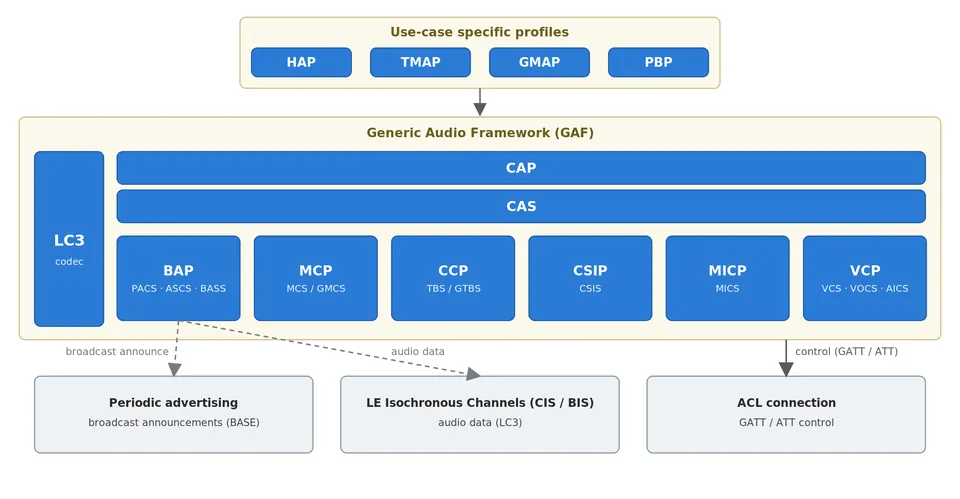
The Bluetooth LE Audio stack: use-case profiles build on the Generic Audio Framework, with profile control over GATT/ATT and audio data over LE isochronous channels.
What does MCP mean in the Bluetooth LE Audio source?
Inside source [1], MCP is the Media Control Profile. It sits in the content control layer of the Generic Audio Framework (GAF), which standardises control over the media content and telephony activity being rendered by an audio stream.
MCP defines two roles: a Media Control Server, which exposes a media player through the Media Control Service (MCS), and a Media Control Client, which discovers that player and controls it. MCS exposes media state such as playing, paused and stopped.
| Term | What the source says |
|---|---|
| MCP | Media Control Profile: a Media Control Server plus a Media Control Client |
| MCS | Media Control Service, exposing the media player and its state |
| Where it lives | Content control layer of the Generic Audio Framework |
| What it controls | Media content and telephony activity being rendered by the stream |
So if you are reading Bluetooth documentation and see "MCP", it is about play, pause and media state, not about giving a language model tools. This naming collision is the single easiest way to misread a spec page while planning a voice build.
How do you get started: which commands build and flash the firmware?
idf.py is the front-end you use day to day. It manages several tools at once: CMake configures the project, Ninja builds it, and esptool flashes the target.
It must be run inside an ESP-IDF project directory, meaning a directory that contains a CMakeLists.txt file. Older-style projects that contain a Makefile will not work with idf.py.
idf.py create-project <project name>
idf.py set-target <target>
idf.py menuconfig
idf.py build
idf.py flash
A few behaviours are worth memorising before your first build:
| Command | Behaviour described in the source |
|---|---|
set-target |
Clears the build directory and regenerates sdkconfig from scratch; the old file is saved as sdkconfig.old |
build |
Incremental, so nothing is rebuilt if no source or configuration changed |
flash |
Builds the project if necessary, then flashes it |
clean |
Removes build output; the project is fully rebuilt next time |
fullclean |
Deletes the entire build directory contents, including CMake configuration output |
idf.py flash accepts -p for the serial port and -b for the flasher baud rate, and the environment variables ESPPORT and ESPBAUD set defaults for those options. Under the hood it uses esptool's write-flash command, and it attempts fast reflashing of only the changed data sectors when previously flashed binaries are present in the build directory.
How does the audio side work on the ESP32?
Source [1] splits Bluetooth LE Audio into three tiers, which is a useful mental model for any voice device.
| Tier | What it carries |
|---|---|
| Transport | LE Isochronous Channels carry audio data; the ACL connection carries GATT/ATT profile control; periodic advertising carries broadcast announcements |
| Generic Audio Framework (GAF) | Four layers: stream control, content control, rendering/capture control, and transition/coordination control |
| Use-case profiles | Higher-level profiles (HAP, TMAP, GMAP, PBP) that select and configure GAF components for a target use case |
Audio travels over two kinds of isochronous channel. A Connected Isochronous Stream (CIS) is a bidirectional link between two devices and needs a prior ACL connection; multiple CIS instances can be grouped into a Connected Isochronous Group for synchronised playback, such as left and right earbuds. A Broadcast Isochronous Stream (BIS) is unidirectional, from a Broadcaster to any number of Synchronised Receivers, with no prior connection.
The LC3 codec is the other key addition, offering better audio quality at lower bitrates than SBC. Above the transport sits the Basic Audio Profile (BAP), the foundational profile for all LE Audio streaming, with roles including Unicast Client, Unicast Server, Broadcast Source, Broadcast Sink, Broadcast Assistant and Scan Delegator. BAP depends on three GATT services: PACS (published audio capabilities), ASCS (audio stream control, on the Unicast Server only) and BASS (broadcast audio scan, on the Scan Delegator only).
ESP-IDF gives direct access to CIS and BIS through the ESP-BLE-ISO API. When you use BAP and above, the ISO layer is managed automatically by the profile stack.
What are the common pitfalls?
- Assuming the sources cover Model Context Protocol. They do not. Nothing here describes tool schemas, agent endpoints, transport for MCP messages, or authentication.
- Confusing the two MCPs. In the Bluetooth material, MCP is the Media Control Profile. Planning a tool-calling assistant around that page will send you down the wrong path.
- Running
idf.pyin the wrong directory. It only works where aCMakeLists.txtexists; Makefile-style projects are not supported. - Losing configuration with
set-target. The command clears the build directory and regeneratessdkconfigfrom scratch, keeping the old file assdkconfig.old. - Overusing
fullclean. It recursively deletes everything in the build directory, including CMake configuration output, so the next build configures from scratch. - Forgetting the target. If no target is set by environment variable, CMake variable,
set-targetorsdkconfig.defaults, the build system defaults to theesp32target, which may not be the chip on your desk. - Expecting audio to just work. LE Audio is a specification with layered dependencies; the source describes profiles and roles, not a working example you can flash.
What do the sources not cover?
Plenty of what a real build needs is simply absent, and it is better to say so than to guess.
| Missing topic | Status in these sources |
|---|---|
| Microphone and speaker wiring, pin numbers, voltages | Not covered |
| Model Context Protocol client or server implementation | Not covered |
| Speech-to-text or text-to-speech services | Not covered |
| Model choice, latency or cost figures | Not covered |
| A complete voice-assistant example project | Not covered |
| Power supply and battery guidance | Not covered |
What you can rely on is the build loop and the audio architecture. Start a project, set the target, configure it, build and flash. Then decide which audio path you need: a connected unicast stream for a headset-style device, or a broadcast stream for one-to-many playback. Everything above that layer, including the MCP integration the search query implies, has to be verified against the documentation of whichever project or protocol you choose.
Frequently asked questions
Does "MCP" in these sources mean Model Context Protocol?
No. The only MCP in the sources is the Media Control Profile, part of the Bluetooth LE Audio Generic Audio Framework. Model Context Protocol is not mentioned anywhere in them.
Can idf.py flash the firmware for me?
Yes. idf.py flash builds the project if necessary and then flashes it, with -p and -b options for serial port and baud rate.
Which chip does the build target by default?
If the target has not been set by an environment variable, a CMake variable, idf.py set-target or sdkconfig.defaults, the build system defaults to the esp32 target.
Why is LC3 used instead of SBC?
The source states that LC3, the Low Complexity Communication Codec, provides better audio quality at lower bitrates compared to SBC.
Does broadcast audio need a connection first?
No. A Broadcast Isochronous Stream is unidirectional from a Broadcaster to any number of Synchronised Receivers without a prior connection, whereas a Connected Isochronous Stream requires a prior ACL connection.
These sources are useful for the plumbing, not for the promise. They give you a dependable `idf.py` build-and-flash loop and a clear picture of how Bluetooth LE Audio is layered, which is exactly what a voice device needs underneath. They say nothing about Model Context Protocol integration, so treat that part of the query as unverified and check it against the project's own docs.
Sources
github.comIDF Frontend - ``idf.py`` (esp-idf docs)github.comBluetooth LE Audio Standard (esp-idf docs)This guide summarises the public sources listed above in our own words. Check the original documentation before relying on exact figures.