ESP32 Arduino Nano: What It Is and How to Start
What is an ESP32 Arduino Nano?
There are two different things people mean by this phrase, and mixing them up is where most of the confusion starts.
The first is a real board: the Arduino Nano ESP32. The person who posted the pinout question on Electronics Stack Exchange described theirs as looking like a common Nano with a wireless chip on board, and the accepted answer simply pointed to Arduino's official documentation at docs.arduino.cc/hardware/nano-esp32, which is where the pinout diagrams live. That is the only board-documentation pointer in the sources.
The second meaning is a pairing: an ESP32 board working alongside an Arduino Nano in the same project. The BLEProof-collection repository on GitHub is exactly that pattern, a set of Bluetooth Low Energy sample apps whose supported-device table lists Android, iOS, ESP32 and Arduino Nano 33. The Nano side was tested on the Arduino Nano 33 IoT, and the README notes it should work on any board compatible with the ArduinoBLE library.
So before you buy anything or copy a wiring diagram, decide which one you actually need:
| What you searched for | What the sources show |
|---|---|
| esp32 nano / esp32 arduino nano board | The Arduino Nano ESP32, a Nano-shaped board with wireless on board; official docs carry pinout diagrams |
| esp32 and arduino nano | Two boards in one project, for example an ESP32 network bridge plus an Arduino Nano 33 IoT HTTP server |
| esp32 arduino nano datasheet | No datasheet numbers appear in the sources; the closest pointer is Arduino's official Nano ESP32 documentation page |
| esp32 with arduino nano | Both the network-bridge and BLE central/peripheral patterns are documented in the sources |
If you are hunting for electrical specifications, timer counts or current limits, be aware that none of the source material used here contains them. Do not lift numbers from a random forum post; go to the official documentation page.
 \2
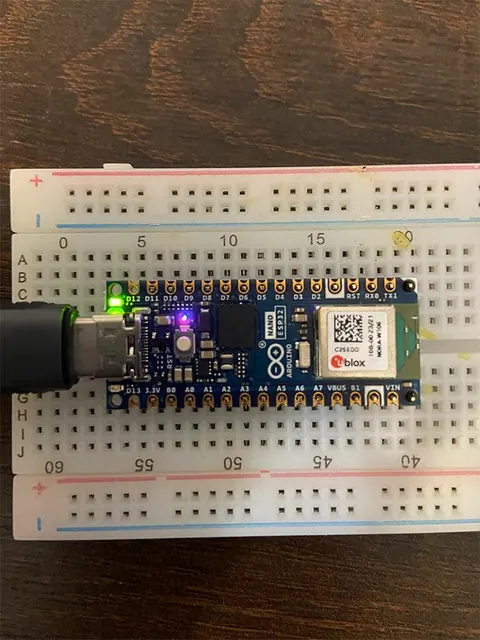
Front of the Arduino Nano ESP32 board from the pinout question
How do I get an ESP32 Nano board running in the Arduino IDE?
The pinout thread shows the practical reality: the board was not listed in the Arduino IDE's ESP32 package for that user, so they uploaded using one of the package's ESP32-S3 presets. The code uploaded, but the digital pin mapping did not line up with the physical labels.
For the ESP32 side of the BLEProof project, the README lists Arduino IDE with the ESP32 board installed as the prerequisite. So the toolchain is the same core you would use for any ESP32 board.
A workable order of operations, based on what the sources show:
- Install ESP32 board support in the Arduino IDE (listed as a prerequisite for the ESP32 side of the BLE sample project).
- If your exact board is not in the list, select a comparable preset. The source used an ESP32-S3 preset. Expect the pin mapping to be off until you check it.
- Before wiring anything, confirm the pin layout against Arduino's official documentation page for the Nano ESP32.
- Upload the smallest sketch you can and test one pin at a time. The owner in the source found the mismatch by checking pins one by one, which works but wastes an evening.
- Only then move to libraries: ArduinoBLE for the Nano 33 side of BLE work, the ESP32 core for the ESP32 side.
One honest caveat: the source only reports that this board was not in the package list for that user at that time. It is not a permanent statement about the Arduino IDE.
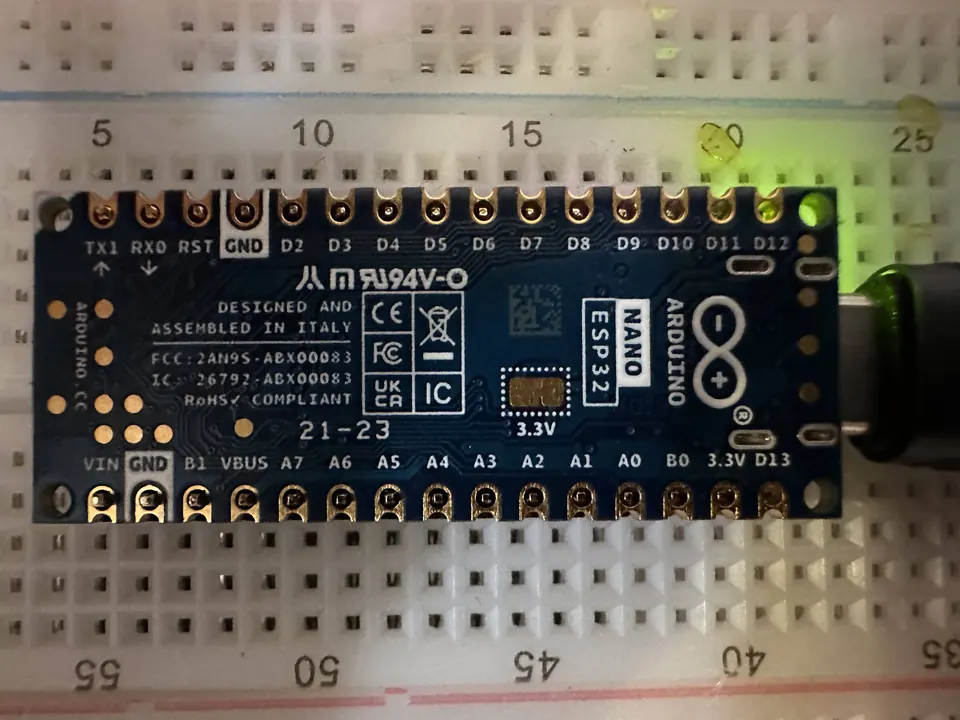 \2
Back of the Arduino Nano ESP32 board from the pinout question
Why is the D6 pin number 9 in my code?
Because the silkscreen and the compiler are using different numbering schemes. In the pinout thread, the owner reported that the physical D6 pin read as 9 in code, and said they found it by testing pins one by one.
| What you see on the board | What the code used | How it was found |
|---|---|---|
| D6 | 9 | Reported after testing pins one at a time |
That single mapping is all the source gives. It does not include a full pin table, so treat any complete pinout list you see elsewhere with suspicion unless it comes from the official documentation page for the board.
A habit that saves time on any Nano-shaped ESP32 board: put a short mapping comment at the top of your sketch listing every pin you actually use, in the form // D6 -> 9. Then every time you move a wire, you have a record of what the firmware believes. When a peripheral behaves strangely, check that comment block before you check your wiring.
How do you use an ESP32 with an Arduino Nano?
The sources show three distinct patterns for using an ESP32 and an Arduino Nano together.
1. ESP32 as a network bridge. In the HTTP response-code thread, the ESP32 acts as both client and server. It joins the local network with a static IP configured through WiFi.config, serves an HTML page from an AsyncWebServer, and lets you control four LEDs that are physically attached to an Arduino Nano 33 IoT. The ESP32 sends requests to the Nano with HTTPClient, prints the response code to the serial monitor, and only stores the new LED state when the response is exactly 200.
The reported trouble is instructive: the owner saw response codes of -5 and sometimes -2, and the LEDs would not always switch off. The material provided contains only the question, not an accepted explanation of those values, so treat them as failed requests and log both the code and the URL you asked for. Note also how the sketch is structured: the LED state array is only updated inside the httpResponseCode == 200 branch, so a failed request leaves the previous state sitting in the UI with no visible error.
2. BLE central and peripheral. The BLEProof collection pairs an ESP32 with an Arduino Nano 33 over Bluetooth Low Energy. Every central is compatible with every peripheral because they share the same service and characteristic UUIDs: one service, plus three characteristics for read, write and indicate. Both ESP32 and Nano 33 are listed as supporting both roles. The README also spells out a detail worth remembering: an indication is a notification with a response, meaning the peripheral notifies and the central confirms.
3. Radio link with the Nano as sender. In the compile-error thread, the author had a working setup where an Arduino Nano sends sensor data over a radio link and an ESP32 receives it, using the RadioHead library with rf95.send(total, dataLength) and rf95.waitPacketSent() between packets. That direction worked. Only the reverse direction failed, and it failed at compile time rather than at runtime.
Can you reuse Arduino Nano code on an ESP32?
Often yes, but not blindly. The clearest example in the sources is a sketch that compiled fine on an Arduino Nano and threw this on the ESP32:
error: invalid conversion from 'uint8_t*' {aka 'unsigned char*'} to 'char*' [-fpermissive]
The cause is a small type mismatch. toCharArray expects a buffer that is an array of char, but the sketch had declared a uint8_t array. The accepted answer gives two fixes: either change the buffer type or cast it.
char total[dataLength];
data.toCharArray(total, dataLength);
data.toCharArray((char*)total, dataLength);
Either one resolves the compiler error. What the thread does not tell you is whether the sketch behaves identically afterwards, so test on real hardware.
The broader lesson is that compile errors are the friendly failure mode. When you move a sketch from a Nano to an ESP32, expect the type system to catch the obvious problems, and expect pin mapping and timing to catch you silently. Build up in small steps: one peripheral, one pin, one packet at a time.
What are the common pitfalls?
| Pitfall | What the sources show | What to do |
|---|---|---|
| Board missing from the Arduino IDE list | The Nano ESP32 was not in the ESP32 package for one user; they used an ESP32-S3 preset instead | Use a comparable preset, then verify every pin against the official docs |
| Silkscreen labels vs code numbers | Physical D6 read as 9 in code | Keep an explicit // label -> number map in the sketch |
| Buffer types that only bite on the ESP32 | uint8_t* to char* conversion error on toCharArray |
Declare the buffer as char or cast it |
| Silent state after a failed request | The bridge sketch only stores LED state on a 200 response, while -5 and -2 codes were being returned | Print the code and the URL; do not let the UI imply success |
| Confusing the Nano ESP32 with the Nano 33 IoT | The sources list them as separate boards | Check the exact board name before following a tutorial |
| Assuming a datasheet value | No datasheet figures appear anywhere in the sources | Go to the official documentation page |
One more habit worth borrowing from the BLE project: stick to a small, fixed set of UUIDs or pin assignments and reuse them everywhere. The BLEProof collection is compatible across Android, iOS, ESP32 and Nano precisely because the service and characteristic UUIDs never change between apps.
Frequently asked questions
Is the Arduino Nano ESP32 the same board as the Arduino Nano 33 IoT?
No. The sources treat them as separate boards. The Nano ESP32 appears in the pinout discussion, while the Nano 33 IoT is the board tested with the ArduinoBLE library in the BLEProof collection.
Where do I find the Arduino Nano ESP32 datasheet and pinout?
The only documentation pointer in the sources is Arduino's official Nano ESP32 page (docs.arduino.cc/hardware/nano-esp32), which the accepted answer says includes pinout diagrams. No datasheet values appear in the material used here.
Why does my sketch compile on an Arduino Nano but fail on an ESP32?
In the source example the failure was a type mismatch: toCharArray needs an array of char, but the sketch passed a uint8_t array. Changing the buffer to char or casting with (char*) fixes the error.
What ESP32 Nano projects do the sources cover?
A BLE central/peripheral sample set that runs on ESP32 and Arduino Nano 33, an ESP32 web bridge controlling LEDs on a Nano 33 IoT over HTTP, and a RadioHead radio link between a Nano and an ESP32.
Can an ESP32 and an Arduino Nano 33 talk over Bluetooth?
Yes. The BLEProof collection lists both as supporting the central and peripheral roles, and any central works with any peripheral because they share the same service and characteristic UUIDs.
If you want a Nano-shaped board with wireless, the Arduino Nano ESP32 fits, but go straight to the official documentation for the pinout and expect code pin numbers to differ from the silkscreen. If you are pairing a plain ESP32 with an Arduino Nano, the HTTP-bridge and BLE patterns in the sources are proven starting points. In either case, port sketches in small steps and watch for type mismatches the Nano compiler let through.
Sources
stackoverflow.comthe code compiles on arduino nano but not on esp32 :(stackoverflow.comWhat does an HTTP response code of -5 or -2 mean?electronics.stackexchange.comArduino NANO ESP32 pinoutgithub.comalexanderlavrushko/BLEProof-collection (GitHub README)This guide summarises the public sources listed above in our own words. Check the original documentation before relying on exact figures.