ESP32 Bluetooth Example: BLE Scanner Step-by-Step
What is ESP32 Bluetooth and what can it do?
On ESP32 SoCs that include Bluetooth, the radio is built directly into the chip — no external module or wiring is needed. That radio operates in two distinct modes.
Bluetooth Classic is the protocol most people know from pairing headphones or keyboards. In the Arduino ecosystem, Espressif's arduino-esp32 core wraps this through the BluetoothSerial library, which gives your sketch a virtual serial port that a phone or laptop can connect to.
Bluetooth Low Energy (BLE) is designed for short, infrequent data bursts at very low power. This is the mode most modern IoT projects use — for beacons, sensors, presence detection, and device provisioning. The arduino-esp32 core exposes BLE through headers including BLEDevice.h, BLEUtils.h, BLEScan.h, and BLEAdvertisedDevice.h.
A third, more advanced option is ESP-BLE-MESH — a networking layer built on BLE that enables many-to-many device communication across large physical areas. It is optimized for building automation, sensor networks, and other IoT deployments where tens, hundreds, or thousands of devices must communicate reliably and securely.
 \2
\2An ESP32 microcontroller — the chip includes both Wi-Fi and Bluetooth radios on a single SoC. Image: Edwiyanto, CC BY-SA 4.0, via Wikimedia Commons
What hardware and software do you need?
Hardware
- An ESP32 development board using a SoC that includes Bluetooth
- USB cable to connect it to your computer
- For BLE Mesh testing: three ESP32 boards and a mobile device running the nRF Mesh app (Android or iOS) or the EspBleMesh Android app
Software
- Arduino IDE with the arduino-esp32 board package installed, or Espressif ESP-IDF
- If calling ESP-IDF Bluetooth APIs directly: the correct memory-reservation header (covered in the Common Mistakes section)
No external Bluetooth antenna module or breakout board is needed for standard Bluetooth Classic or BLE use.
 \2
\2A typical ESP32 development board with USB connector, ready for flashing Bluetooth examples via Arduino IDE or ESP-IDF. Image: Edwiyanto, CC BY-SA 4.0, via Wikimedia Commons
How do I run the ESP32 BLE scanner example code step by step?
This example scans for nearby BLE devices and prints each one to the Serial Monitor. The code is drawn from the arduino-esp32 BLE examples.
Step 1 — Open Arduino IDE and create a new sketch. Delete any placeholder code so the file is blank.
Step 2 — Add the required BLE headers.
#include <BLEDevice.h>
#include <BLEUtils.h>
#include <BLEScan.h>
#include <BLEAdvertisedDevice.h>
Step 3 — Set the scan duration.
int scanTime = 30; // in seconds
Step 4 — Create a callback class. This class receives one call per BLE device the scan finds:
class MyAdvertisedDeviceCallbacks: public BLEAdvertisedDeviceCallbacks {
    void onResult(BLEAdvertisedDevice advertisedDevice) {
      Serial.printf("Advertised Device: %s \n", advertisedDevice.toString().c_str());
    }
};
Step 5 — Write the setup() function.
void setup() {
  Serial.begin(115200);
  Serial.println("Scanning...");

  BLEDevice::init("");
  BLEScan* pBLEScan = BLEDevice::getScan();
  pBLEScan->setAdvertisedDeviceCallbacks(new MyAdvertisedDeviceCallbacks());
  pBLEScan->setActiveScan(true);
  BLEScanResults foundDevices = pBLEScan->start(scanTime);
  Serial.print("Devices found: ");
  Serial.println(foundDevices.getCount());
  Serial.println("Scan done!");
}
Step 6 — Add a minimal loop() function.
void loop() {
  delay(2000);
}
Step 7 — Select your board and port. Go to Tools → Board and choose your ESP32 variant. Select the matching port under Tools → Port.
Step 8 — Upload and open the Serial Monitor.
Click Upload. Once flashing finishes, open Tools → Serial Monitor and set the baud rate to 115200. The sketch executes setup() once; the BLE scan results appear during that run.
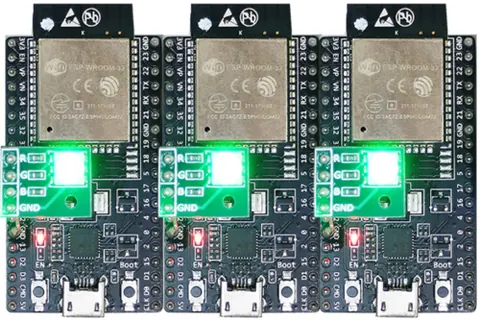 \2
\2Three ESP32 BLE Mesh nodes powering on with RGB LED green, indicating they are unprovisioned and advertising.
How do I verify the ESP32 Bluetooth example is working?
The Serial Monitor should display output in this sequence:
| Output | What it means |
|---|---|
Scanning... |
BLE radio initialized, scan is active |
Advertised Device: ... |
One line per BLE device found nearby |
Devices found: X |
Total unique devices seen during the scan window |
Scan done! |
The 30-second scan has finished |
If no devices appear, confirm there are BLE-capable devices nearby — a smartphone with Bluetooth turned on is enough. If the Serial Monitor shows nothing at all, verify the baud rate is set to 115200.
Reading signal strength (RSSI)
Each BLEAdvertisedDevice carries an RSSI value you can retrieve inside onResult:
int BLEAdvertisedDevice::getRSSI() {
   return m_rssi;
}
A more negative number means a weaker signal. To reduce noise you can take multiple readings and average them — the same averaging pattern used for Wi-Fi RSSI applies here.
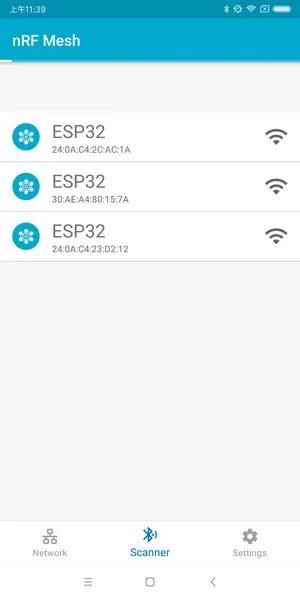 \2
\2The nRF Mesh app Scanner view showing three unprovisioned ESP-BLE-MESH devices waiting to be added to the network.
What are the most common ESP32 Bluetooth mistakes?
1. Missing the memory-reservation header when using ESP-IDF APIs directly If your sketch calls ESP-IDF Bluetooth APIs instead of using the Arduino libraries, you must include the matching header in at least one source file:
- BLE:
#include "esp32-hal-alloc-ble-mem.h" - Bluetooth Classic:
#include "esp32-hal-alloc-bt-classic-mem.h"
Without the correct include, initArduino() releases the Bluetooth controller memory back to the heap before you can use it. The result is an initialization failure or unpredictable behavior.
2. Leaving active scan on in battery-powered projects
pBLEScan->setActiveScan(true) returns results faster but uses more power. If battery life matters, evaluate whether active mode is necessary for your use case.
3. Running Bluetooth and Wi-Fi simultaneously without caution
The ESP32 shares radio hardware between Bluetooth and Wi-Fi. Running a Bluetooth GATT server at the same time as HTTPS requests can produce alloc fail errors and cause Wi-Fi to disconnect. One proven workaround is to disconnect Bluetooth before initiating Wi-Fi-intensive operations.
4. Assuming every ESP32 board has Bluetooth
The BluetoothSerial library documentation explicitly notes it works on "SoCs that include it." Some ESP32 variants omit Bluetooth. Check the datasheet for the specific module on your board before writing Bluetooth code.
What other ESP32 Bluetooth examples and tutorials are available?
The arduino-esp32 library ships with more than the BLE scanner. Two examples named in the official documentation are:
- SerialToSerialBT — sets up a virtual serial port over Bluetooth Classic, so you can type from a phone app and read it in the Serial Monitor.
- bt_classic_device_discovery — scans for nearby Bluetooth Classic devices, the Classic equivalent of the BLE scanner above.
The full list is in the arduino-esp32 repository under libraries/BluetoothSerial/examples.
For a more advanced project, Espressif's ESP-IDF includes an ESP-BLE-MESH onoff_server example. You compile it with idf.py build and flash three boards with idf.py flash. Then use the nRF Mesh app to provision each board over BLE, assign it a unicast address, and retrieve its Composition Data. Once all three nodes are configured, you can send on/off commands to Generic OnOff Server Models on specific nodes — a practical introduction to how mesh lighting and sensor networks operate at the firmware level.
Frequently asked questions
Does every ESP32 board support Bluetooth?
No. The BluetoothSerial library documentation states it works on 'SoCs that include it.' Some ESP32 variants omit Bluetooth, so check the datasheet for your specific module.
What does setActiveScan(true) do in the BLE scanner?
Active scan gets results faster than passive scan, but it uses more power. For battery-powered devices, consider whether the speed benefit justifies the extra current draw.
Can the ESP32 run Wi-Fi and Bluetooth at the same time?
They can run together, but the shared radio hardware can cause memory allocation failures and Wi-Fi disconnects during heavy Bluetooth GATT activity. Disabling Bluetooth before Wi-Fi-intensive operations is one documented workaround.
How do I measure the signal strength of a detected BLE device?
Call getRSSI() on the BLEAdvertisedDevice object inside the onResult callback. It returns an integer RSSI value — more negative means weaker signal.
What is ESP-BLE-MESH and when would I use it?
ESP-BLE-MESH is a networking layer built on BLE that enables many-to-many communication across large device networks. It is certified against Mesh Profile v1.0.1 and supports Proxy, Relay, Low Power, and Friend node features. It suits building automation and large-scale sensor deployments.
For most makers, the BLE scanner example is the right starting point — it needs only four headers, runs in setup(), and immediately shows real nearby devices. Once that works, the SerialToSerialBT example adds Classic Bluetooth in similarly few lines. Graduating to ESP-BLE-MESH makes sense when you need a self-healing, large-area device network rather than a simple point-to-point link.
Sources
github.comBluetooth (arduino-esp32 docs)github.comESP-BLE-MESH (esp-idf docs)stackoverflow.comMeasuring bluetooth connection force with ESP32stackoverflow.comESP32: Error when trying to connect to Web server via Wifi while Bluetooth is on: bcn_timout, alloc failThis guide summarises the public sources listed above in our own words. Check the original documentation before relying on exact figures.