ESP32 OLED Display: Wiring, Code and Common Pitfalls
What is an ESP32 OLED display?
An OLED (Organic Light-Emitting Diode) screen paired with an ESP32 is one of the most popular starting points for embedded projects. Because each pixel generates its own light, there is no backlight circuit to design, contrast is naturally high, and idle power draw is low. The two controller chips you will encounter most are the SSD1306 and the SH1106, both driving monochrome panels. Common panel sizes are 128×64, 128×32, 64×48, and 64×32 pixels.
The display connects to the ESP32 over either I2C or SPI. The I2C variant dominates in hobbyist modules because it uses only two signal lines—SDA (serial data) and SCL (serial clock)—leaving most of the ESP32's GPIO pins available for sensors and other peripherals.
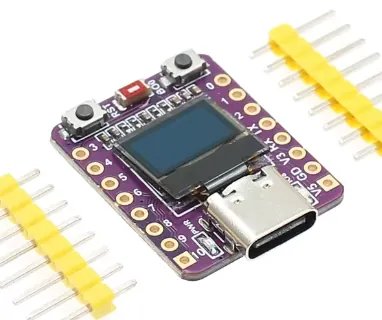 \2
\2An ESP32-C3 development board with a soldered-on 0.42-inch onboard OLED display
What hardware do you need?
A standalone OLED module breaks out four pins:
| Module Pin | Purpose |
|---|---|
| VCC | Power (3.3 V or 5 V—check your module's rating) |
| GND | Ground |
| SDA | I2C serial data |
| SCL | I2C serial clock |
The default I2C address on most modules is 0x3C. Some compact development boards—such as certain ESP32-C3 designs sold online—solder a tiny onboard OLED (often 0.42 inch) directly to the PCB, which removes external wiring but can introduce a non-standard pixel offset or a different controller chip than the markings suggest.
 \2
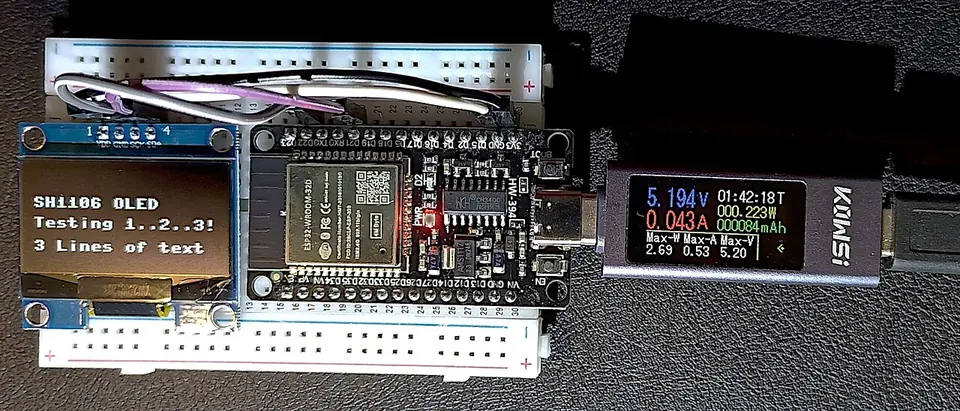
\2An ESP32 development board wired to an SH1106 OLED display on a breadboard, assembled as a USB power meter Image: King of Pwnt, CC0, via Wikimedia Commons
How do you wire an ESP32 OLED display over I2C?
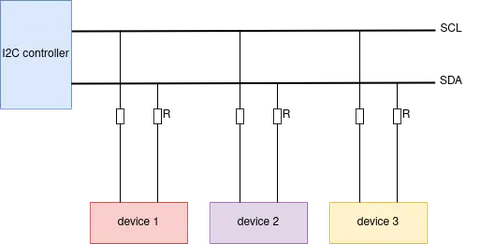
I2C uses two bidirectional open-drain lines. Both SDA and SCL require pull-up resistors; Espressif's documentation recommends 2 kΩ–5 kΩ, though many OLED modules include them on the PCB, so check your module's schematic before adding external ones. The bus supports Standard-mode (up to 100 kHz) and Fast-mode (up to 400 kHz), and the SCL clock should not exceed 400 kHz.
Connect OLED to ESP32 as follows (exact GPIO numbers depend on your board—consult its pinout):
| OLED Pin | ESP32 Connection |
|---|---|
| VCC | 3.3 V rail |
| GND | GND |
| SDA | SDA GPIO (board default or any I2C-capable pin) |
| SCL | SCL GPIO (board default or any I2C-capable pin) |
Run an I2C scan to confirm the display is detected and to note its address before writing display code.
How do you write ESP32 OLED display code in Arduino?
The ThingPulse ESP8266 and ESP32 OLED Driver for SSD1306 Displays library supports both SSD1306 and SH1106 controllers across all common sizes. Install it from the Arduino Library Manager by that name, or with PlatformIO:
platformio lib install 2978
For a 128×64 SSD1306 over I2C with the Wire library:
#include <Wire.h>
#include "SSD1306Wire.h"

SSD1306Wire display(0x3c, SDA, SCL);  // ADDRESS, SDA, SCL
For a 128×32 panel, pass the geometry constant as a fourth argument:
SSD1306Wire display(0x3c, SDA, SCL, GEOMETRY_128_32);
For SH1106 panels, substitute SH1106Wire for SSD1306Wire. You can also pass a specific I2C frequency as a fifth argument, or -1 to skip setting the frequency. The library lets you draw pixels, lines, and rectangles; render text with left, right, or center alignment; use custom fonts generated from open-source typefaces via the web tool at http://oleddisplay.squix.ch; and build an automatically scrolling frame-carousel UI that cycles between screens with configurable transition durations.
How do you use an ESP32 OLED display with MicroPython?
For an SSD1306 panel, use the ssd1306 module with SoftI2C or hardware I2C:
import machine
import ssd1306

i2c = machine.SoftI2C(scl=machine.Pin(6), sda=machine.Pin(5))
oled = ssd1306.SSD1306_I2C(128, 64, i2c)
oled.fill(0)
oled.text("hello", 0, 0)
oled.show()
If your board ships with an SH1106 controller—common on 0.42-inch and some 1.3-inch panels—switch to the sh1106 library:
from machine import Pin, I2C
from sh1106 import SH1106_I2C

i2c = I2C(0, scl=Pin(6), sda=Pin(5), freq=400000)
print("I2C Address : " + hex(i2c.scan()[0]).upper())
oled = SH1106_I2C(128, 64, i2c)
oled.rotate(1)
oled.fill(0)
oled.contrast(255)
oled.text("Hello", 30, 12)
oled.show()
Always call i2c.scan() first to verify the display is on the bus and to confirm its address before instantiating the OLED object.
What are the most common pitfalls with ESP32 OLED displays?
1. Reset pin not driven high. Some boards include a dedicated OLED reset pin that must be pulled high before the display registers on the I2C bus. On the HTIT-WB32, i2c.scan() returns an empty list until GPIO16 (the OLED reset pin) is pulled high—after which the display appears at 0x3C immediately.
2. SSD1306 vs SH1106 confusion. These two controllers are not register-compatible. A module physically labelled SSD1306 can house an SH1106. If the screen shows garbled output or only a partial image, try switching to the SH1106 driver.
3. Wrong display dimensions. A 0.42-inch panel is not 128×64. One ESP32-C3 onboard OLED has a visible area of 72×40 pixels; passing 128×64 to the constructor produces a static or all-black image.
4. Non-standard pixel offset. Some panels place their active area at a column and row offset from pixel (0, 0). At least one ESP32-C3 board sold online lists a starting offset of column 13, row 14 in its product description—ignore this and the image will appear shifted.
5. Missing or incorrect pull-up resistors. I2C lines require pull-ups. Without them, or with values outside the 1 kΩ–10 kΩ range, the bus may work intermittently or fail entirely, especially at 400 kHz.
What ESP32 OLED display projects can you build?
The ThingPulse library ships with examples for weather stations and world clocks, and its frame-carousel feature is well-suited to dashboards that cycle between sensor values and status lines. Espressif's official ESP-IDF repository includes a peripherals/lcd/i2c_oled example that ports the LVGL graphics library onto an SSD1306 and demonstrates scrolling text—a useful starting point for richer UIs. A USB power meter built from an ESP32 and an SH1106 OLED wired on a breadboard shows how little hardware is needed for a practical, real-world instrument.
Frequently asked questions
What I2C address does an ESP32 OLED module use?
Most SSD1306 and SH1106 modules default to 0x3C. Run i2c.scan() in MicroPython or an I2C scanner sketch in Arduino to confirm the address before initializing the display driver.
Can I use SPI instead of I2C for an OLED with ESP32?
Yes. The ThingPulse library supports both I2C and SPI variants of SSD1306 and SH1106 displays.
What panel sizes does the ThingPulse library support?
It covers 128×64, 128×32, 64×48, and 64×32 pixel panels. Pass the correct GEOMETRY_ constant at construction time to match your panel.
How do I add custom fonts to an ESP32 OLED Arduino project?
The ThingPulse library uses its own open font format. Generate a font array from open-source typefaces at http://oleddisplay.squix.ch, then paste the output into a header file in your project.
Why does i2c.scan() return an empty list for my OLED?
A common cause is a dedicated reset pin that has not been pulled high—on the HTIT-WB32, pulling GPIO16 high makes the display appear at 0x3C immediately. Also verify wiring, pull-up resistors, and that you are using the correct SDA and SCL pins for your specific board.
An ESP32 paired with an SSD1306 or SH1106 OLED is one of the most approachable hardware combinations a beginner can pick up—two signal wires, a mature library, and a handful of lines of code get text on screen quickly. The most reliable way to avoid frustration is to run an I2C scan first, match the library to the actual controller chip on your module, and supply the correct pixel dimensions for your specific panel. Once those three things align, both the ThingPulse Arduino library and the MicroPython sh1106/ssd1306 modules provide a solid foundation for projects ranging from simple sensor readouts to animated UI carousels.
Sources
github.com:link_to_translation:`zh_CN:[中文]` (esp-idf docs)github.comInter-Integrated Circuit (I2C) (esp-idf docs)stackoverflow.comHow to access OLED on HTIT-WB32 with Micropython through I2C?electronics.stackexchange.comHow to use onboard 0.42 inch OLED for ESP32-C3 OLED development board with micropythongithub.comThingPulse/esp8266-oled-ssd1306 (GitHub README)This guide summarises the public sources listed above in our own words. Check the original documentation before relying on exact figures.