ESP32 OTA Example: Update Firmware Over Wi-Fi Step-by-Step
What is ESP32 OTA and when should you use it?
ESP32 OTA (Over-The-Air) update lets a device download and install new firmware while the existing firmware is already running — over Wi-Fi, Bluetooth, or Ethernet. Instead of physically connecting a USB cable every time you push a fix, the device fetches a binary from a server and writes it to a spare flash partition. Once the image is verified, the OTA data partition is updated to specify that the new image should be used on the next boot, and the device restarts into the updated code.
This is essential for any product deployed in the field where connecting a cable is impractical. ESP-IDF treats application OTA as a safe update mode: even if power is cut during the write, the current app remains intact and the device can still boot.
 \2
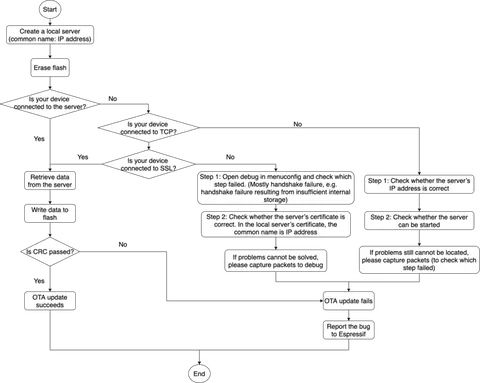
\2Diagram showing how to debug OTA failures on ESP32
What do you need before starting an ESP32 OTA project?
Before writing a single line of OTA code, make sure you have these in place:
| Requirement | Detail |
|---|---|
| Flash size | At least 4 MB recommended; OTA needs two app slots plus overhead |
| Toolchain | ESP-IDF for native C/C++, or Arduino core with the Update library |
| Firmware server | An HTTPS server to host your .bin file |
| TLS certificate | Root CA certificate in PEM format for server verification |
| Partition table | Must include ota_0, ota_1, and an OTA data partition |
A note on flash space: with OTA enabled on a 4 MB chip, each app slot is roughly 1 MB. The Wi-Fi stack alone can consume close to half of one slot, so plan your feature set before committing to a partition layout. Adding a 16 MB flash module gives much more headroom if your application grows.
How do I configure ESP32 OTA partitions?
OTA requires a partition table with at least two OTA app slot partitions — ota_0 and ota_1 — plus a data partition of subtype ota. ESP-IDF ships a ready-made OTA partition table you can select in menuconfig; Arduino IDE exposes equivalent choices under Tools → Partition Scheme (look for entries that mention OTA, such as "Default with spiffs" or "Minimal SPIFFS with OTA").
How the OTA data partition works:
- At factory boot it contains no data (all bytes erased to
0xFF). The bootloader boots the factory app if present, or falls back toota_0. - The partition is sized at two flash sectors (0x2000 bytes). Both sectors are written independently with matching data so that a power failure mid-write does not corrupt it — a counter field determines which sector was written more recently.
- After each successful OTA update, this partition is rewritten to point to the new slot, so the bootloader knows which image to run next.
If your partition table has no OTA slots, esp_https_ota() will return an error immediately. Verify your partition layout first with idf.py partition-table before debugging anything else.
How do I write ESP32 OTA example code?
The simplest ESP-IDF path is esp_https_ota, an abstraction layer over the lower-level OTA APIs. The core pattern from the official documentation looks like this:
esp_err_t do_firmware_upgrade()
{
    esp_http_client_config_t config = {
        .url = CONFIG_FIRMWARE_UPGRADE_URL,
        .cert_pem = (char *)server_cert_pem_start,
    };
    esp_https_ota_config_t ota_config = {
        .http_config = &config,
    };
    esp_err_t ret = esp_https_ota(&ota_config);
    if (ret == ESP_OK) {
        esp_restart();
    } else {
        return ESP_FAIL;
    }
    return ESP_OK;
}
Key points about this esp32 ota example code:
CONFIG_FIRMWARE_UPGRADE_URLis the HTTPS URL of your.binfile, set inmenuconfigor defined as a string literal.cert_pemmust point to your server's root CA certificate in PEM format — not an intermediate certificate. The docs are explicit: the root certificate has the longest validity and validates any intermediate in the chain.- On success,
esp_restart()reboots into the new firmware immediately. - The function handles writing to whichever OTA slot is not currently running and updates the OTA data partition automatically.
Optional: OTA resumption. If a download fails midway, the advanced_https_ota example demonstrates saving the intermediate byte count in NVS and resuming via an HTTP partial range request, so you do not restart the entire download.
How do I add rollback safety to an ESP32 OTA update?
Application rollback is enabled by default via CONFIG_BOOTLOADER_APP_ROLLBACK. After a successful OTA, the new firmware boots in the ESP_OTA_IMG_PENDING_VERIFY state. Two confirmation modes are available:
- Automatic (default): ESP-IDF marks the app valid just before calling
app_main. If the app crashes or reboots before reaching that point, the bootloader rolls back on the next boot. - Application-controlled: your code checks the state and explicitly confirms or rejects the update after running its own diagnostics.
const esp_partition_t *running = esp_ota_get_running_partition();
esp_ota_img_states_t ota_state;
if (esp_ota_get_state_partition(running, &ota_state) == ESP_OK) {
    if (ota_state == ESP_OTA_IMG_PENDING_VERIFY) {
        bool diagnostic_is_ok = diagnostic();
        if (diagnostic_is_ok) {
            esp_ota_mark_app_valid_cancel_rollback();
        } else {
            esp_ota_mark_app_invalid_rollback_and_reboot();
        }
    }
}
Switching between the two confirmation modes does not require rebuilding or re-flashing the bootloader — only the application changes. If a reset, crash, or power loss occurs before the selected confirmation point, the bootloader automatically selects the previously working app on the next boot.
How do I verify the OTA update worked?
Follow these steps after triggering an update:
- Build the updated firmware with a clearly identifiable change — a different version string in the serial log, a changed LED blink rate, or a new HTTP endpoint response.
- Host the
.binfile on your HTTPS server and confirm it is reachable withcurl -I https://your-server/firmware.bin. - Trigger the OTA from the ESP32 (via an MQTT command, HTTP POST, or a timer-based check).
- Watch the serial monitor — you should see the download progressing, then a reboot message.
- After the reboot, verify the new version is running: look for your identifiable change in the serial output or query a status endpoint.
- Optionally call
esp_ota_get_running_partition()in your app and log the partition label; it should now show the new slot (ota_0orota_1, whichever was inactive before).
What are the most common ESP32 OTA mistakes?
1. Missing OTA partitions. Selecting a non-OTA partition scheme (such as the default single-app layout) means ota_0 and ota_1 do not exist. The esp_https_ota() call will fail immediately. Always confirm your partition table before debugging network or certificate issues.
2. Using an intermediate certificate instead of the root certificate. The docs state clearly that the root certificate should be used for cert_pem, not an intermediate one. The root has the longest validity and anchors the whole chain.
3. Short-lived root certificates. If your root certificate expires and a device has not yet updated, it loses its only OTA lifeline and can only be recovered via a serial cable — often not feasible in the field. A practical approach is to create an embedded root CA valid for a long period and rotate only the intermediate certificates, which can be updated via OTA under the long-lived root. Devices that miss a rotation deadline before the root expires become unreachable remotely.
4. Task watchdog triggers during manual download loops. Writing a blocking client.read() loop without yielding starves the Wi-Fi background tasks, causing the task watchdog to fire and abort. Using the esp_https_ota() API avoids this — it handles the download loop internally and correctly.
5. Underestimating flash usage. With OTA enabled, each app slot is roughly half the total flash. On a 4 MB chip, the Wi-Fi stack alone can occupy close to half of one 1 MB slot. Plan your partition layout before feature development, not after.
6. Skipping rollback configuration. Deploying firmware with no rollback strategy means a crashing OTA image can leave a remote device permanently stuck. At minimum, keep CONFIG_BOOTLOADER_APP_ROLLBACK enabled so the bootloader can recover automatically.
Frequently asked questions
Does ESP32 OTA support automatic rollback if the new firmware crashes?
Yes. Application rollback is enabled by default via CONFIG_BOOTLOADER_APP_ROLLBACK. If the new app crashes or reboots before being confirmed as valid, the bootloader rolls back to the previous working image on the next boot.
Can I do ESP32 OTA with the Arduino IDE?
Yes. The Arduino core for ESP32 includes the Update library, and you must select an OTA-compatible partition scheme under Tools → Partition Scheme. The esp_https_ota API described here is the ESP-IDF equivalent for native C/C++ projects.
What happens if power is cut during an ESP32 OTA update?
For application OTA this is safe: the new image is written to the inactive slot and the OTA data partition is only updated after the image is verified. If power cuts out before that final step, the bootloader simply boots the old app. The OTA data partition's two-sector design with a counter field protects against mid-write corruption.
How should I handle TLS certificate expiry for ESP32 OTA?
If your root certificate expires and a device has not yet updated it, that device loses OTA access and can only be recovered via cable. The recommended approach is to use a root CA with a very long validity period and rotate only shorter-lived intermediate certificates — devices can validate any intermediate as long as the root is trusted and has not expired.
Why does my ESP32 OTA download fail with a task watchdog error?
A blocking read loop that calls client.read() in a tight while loop without yielding starves the Wi-Fi background tasks. The task watchdog fires and aborts the download. Using the esp_https_ota() API avoids this because it handles the download loop internally without blocking the RTOS scheduler.
ESP32 OTA programming is straightforward once the partition table is correct and HTTPS with a root certificate is in place. The esp_https_ota API handles the heavy lifting in a single call, and the built-in rollback mechanism gives you a safety net for failed updates. The most field-deployable setups pair a long-lived root CA with application-controlled rollback confirmation so that neither a certificate expiry nor a bad firmware image can permanently strand a device.
Sources
github.comOver The Air Updates (OTA) (esp-idf docs)github.comESP HTTPS OTA (esp-idf docs)stackoverflow.comESP32 TLS cert updatestackoverflow.comDownloading file on ESP32 using WiFiClient.client.read() fails -- "Task watchdog" errorelectronics.stackexchange.comwhat is the maximum ESP32 app code space for 16mb flash?This guide summarises the public sources listed above in our own words. Check the original documentation before relying on exact figures.