ESP32 Examples: Step-by-Step Setup and Run Guide
What are ESP32 examples, and what do they cover?
Every example in the ESP-IDF framework is a complete, standalone project—not a snippet or fragment—that someone else can copy and adapt to solve their own problem. Each one demonstrates a single, distinct feature: toggling an LED, creating a WiFi access point, serving HTTP pages, or opening a TCP socket. Because each example compiles and runs as-is, you have a proven working foundation before writing a single line of your own code.
The standard beginner starting point is get-started/blink, which toggles an LED and is used throughout the official debugging documentation to illustrate JTAG and GDB workflows. More practical starting points include wifi/getting_started/softAP, which turns the ESP32 into its own dedicated WiFi network, and protocols/http_server/simple, which serves web pages over HTTP. There is also a TCP client example that demonstrates connecting to a remote server and exchanging data over a socket.
If you come from the Arduino side, the ESP32 Arduino core uses familiar function names. Many Arduino libraries have been migrated to the ESP platform, so shared APIs reduce the learning curve when you move between boards.
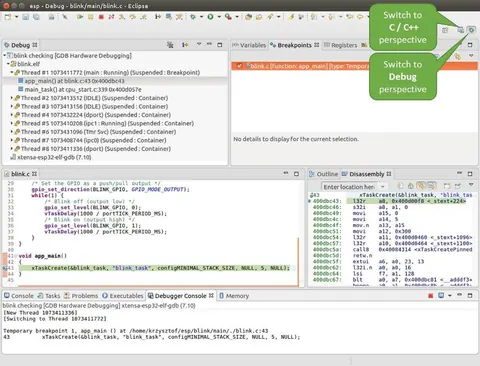 \2
\2Eclipse IDE Debug Perspective for ESP32 JTAG debugging
What do you need before running your first example?
Gather these before you start:
- An ESP32 board. The ESP-WROOM-32 is a widely used starting point.
- A development machine. The official toolchain documentation references Ubuntu 20 with the ESP-IDF dev kit; ESP-IDF also runs on Windows and macOS.
- ESP-IDF installed with its environment variables active in your shell.
- A USB cable to connect the board for flashing.
- Eclipse IDE (optional) if you want a graphical JTAG debugging experience with breakpoints and call-stack inspection.
If you prefer the Arduino IDE over ESP-IDF, install the ESP32 board support package inside the Arduino IDE. One important distinction: ESP8266 and ESP32 share a physical resemblance and similar workflows, but they use different libraries and pin maps. An ESP8266 library will not drop into an ESP32 project without adjustment—always confirm that a library explicitly supports ESP32 before importing it.
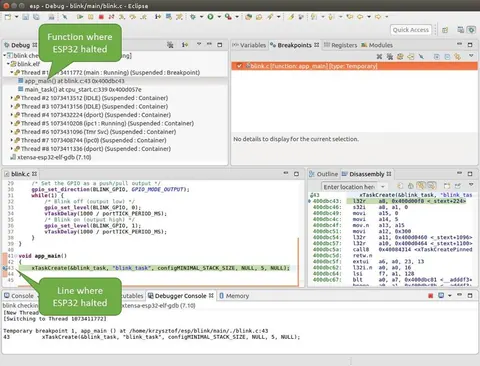 \2
\2ESP32 target halted at breakpoint during JTAG debug session
How do I find and load an ESP32 example? (Step-by-step)
-
Locate the examples directory. After installing ESP-IDF, examples live under the
examples/folder of the repository, organized by category:get-started/,wifi/,protocols/,bluetooth/, and others. -
Copy the example to your own workspace. Each example is an independent project. Copy its entire folder outside the ESP-IDF tree rather than building inside the framework's own directory. This preserves the original and keeps your changes isolated.
-
Read the README.md first. Every official example ships with a README that describes what it does, what hardware it requires, and any wiring notes. Reading it before touching the configuration saves time and avoids obvious mistakes.
-
Understand the project structure. The main logic lives in the
main/directory inside a file named(something)_example_main.c. If the example handles multiple concerns, additional source files appear inmain/, or acomponents/subdirectory holds example-specific library code. -
Check the license if you plan to publish. Original ESP-IDF example code carries either a public domain / CC0 notice or an Apache 2.0 license. Any third-party code included in an example keeps its original license header and must be Apache 2.0-compatible.
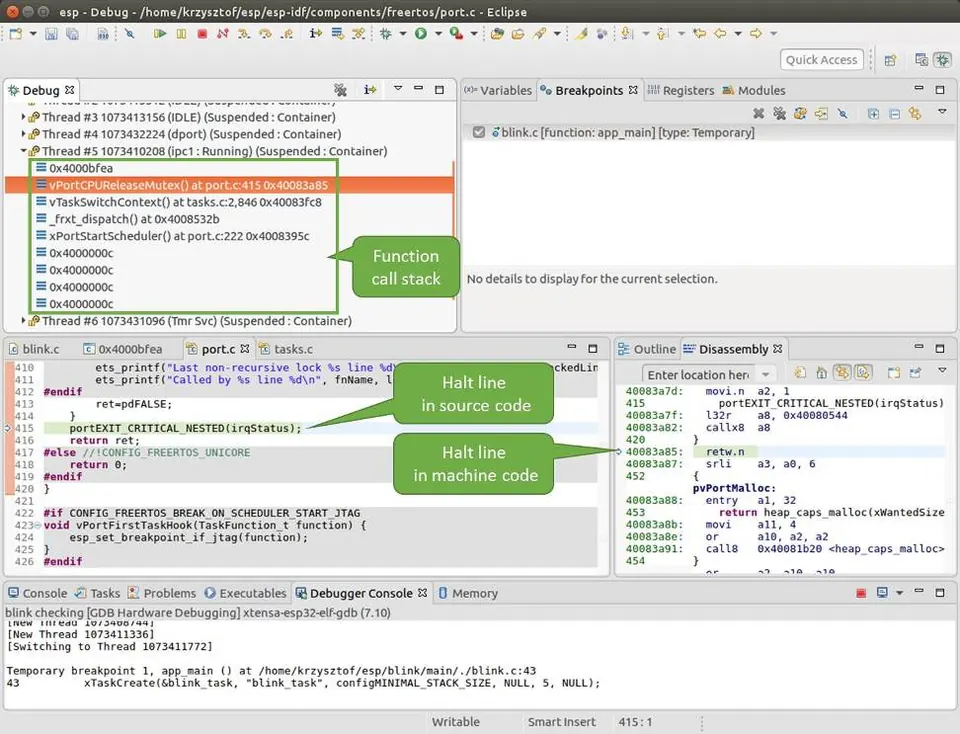 \2
\2Navigating the call stack in Eclipse during ESP32 debugging
How do I configure and flash an example?
ESP-IDF examples deliberately avoid hard-coding values like WiFi credentials, server addresses, or port numbers directly into source. Those settings live in a menu-driven configuration system instead.
- Open a terminal in your copied example's root folder, with the IDF environment variables active.
- Run the configuration tool:
idf.py menuconfig - Navigate to Example Configuration. This menu is generated from the
Kconfig.projbuildfile in themain/directory and lists every setting the example exposes—SSID, password, server IP, port number, and so on. - Fill in your values, save, and exit. The tool writes a
sdkconfigfile that the build system reads automatically. - Build the project, flash it to your board, then open the serial monitor to watch log output—all using standard IDF workflow commands.
For network examples, the TCP client example shows the standard BSD socket pattern: call getaddrinfo() to resolve the server hostname, call socket() to allocate the descriptor, set a send timeout with setsockopt() (the reference example uses two seconds), then call connect(). On success the serial monitor prints ... connected; on failure it prints the errno value for diagnosis.
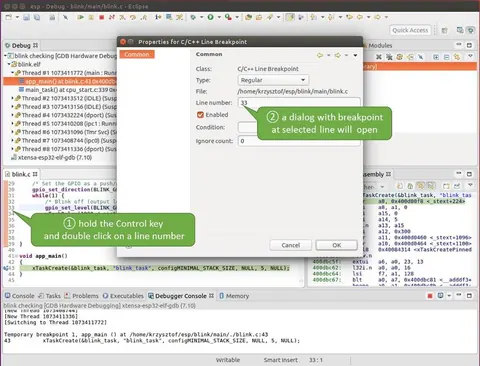 \2
\2Setting a breakpoint in Eclipse for ESP32 firmware debugging
How do I verify the example is working?
Blink: The onboard LED starts toggling. If it stays off, the most common cause is a mismatch between the GPIO number in the code and your board's actual LED pin.
WiFi softAP: Scan for networks on a phone or laptop—the SSID you configured in menuconfig should appear in the list.
HTTP server combined with softAP: Connect a device to the ESP32's network and point a browser at the ESP32's IP address. The example documentation references using the ESP32's network address; a response page from the board confirms both services are running.
TCP client: Watch the serial monitor. A working connection prints DNS lookup succeeded. IP=<address> followed by ... connected. A failure prints DNS lookup failed or socket connect failed errno=<number>, giving you a specific error code to investigate.
JTAG debugging in Eclipse: Load the blink example and set breakpoints in blink.c at the lines where the LED state changes. Click Resume. The LED stops toggling each time execution halts at a breakpoint. The Debug window shows the active thread and full call stack, letting you trace from blink_task() up through app_main()—and step into or over individual function calls using F5 and F6 respectively.
What are the most common mistakes with ESP32 examples?
Exceeding the JTAG breakpoint limit. The ESP32 supports a maximum of two hardware breakpoints during JTAG debugging. Eclipse automatically places a temporary breakpoint at app_main() on startup. If you then add two more of your own you have three total, and debugging will fail. Delete the auto-created one before setting yours.
Building inside the ESP-IDF tree. Modifying or building an example inside the framework's own examples/ folder contaminates the installation. Always copy the project to your own workspace first.
Mixing ESP8266 and ESP32 libraries. Both platforms share some Arduino-compatible function names and many libraries have been ported across, but they are not the same. An ESP8266-specific library imported into an ESP32 project will cause compile errors or silent misbehavior. Confirm that every library you add explicitly targets ESP32.
Hard-coding credentials in source. Official examples store WiFi SSIDs, passwords, and addresses in menuconfig for good reason: pasting them directly into source files risks exposing them in version control and makes the code harder to share or reuse.
Forgetting to merge Kconfig files when combining examples. If you pull source from two separate examples into one project but keep only one Kconfig.projbuild, menuconfig will be missing the other example's settings. Merge both files' contents into a single Kconfig.projbuild so every option appears.
Skipping the README. Every example includes a README that lists required hardware and expected serial output. Most first-run problems are answered there.
How do I turn an example into my own project?
Once an example runs cleanly, the path forward is straightforward.
Run each feature independently first. If your goal combines WiFi and an HTTP server, confirm that each example works on its own before merging them. Debugging a combined project without knowing each half is functional is significantly harder.
Integrate by merging Kconfig files. Copy the contents of each example's main/Kconfig.projbuild into a single file in your new project. All configuration options then appear together under the unified menuconfig menu—this is the officially documented way to combine two ESP-IDF example configurations.
Move reusable logic into components/. If your project grows, place library-style code in a components/ directory rather than piling everything into main/. Only do this for code specific to your project; anything generic belongs in ESP-IDF itself.
Keep all configurable values in menuconfig. Any value that might change—a pin number, an IP address, a timeout—should be a Kconfig option rather than a hard-coded constant. This makes the project portable and safe to share.
Add a test file. Official examples include a pytest_<example name>.py file for automated testing. Adding one to your project catches regressions as you iterate on the code.
Frequently asked questions
What is the first example I should run on an ESP32?
The get-started/blink example is the standard starting point. It toggles an LED and is simple enough to confirm that your toolchain, USB connection, and board all work before you tackle anything more complex.
Can I use Arduino libraries with ESP32 examples?
Many Arduino libraries have been migrated to the ESP platform and share common function names, so moving between boards becomes more habit than rewrite. ESP8266 libraries are a different matter—they are not directly compatible with ESP32, so always confirm a library explicitly supports ESP32 before importing it.
How do I set WiFi credentials in an ESP32 example?
Run idf.py menuconfig, navigate to the Example Configuration menu, and enter your SSID and password there. The tool writes them to sdkconfig; they are never hard-coded in source files.
How many hardware breakpoints does the ESP32 support during JTAG debugging?
A maximum of two. Setting three or more causes debugging to fail. Eclipse adds a temporary one at app_main() on startup, so delete that before adding your own.
How do I combine two ESP-IDF examples into one project?
Merge the contents of both projects' main/Kconfig.projbuild files into a single file in your combined project. All settings from both examples will then appear in the menuconfig menu. Then integrate the source code, making sure each example's initialization runs where appropriate.
ESP32 examples are the fastest honest path from a blank board to a working feature—each one is a complete project you can copy, configure, and flash without writing boilerplate. Start with `get-started/blink` to validate your toolchain, then move to network examples like softAP or the HTTP server once the basics are solid. The biggest time-savers are reading the README before anything else and keeping every configurable value in menuconfig rather than source code.
Sources
github.comDebugging Examples (esp-idf docs)github.comCreating Examples (esp-idf docs)stackoverflow.comESP32 TCP clientstackoverflow.comESP32 - combining two or more SDK example projects into oneelectronics.stackexchange.comnewb to arduino, how to navigate the ESP8266 vs ESP32 examples and tutorials?This guide summarises the public sources listed above in our own words. Check the original documentation before relying on exact figures.