Batear: Build an Acoustic Drone Detector with ESP32-S3
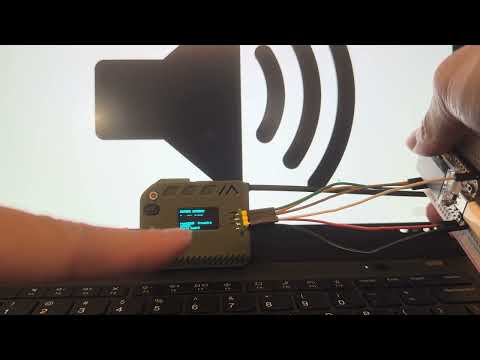
Bench test demo showing Batear detecting drone rotor harmonics in real time on an ESP32-S3 board.
- Heltec WiFi LoRa 32 V3
- Heltec WiFi LoRa 32 V4
- LILYGO T-ETH-Lite S3
- ICS-43434 MEMS microphone
- SX1262 LoRa radio
- W5500 Ethernet controller
- SSD1306 OLED display
What You Will Build and Why It Is Useful
Batear turns an ESP32-S3 board and a MEMS microphone into an always-on acoustic drone detector that runs entirely at the edge — no cloud subscription, no internet connection, no ongoing cost. When it detects the characteristic rotor harmonics of a drone, it fires an encrypted alert over LoRa radio or wired Ethernet straight to Home Assistant.
The same firmware codebase covers three distinct roles you select at build time:
- Detector — microphone plus LoRa transmitter, placed at the perimeter
- Gateway — LoRa receiver with SSD1306 OLED display, LED alarm indicator, and MQTT publisher, placed centrally
- Wired Detector — microphone plus Ethernet/PoE plus MQTT, no LoRa or gateway board required
A single gateway can aggregate alerts from multiple detectors spread around a property. The wired path suits permanent rooftop or fence-line installations where running a cable is practical.
Because everything runs on low-cost hardware, Batear makes acoustic airspace awareness accessible to homes, farms, and community groups that cannot justify radar or camera systems.
 \2
\2What You Need
Hardware
For the wireless path you need at least one Heltec WiFi LoRa 32 V3 or V4 acting as a detector and one more acting as a gateway. For the wired path, use a LILYGO T-ETH-Lite S3 instead — it integrates a W5500 Ethernet controller and supports PoE. Both paths use an ICS-43434 MEMS microphone as the acoustic sensor. The gateway role also uses an SSD1306 OLED display and an LED alarm indicator, as shown in the architecture diagram.
Software
- ESP-IDF — the official Espressif development framework;
idf.pymust be on your PATH - Git — to clone the repository
- An MQTT broker reachable by the gateway or wired detector on your local network
- Home Assistant (optional) for dashboard views, diagnostics, and automations
No toolchain? Use the Web Flasher.
If you prefer not to set up ESP-IDF locally, Batear ships a browser-based flasher at docs.batear.io/flasher. It works in Chrome or Edge on desktop — connect your supported board via USB-C and click Install. This is the fastest path to a working detector.
Typical use cases
Mount a detector at a window, fence line, or rooftop and receive an instant Home Assistant alert whenever a drone approaches your property.
Spread several detector nodes across a large agricultural site, all reporting through one gateway, giving wide-area acoustic coverage on a tight budget.
Use Batear's binary sensor to kick off any Home Assistant automation — lights, sirens, cameras, or phone push notifications — the moment a detection fires.
Run a LILYGO T-ETH-Lite S3 over a PoE cable for a zero-maintenance wired detector that publishes directly to MQTT with no radio or gateway board required.
How It Works
Batear samples audio continuously through the ICS-43434 MEMS microphone. On the ESP32-S3 it runs an FFT (Fast Fourier Transform) to convert the raw audio stream into a frequency spectrum. It then searches for the harmonic patterns that drone rotors produce — repeating energy peaks at multiples of a fundamental frequency — and triggers an alert when those patterns cross a configurable threshold.
In the wireless deployment, the detector encodes the alert into a compact 36-byte packet, encrypts it with AES-128-GCM, and transmits it on 915 MHz LoRa via the SX1262 radio. The gateway receives and decrypts the packet, activates its OLED display and LED indicator, and forwards the event to Home Assistant over MQTT.
In the wired deployment, the LILYGO board publishes detection events directly over Ethernet — no gateway board is needed. It also exposes a REST API and supports OTA firmware updates over the same wired connection.
Full details of the FFT harmonic detection algorithm are documented at docs.batear.io/how-it-works.
Build and Flash from Source
1. Clone the repository
git clone https://github.com/batear-io/batear.git && cd batear
2. Build a Detector (LoRa transmitter)
The build system uses ESP-IDF's idf.py with role-specific sdkconfig files. The SDKCONFIG_DEFAULTS flag selects which role to compile.
idf.py -B build_detector \
  -DSDKCONFIG=build_detector/sdkconfig \
  -DSDKCONFIG_DEFAULTS="sdkconfig.defaults;sdkconfig.detector" \
  set-target esp32s3
idf.py -B build_detector -DSDKCONFIG=build_detector/sdkconfig build
3. Flash and monitor
Replace PORT with your board's serial port (/dev/ttyUSB0 on Linux, COM3 on Windows):
idf.py -B build_detector -DSDKCONFIG=build_detector/sdkconfig -p PORT flash monitor
4. Switching roles
Repeat the set-target, build, and flash steps with a matching build directory and the sdkconfig for the role you need:
| Role | SDKCONFIG_DEFAULTS |
|---|---|
| Detector (LoRa TX) | "sdkconfig.defaults;sdkconfig.detector" |
| Gateway (LoRa RX + MQTT) | "sdkconfig.defaults;sdkconfig.gateway" |
| Wired Detector (Ethernet/PoE) | "sdkconfig.defaults;sdkconfig.wired_detector" |
After flashing, open the Configuration guide to set your AES encryption keys, LoRa frequency, MQTT broker address, and device IDs. Tune the detection threshold for your environment using the Calibration guide. The full step-by-step build guide with gateway and wired-detector instructions is at docs.batear.io/build-flash.
Home Assistant Integration
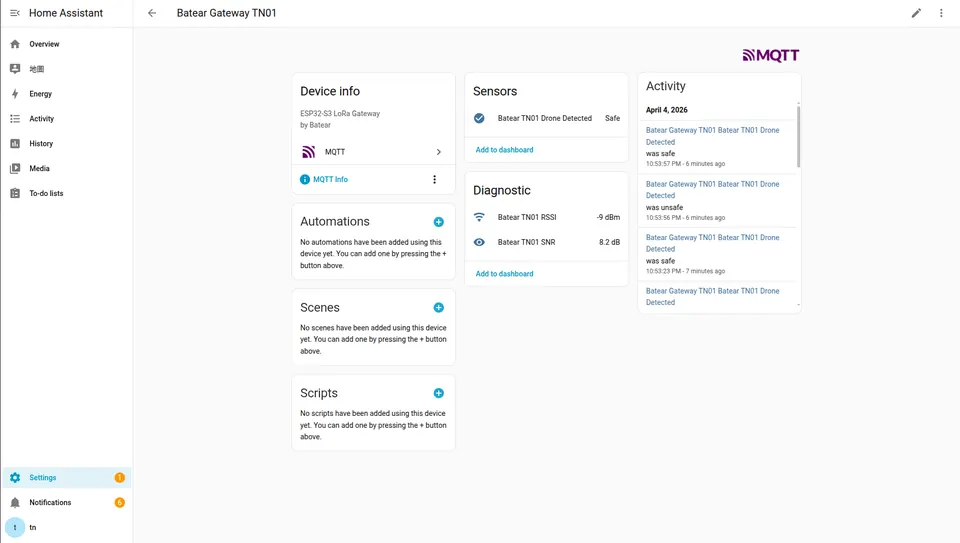
Once the gateway or wired detector is publishing to your MQTT broker, Home Assistant picks up Batear automatically via MQTT auto-discovery — no manual entity configuration is required.
The integration surfaces:
- A binary sensor that trips when a drone detection event arrives
- Real-time RSSI and SNR readings from each received LoRa packet, useful for tracking signal quality at range
- Historical event logs you can query directly from the Home Assistant interface to analyze detection patterns over time
With those entities in place you can build standard HA automations: flash smart lights, push a phone notification, trigger a siren, or start a camera recording the moment an alert arrives. Because discovery is automatic, adding a second or third detector node requires no additional HA configuration — the new device registers itself.
Ideas to Extend It and Limitations to Know
Ways to extend the build
- Multi-node perimeter — deploy several detector boards around a large property; each transmits on the same encrypted LoRa channel and a single gateway aggregates them all into one Home Assistant dashboard.
- Port to new boards — the project documents the porting process at docs.batear.io/adding-boards, so adapting Batear to other ESP32-S3 hardware is supported.
- REST API integration — the wired detector exposes a REST API, making it straightforward to feed detection events into non-Home-Assistant systems or custom dashboards.
- OTA updates — the wired detector supports over-the-air firmware updates over Ethernet, useful for permanent installations where physical access is inconvenient.
Limitations to keep in mind
Acoustic detection range depends heavily on ambient noise. Wind, nearby machinery, and road traffic can mask drone rotor harmonics or produce false patterns. The 915 MHz LoRa band is region-specific — verify local radio regulations before deploying. Detection thresholds require per-site calibration; the defaults may need adjustment before the system is reliable in a high-noise environment. As an open-source community project, deployments in demanding or adversarial electronic-warfare environments should be validated against field data before being relied upon.
Batear is a well-structured open-source project that genuinely delivers on its promise: edge-only drone detection with encrypted wireless or wired alerting, solid Home Assistant integration, and a web flasher that lets anyone try it without touching a toolchain. The three-role architecture is thoughtfully designed, and the documentation site covers everything from calibration to board porting. If you need acoustic airspace awareness on a constrained budget, this is the most complete ESP32 solution available today.
Sources
github.combatear-io/batear — repository & README batear.ioOfficial websiteFacts in this article come from the project's public README and GitHub metadata at the time of writing. Images belong to their respective owners and link back to the original source.