Ivy AI: Fully Offline Voice Assistant on ESP32-S3
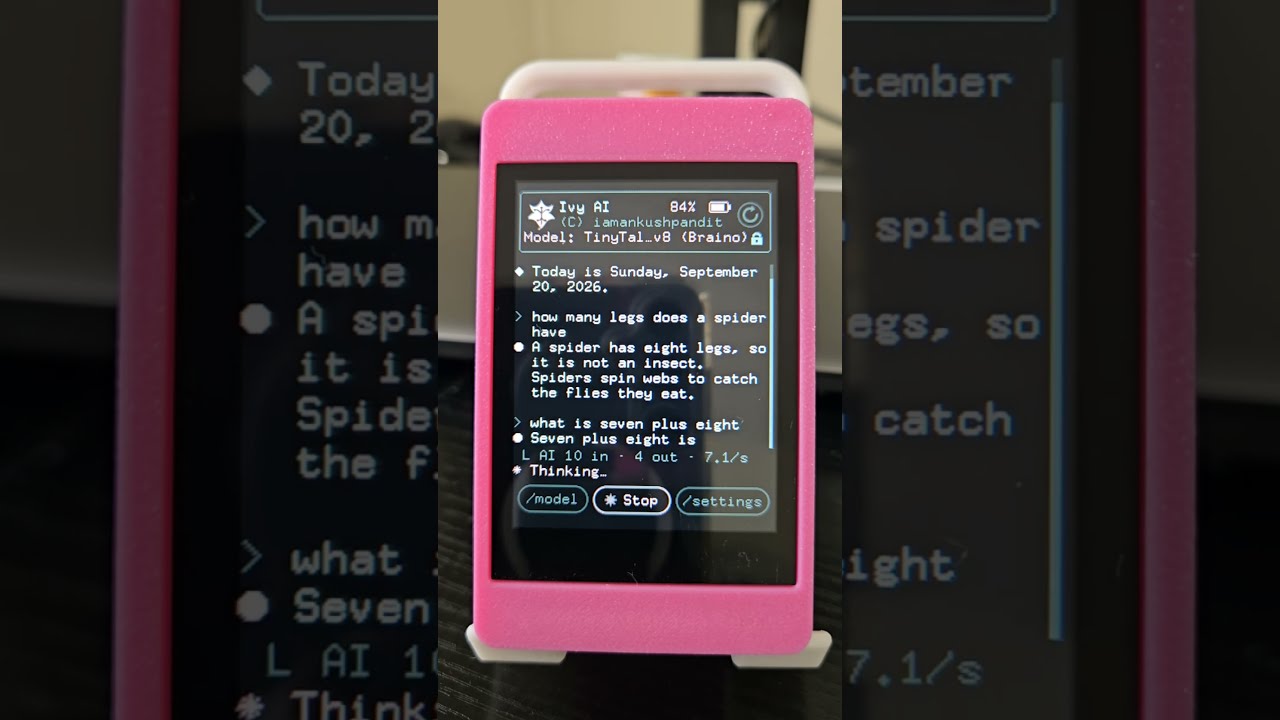
Ivy AI running on the Freenove FNK0104B — the board listens, transcribes, generates a response with its on-device LLM, and speaks the answer.
- Freenove FNK0104B (ESP32-S3R8)
- ILI9341 240x320 LCD (on-board)
- FT6336U touch controller (on-board)
- ES8311 codec with microphone and speaker (on-board)
- microSD card (SDMMC, on-board slot)
- Li-ion battery with charging (on-board)
What You Will Build
Ivy AI turns a single $20 microcontroller into a self-contained voice assistant. Say "Hey Ivy", ask a question in plain speech, and the board transcribes your words, runs a small language model, and speaks an answer — all without touching the internet. Wi-Fi is only used to set the clock over NTP once an hour; after that the radio shuts off.
The full pipeline looks like this:
mic → [LISTEN: energy VAD] → [TRANSCRIBE: conformer CTC]
    → [THINK: 19.7M-parameter LLM, 4-bit] → [SPEAK: SVOX Pico] → speaker
Beyond the AI path, the board also handles timers, date and time queries, and an on-screen T9 keyboard in plain C — no model weight needed for those. A built-in demo mode lets the device ask itself questions and answer them hands-free, which is handy for filming or showing it off.
What You Need
Hardware
- Freenove FNK0104B development board (ESP32-S3R8: dual Xtensa cores at 240 MHz, 8 MB octal PSRAM, 16 MB flash). The LCD, touch screen, codec, microphone, speaker, microSD slot, and battery charger are all on the board — nothing extra to wire up.
- A microSD card to hold the STT model, TTS engine, and language model weights.
- A USB cable to flash and communicate with the board.
Software
- ESP-IDF v6.1 (the project uses native IDF, not Arduino or LVGL).
- Python 3 (for the SD upload and serial console tools).
- PowerShell (the build scripts are
.ps1wrappers aroundidf.py).
All large assets — the conformer STT weights, SVOX Pico TTS data, and the LLM — live on the SD card rather than in flash, so the 16 MB flash is not a bottleneck.
Typical use cases
Answer questions, set timers, and check the time by voice — with no cloud dependency and no data leaving the device.
A working baseline for running quantized language models on resource-constrained microcontrollers, with measured benchmarks and documented memory budgets.
Host-side build harnesses let you develop and test the LLM, UI, and arena allocator on a PC before touching hardware, shortening the iteration loop.
Drop any compatible GGUF file onto the SD card or convert a Hugging Face checkpoint to try different small language models on the same hardware.
How It Works
The main engineering challenge is that STT alone needs 5.4 MB of RAM and the LLM needs 6.5 MB, but the board only has 8 MB of PSRAM and about 300 KB of usable internal SRAM. Ivy solves this with a phase-based memory arena: two large arenas (7 MB PSRAM, ~145 KB internal) are reserved at boot, and STT and the LLM never run at the same time. Each phase claims the whole arena, does its work, then returns it. Every transition logs free, largest, and minimum-ever bytes to the screen, so an allocation failure is visible rather than silent.
Speed comes from several places at once: weights are stored at 4-bit with int8 activations, there is a hand-written ESP32-S3 PIE SIMD kernel (dot_q4_pie.S) for the inner dot product, and matrix-vector multiplication is offloaded to the second Xtensa core. The result is 5.4–5.9 tokens per second with the default TinyTalk v8 model (6.5 MB), or up to 30 tok/s with a tiny storytelling GGUF.
The wake word engine (Espressif WakeNet9) runs continuously at very low power, even from sleep. When it fires, the VAD captures audio, the conformer CTC model transcribes it from SD-streamed tensors, and the resulting text goes to whichever LLM is selected. SVOX Pico en-US synthesises the reply and sends it to the ES8311 codec.
Build and Flash
1. Flash the firmware
The PowerShell wrapper sets the correct IDF environment and flashes in one step. Replace COM22 with your board's port:
powershell -ExecutionPolicy Bypass -File tools/idf.ps1 -p COM22 flash
The compiled app is 2.8 MB. The WakeNet9 model is written to its own flash partition automatically during the build.
2. Copy assets to the SD card
The STT, TTS, and LLM files are too large for flash. Upload everything listed in the manifest over the serial console at about 700 KB/s with CRC checking:
python tools/sd_put.py --manifest
To update a single model instead of the full set, use --only <name>.
3. Verify over serial
The serial_cmd.py tool drives the device's own command console — the same code paths the touchscreen UI uses, so results reflect real behaviour:
python tools/serial_cmd.py "models" "model 13" "ask what is half of twelve"
Useful commands: models / model <n> to list and switch models, ask <question>, say <text>, bat for battery level, time, wifi <ssid> <pw> to configure Wi-Fi for NTP, and wakemon on to watch the microphone peak level while the wake word engine is listening.
4. Test without hardware
Most components — arenas, the LLM engine, and the UI renderer — also build for PC. The host test runner checks them without needing a board:
powershell -ExecutionPolicy Bypass -File tools/hosttest.ps1
Adding Your Own Models
Ivy supports two model formats, both selected from the on-device /model page:
TinyTalk / CRDP — a folder on the SD card containing model.bin, tok.bin, and an optional name.txt. These are converted from Hugging Face GPT-Neo checkpoints using the tools in the tools/ directory.
GGUF — any llama.cpp-format file dropped into /sd/models/. Supported architectures: llama. Supported quantisations: F32, F16, Q8_0, Q4_0, with SentencePiece tokeniser. The practical size limit is about 5.8 MB, which fits roughly 10M parameters at 4-bit. docs/GGUF.md in the repository covers the fit rules, conversion steps, and a vocabulary-shrinking tool that can push a borderline model under the limit.
The model selection is saved in NVS and shown in the header so you always know what is loaded.
Limitations and Ideas to Extend It
Known limits to keep in mind:
- The default TinyTalk v8 model scores 99.2% accuracy on phrasings it was trained on, but drops to 63.3% on rephrasings. That gap closed by 24 points between v7 and v8, so further training should help.
- STT is slower than real time: a 2.9-second utterance takes up to 4.6 seconds to transcribe.
- The VAD occasionally clips the last syllable of a sentence.
- Wake word sensitivity varies by voice;
wakemon onis the tool to measure it. - Some model weights carry non-commercial dataset terms — fine for a personal build, but check licensing before shipping a product.
Ways to take it further:
- Swap in a different GGUF model to change the assistant's personality or knowledge domain, within the 5.8 MB budget.
- Train a domain-specific TinyTalk model using the PyTorch MPS pipeline documented in
docs/MODELS.md— the project was trained on an Apple M1 Max. - Use
goplay <wav> <vol>via serial to run acoustic loopback tests and measure how well the mic picks up speech at various volumes and distances. - Extend the intent handler in
main/to add new built-in commands that bypass the LLM for deterministic answers, just as time, date, and timers already do.
Ivy AI is a serious piece of embedded systems engineering: a fully self-contained voice pipeline — wake word, STT, LLM, TTS — running on a single $20 board with no cloud and no compromises on functionality. The phase-based memory arena, hand-written SIMD kernels, and dual-core dispatch show careful work to squeeze every byte and cycle out of the hardware. This is a challenging build aimed at experienced ESP-IDF developers, but the host-side test harnesses and well-documented memory budget make it unusually approachable for a project of this complexity.
Sources
github.comiamankushpandit/esp_ai — repository & README iamankushpandit.github.ioOfficial websiteFacts in this article come from the project's public README and GitHub metadata at the time of writing. Images belong to their respective owners and link back to the original source.