Build a Free AI Voice Assistant with ESP32-S3 and HuggingFace
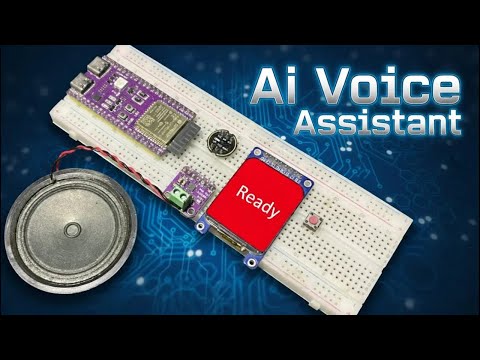
Project walkthrough video showing the completed ESP32-S3 AI voice assistant in action
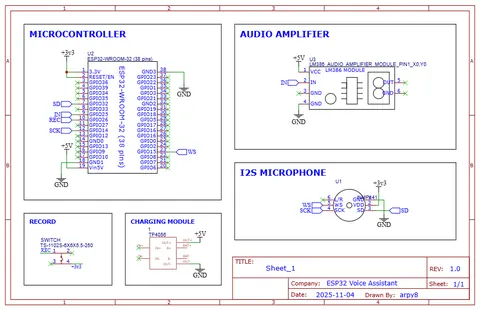
- ESP32-S3 (16MB Flash, 8MB PSRAM)
- ST7789 TFT Display
- INMP441 I2S MEMS Microphone
- MAX98357A I2S Audio Amplifier
- Half-watt 8-ohm speaker
- Tactile button
What You Will Build
You will build a push-to-talk AI voice assistant that lives on an ESP32-S3 development board. Hold a button to speak, release it, and the board sends your recorded audio to a server you host for free on HuggingFace. The server runs a full speech-to-text, large language model, and text-to-speech pipeline, then streams the spoken answer back to the ESP32, which plays it through a small amplifier and speaker. A small TFT display shows the assistant's status.
The project is completely free to run: the HuggingFace Space uses CPU Basic hardware at no charge, and no paid API keys are involved. It is a practical way to bring a capable conversational assistant to embedded hardware without a subscription.
What You Need
Hardware
| Component | Details | Note |
|---|---|---|
| Development board | ESP32-S3, 16MB Flash, 8MB PSRAM | PSRAM is mandatory — the firmware will not work without it |
| Display | ST7789 TFT | See the display tutorial linked in the video description for pin configuration |
| Microphone | INMP441 I2S MEMS | Add a capacitor between Ground and VCC on the microphone module |
| Audio amplifier | MAX98357A I2S | Connect to a half-watt, 8-ohm speaker |
| Button | Tactile push button | Starts and stops voice recording |
| Wiring | Dedicated I2S GPIO lines | Separate I2S lines for mic and amp reduce noise |
Software and accounts
- Arduino IDE with ESP32-S3 board support
- Required Arduino libraries (download links are in the project's video description); the ESP8266 audio library is compatible with ESP32
- A free HuggingFace account
- The server files from this repository:
Dockerfile,app.py,docker-compose.yml,requirements.txt
Typical use cases
Press a button, ask a question, hear the answer — all on a self-contained ESP32-S3 device with no subscription required.
Learn how to wire a HuggingFace Docker Space as a live AI backend for embedded hardware without paying for API access.
Swap in different language models or system prompts on the server side to experiment with assistant personalities and capabilities.
Extend the firmware to parse the LLM's text response and trigger GPIO actions — turning the assistant into a voice-controlled smart home node.
How It Works
The ESP32-S3's large PSRAM buffer is the key enabler. When you press and hold the tactile button, the firmware records your voice directly into PSRAM. Ordinary ESP32 boards without PSRAM cannot hold enough audio data for this task, which is why PSRAM is listed as mandatory.
On release, the board sends the recorded audio over Wi-Fi to your HuggingFace Space. The Space runs a Docker container that chains three AI steps in sequence:
- STT (Speech-to-Text): Converts your audio to text.
- LLM (Large Language Model): Generates a text response.
- TTS (Text-to-Speech): Converts the response back to audio.
The resulting audio file is returned to the ESP32, saved to the onboard LittleFS filesystem, and played immediately through the MAX98357A amplifier and speaker. The ST7789 display shows status messages throughout, starting with "Assistant Ready" when the system is online.
Set Up the HuggingFace Server
The server is the backbone of the assistant. Follow these steps before touching the firmware:
- Log in to HuggingFace and click New Space.
- Configure the Space:
- SDK: Docker
- Template: Blank
- Hardware: CPU Basic
- In the Space's Files tab, use Contribute → Create new file to upload these four files from this repository:
Dockerfileapp.pydocker-compose.ymlrequirements.txt
- Go to your profile's Access Tokens, create a Write token, and copy it.
- In your Space's Settings tab, scroll to Secrets and add a new secret:
- Name (exact):
HF_TOKEN - Value: your copied token
- Name (exact):
- Wait for the Space status to change from Building to Running. If it stays in an error state, check the Logs tab for details.
Once running, note your Space URL — you will paste it into the firmware configuration.
Flash the Firmware
With the server running, open the Arduino project from this repository:
- Install libraries: Download and install all required libraries listed in the video description. The ESP8266 audio library is confirmed to work with ESP32.
- Edit the configuration in the sketch:
- Enter your Wi-Fi SSID and password.
- Paste your HuggingFace Space URL into the server URL field. The README notes that the URL is case-sensitive, so copy it exactly.
- Board settings in the Arduino IDE Tools menu:
- Select your ESP32-S3 board.
- Enable PSRAM.
- Choose a Partition Scheme that includes SPIFFS (LittleFS shares this partition type).
- Click Upload.
After upload, open the serial monitor to watch for connection messages. When the TFT display shows "Assistant Ready", the device is online and waiting for input.
Usage, Ideas to Extend, and Limitations
Using the assistant
- Press and hold the button to record your question.
- Release the button; the board sends audio to the server automatically.
- Wait a moment while the STT → LLM → TTS chain runs, then listen to the spoken reply through the speaker.
Ideas to extend
- Custom LLM personality: Edit
app.pyon HuggingFace to swap the language model or add a system prompt that gives the assistant a specific role — a home automation helper, a language tutor, and so on. - Wake-word detection: Add always-on listening on the ESP32-S3 so a physical button is no longer needed.
- Multi-language support: The README lists multi-language as a future goal; contributing language models or TTS voices to the HuggingFace server is a natural next step.
- Wi-Fi provisioning: Replace the hard-coded credentials with a captive-portal setup so the device can be configured without reflashing.
Limitations to be aware of
- English only at this time. The README confirms multi-language is not yet supported.
- Latency: The full STT → LLM → TTS round trip on free CPU Basic hardware will be noticeably slower than cloud API alternatives. This is a trade-off for zero cost.
- PSRAM is non-negotiable. Any ESP32-S3 board without 8MB PSRAM will not run this firmware.
- HuggingFace Space sleep: Free Spaces may pause after a period of inactivity and take a moment to wake up on the next request.
This project delivers a genuinely functional AI voice assistant on accessible hardware with zero ongoing cost, which makes it a rare find in the DIY space. The reliance on free HuggingFace CPU hardware means response latency will be higher than a paid cloud service, and the English-only limitation rules it out for some makers today. That said, the clean separation between the ESP32-S3 firmware and the server-side Docker container makes it straightforward to swap models or extend functionality as the project matures.
Sources
github.comderdacavga/Esp32-Ai-Voice-Assistant — repository & READMEFacts in this article come from the project's public README and GitHub metadata at the time of writing. Images belong to their respective owners and link back to the original source.