ESP32 Bluetooth Proxy: What It Is and How to Set It Up
What does "ESP32 Bluetooth proxy" actually mean?
The phrase gets used for two different things, so it is worth sorting out first. In Espressif's ESP-IDF documentation, "Proxy" is one of the node features of ESP-BLE-MESH, the Bluetooth mesh implementation that ships with the SDK. The docs list it next to Relay, Low Power and Friend as a capability a mesh node can take on. Bluetooth mesh itself is described there as a networking technology rather than a radio technology: it rides on top of Bluetooth Low Energy and lets many devices talk many-to-many, relaying messages between nodes that are out of direct radio range of each other.
Why does a proxy matter in that picture? In the ESP-IDF getting-started walkthrough, a phone running the nRF Mesh app opens a normal Bluetooth LE connection to an ESP32 board, discovers the "ESP-BLE-MESH GATT Service", and then provisions and configures the node through that connection. That GATT-based path is how a phone, which does not speak the mesh advertising bearer natively, gets into the network. The sources do not go further into the proxy mechanics than listing the feature and showing the GATT service in use, so this guide sticks to what they document.
The other meaning, a Home Assistant "Bluetooth proxy" built with ESPHome that forwards BLE advertisements over Wi-Fi, is not covered by the ESP-IDF sources used here. If that is what you came for, skip to the last section and the linked guide.
This article is an esp32 bluetooth proxy how to in the ESP-IDF sense: understand the stack, pick a chip, flash the mesh example, and provision it from your phone.
 \2
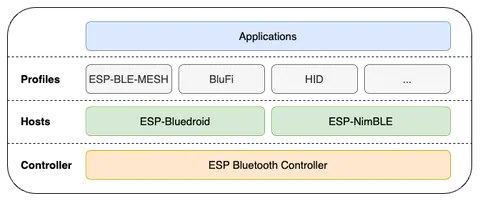
Layered ESP-IDF Bluetooth LE stack: controller at the bottom, Bluedroid or NimBLE host above, profiles such as ESP-BLE-MESH on top
Which ESP32 chips support BLE Mesh and the Proxy feature?
Not every Espressif chip gets the mesh stack. The ESP-IDF Bluetooth LE overview includes a support matrix; the mesh-relevant columns are summarised below.
| Chip | Controller | ESP-Bluedroid | ESP-NimBLE | ESP-BLE-MESH |
|---|---|---|---|---|
| ESP32 | Yes | Yes | Yes | Yes |
| ESP32-S3 | Yes | Yes | Yes | Yes |
| ESP32-C2 | Yes | Yes | Yes | No |
| ESP32-C3 | Yes | Yes | Yes | Yes |
| ESP32-C5 | Yes | Yes | Yes | Yes |
| ESP32-C6 | Yes | Yes | Yes | Yes |
| ESP32-C61 | Yes | Yes | Yes | Yes |
| ESP32-H2 | Yes | Yes | Yes | Yes |
| ESP32-H4 | Yes | Yes | Yes | Yes |
The ESP32-C2 is the odd one out: it has a full BLE stack but no ESP-BLE-MESH, so it cannot act as a mesh proxy node.
Bluetooth versions also differ by family, according to the same document:
- ESP32: Dual-Mode Bluetooth 4.2, certified for Dual-Mode Bluetooth 4.2 and Bluetooth LE 5.0.
- ESP32-C3 and ESP32-S3: Bluetooth 5.0 (LE), certified for Bluetooth LE 5.4.
- ESP32-C2, C6, H2, H21, C5, C61: Bluetooth 5.0 (LE), certified for Bluetooth LE 5.3.
Only the original ESP32 offers Classic Bluetooth. Every other listed chip is LE-only, which is fine for mesh since Bluetooth mesh depends on BLE anyway. For the hands-on walkthrough below, the docs name the ESP32-DevKitC and ESP-WROVER-KIT as supported boards for the example application.
 \2
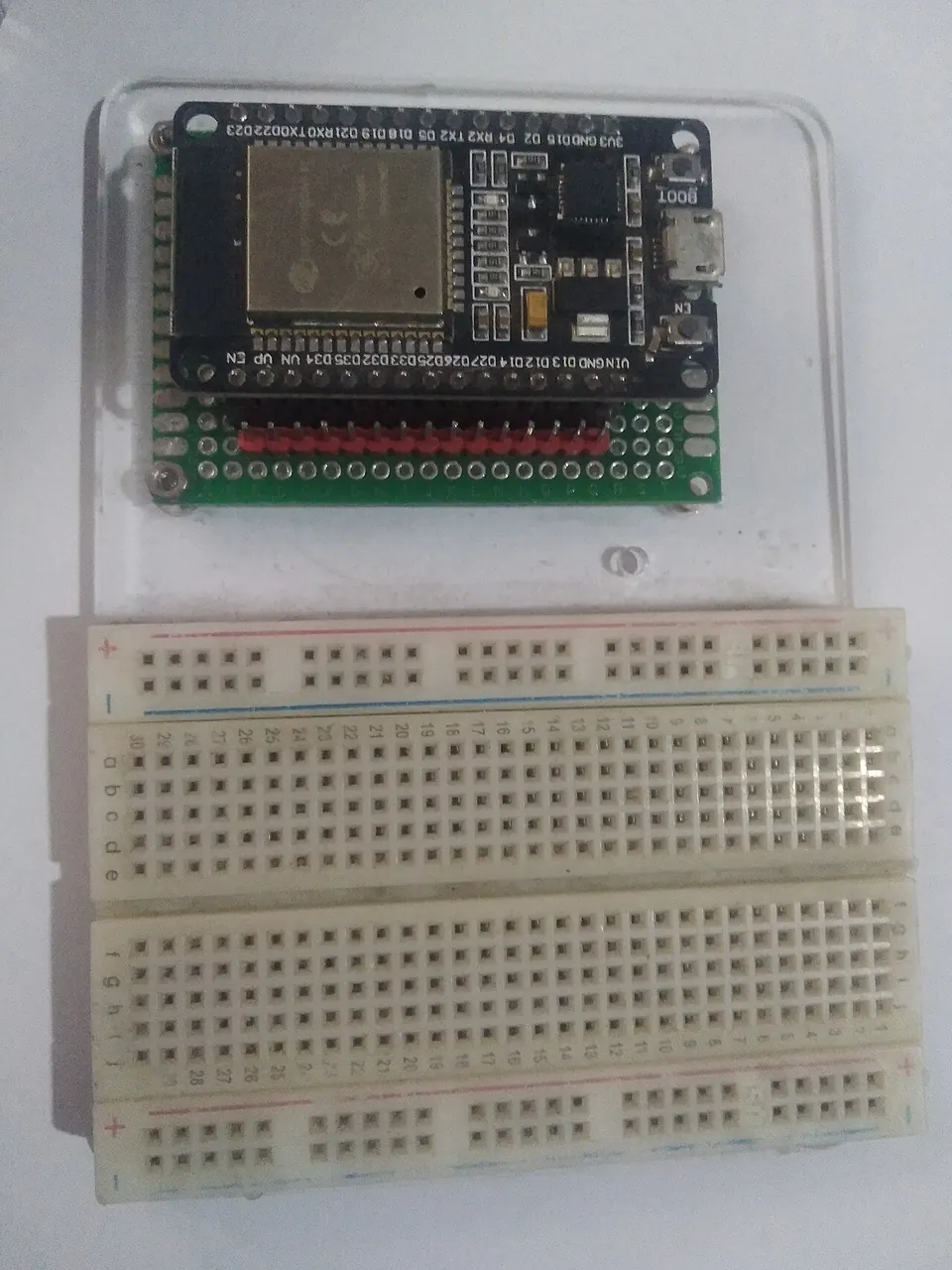
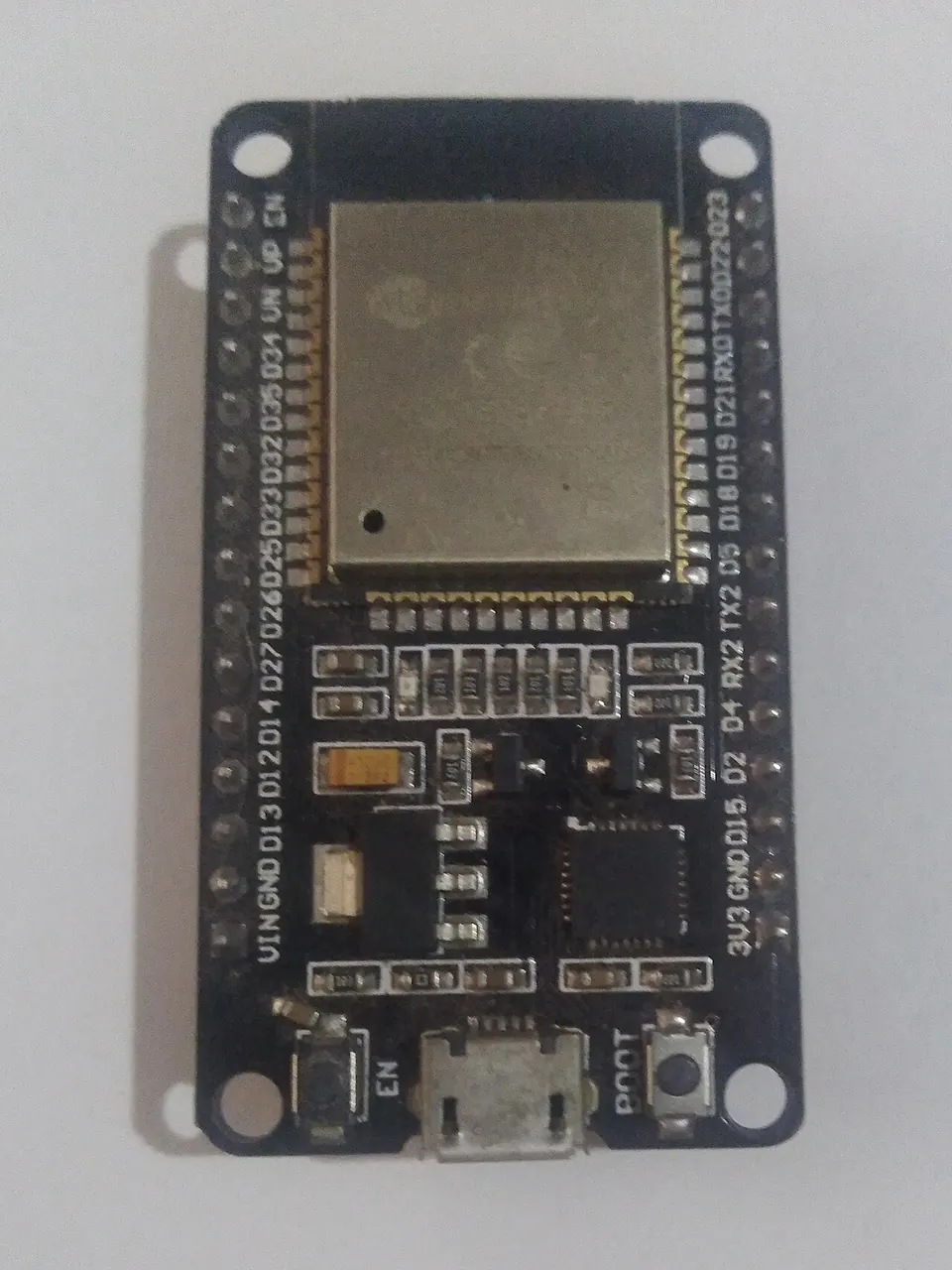
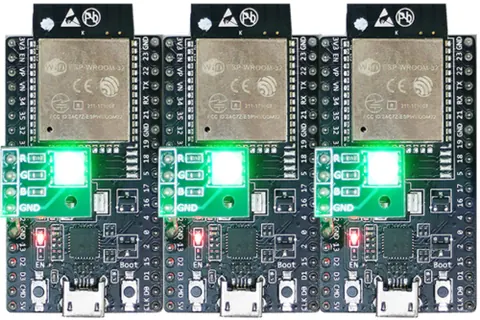
Three ESP32 boards running the onoff_server example with RGB LEDs lit green, indicating unprovisioned nodes
Bluedroid or NimBLE: which host stack should I pick?
ESP-IDF's Bluetooth LE stack is layered. At the bottom sits the ESP Bluetooth Controller, covering PHY, baseband, link controller, link manager, device manager and HCI; it is delivered as libraries and talks directly to the radio hardware. Above it you choose one of two hosts, and above the host run the profiles, including ESP-BLE-MESH and BluFi.
The two hosts are:
| Host | Origin | Classic Bluetooth | Footprint |
|---|---|---|---|
| ESP-Bluedroid | Modified Android Bluedroid stack (BTU + BTC layers) | Yes, on ESP32 only | Larger |
| ESP-NimBLE | Apache Mynewt NimBLE ported to ESP chips and FreeRTOS | No | Less heap and flash |
The docs state that the profiles, including ESP-BLE-MESH, can run on either host depending on configuration. If you are building a mesh node and have no use for Classic Bluetooth, NimBLE's smaller memory requirement is the obvious advantage. If you are on an ESP32 and need Classic profiles alongside LE, Bluedroid is your only option. Whichever you pick, Espressif's guidance for Bluedroid is to use the APIs prefixed with esp rather than the lower-level bta interfaces.
 \2
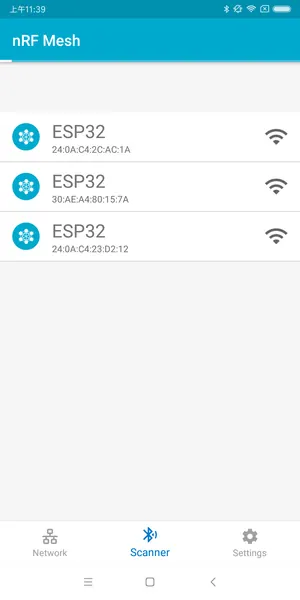
nRF Mesh Scanner screen listing the unprovisioned ESP-BLE-MESH devices in range
How do I set up an ESP32 Bluetooth mesh proxy node step by step?
The esp32 bluetooth proxy setup that Espressif documents is the ESP-BLE-MESH getting-started flow. It builds a small three-node network, provisions each node from a phone, and then toggles Generic OnOff Server models. If you have never used ESP-IDF, work through the top-level ESP-IDF getting-started guide first so you can build, flash and monitor a project.
What you need
- Three ESP32-series boards (ESP32-DevKitC or ESP-WROVER-KIT are the documented choices)
- USB cables
- A computer with ESP-IDF installed
- An Android or iOS phone or tablet
- The example
bluetooth/esp_ble_mesh/onoff_models/onoff_server - The nRF Mesh app (the EspBleMesh Android app or Silicon Labs apps are listed as alternatives)
Step 1: Check the hardware. If you use an ESP32-DevKitC, wire an RGB LED to GPIO 25, 26 and 27. The example uses it to show status.
Step 2: Configure. Enter the example directory and open menuconfig to pick your board under Example Configuration > Board selection for ESP-BLE-MESH, then build:
idf.py menuconfig
idf.py build
Step 3: Flash all three boards. The same binary goes onto each node:
idf.py flash
When the boards power up, the RGB LED on each should glow green, meaning the node is unprovisioned and waiting.
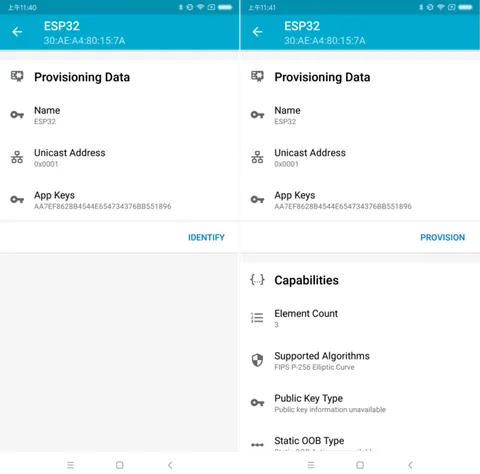
Step 4: Provision from your phone. Open nRF Mesh and tap Scanner. After a moment the three unprovisioned devices appear. Tap one; the app opens a Bluetooth LE connection and discovers the ESP-BLE-MESH GATT Service. Tap IDENTIFY, then PROVISION. On success the LED turns off and the app disconnects, reconnects, fetches the node's Composition Data and adds an AppKey. Press OK and you should see a unicast address assigned and the Composition Data decoded. Repeat for the other two boards.
That is the whole esp32 bluetooth proxy tutorial as far as the sources go: once the nodes are provisioned and configured, the phone can send on/off commands to the Generic OnOff Server on specific nodes.
 \2
nRF Mesh showing the IDENTIFY and PROVISION buttons after connecting to a node's GATT service
What are the common pitfalls?
The ESP-IDF walkthrough is honest about the rough edges, and they match what most people hit in practice.
The phone fails to connect. The docs note that establishing the Bluetooth LE connection to an unprovisioned device sometimes takes several attempts. Just retry from the Scanner rather than assuming the firmware is broken.
IDENTIFY does nothing visible. Pressing IDENTIFY is supposed to make the target device show itself, but with the stock example the only sign is a line in the serial monitor log. Keep idf.py monitor (or your preferred serial viewer) open if you want to confirm which board you are talking to.
Reconnect fails after provisioning. Provisioning is a multi-step dance: disconnect, reconnect, discover the GATT service, read Composition Data, add an AppKey. The reconnect step occasionally fails. When it does, pressing OK shows that only a unicast address was assigned and no Composition Data was read. The fix in the docs is to tap CONNECT at the top right so the app reattaches to the node and finishes configuration.
Wrong board in menuconfig. The example relies on the board selection to know which pins drive the LED. Pick the right board, and on a DevKitC actually wire the RGB LED to GPIO 25/26/27, or you lose your only visual status indicator.
Chip has no mesh. The ESP32-C2 has BLE but no ESP-BLE-MESH, so the example will not build for it. Check the support table before buying boards.
Memory pressure. Mesh on top of a Bluetooth host is not small. The docs point out that ESP-NimBLE needs less heap and flash than ESP-Bluedroid, so if you run out of room, switching hosts is the first lever to pull.
Looking for the Home Assistant Bluetooth proxy instead?
If you typed "esp32 bluetooth proxy" expecting the ESPHome feature that turns a spare board into a Bluetooth receiver for Home Assistant, the ESP-IDF sources used for this article do not describe it, so there are no setup steps or configuration snippets to give you here without guessing. What the sources do establish is relevant background: every listed ESP32-series chip has a BLE controller and both host stacks, and the original ESP32 additionally supports Classic Bluetooth. For a source-backed look at that use case, see the site's dedicated guide on the Home Assistant Bluetooth proxy, and for a simpler first BLE project, the BLE scanner example guide.
Frequently asked questions
Does the ESP32 support a Bluetooth proxy?
In ESP-IDF terms, yes: ESP-BLE-MESH lists Proxy as a supported node feature, together with Relay, Low Power and Friend. The mesh stack is available on ESP32, S3, C3, C5, C6, C61, H2 and H4, but not on the ESP32-C2.
Which app do I use to provision an ESP32 mesh node?
Espressif's walkthrough uses nRF Mesh for Android or iOS. The EspBleMesh Android app and Silicon Labs' Android/iOS apps are listed as alternatives.
What does the green LED mean on the onoff_server example?
On power-up the RGB LED turns green to show the node is unprovisioned. It switches off once the node has been provisioned successfully.
Should I use Bluedroid or NimBLE for a mesh node?
Both can run ESP-BLE-MESH. NimBLE uses less heap and flash but is LE-only; Bluedroid is larger and, on the original ESP32, also supports Classic Bluetooth.
What Bluetooth version does the ESP32 have?
The original ESP32 supports Dual-Mode Bluetooth 4.2 and is certified for Dual-Mode 4.2 and Bluetooth LE 5.0. ESP32-C3 and S3 are Bluetooth 5.0 LE, certified for LE 5.4; C2, C6, H2, C5 and C61 are certified for LE 5.3.
If you want the ESP-IDF Bluetooth mesh proxy, the onoff_server example plus nRF Mesh is a well-documented, repeatable way to get three nodes provisioned in an afternoon, with the main friction being flaky phone connections during provisioning. Pick a chip with ESP-BLE-MESH support (anything but the C2), consider NimBLE to save memory, and keep the serial monitor open. If you meant the Home Assistant proxy, these sources will not get you there; use the linked guide instead.
Sources
github.comIntroduction (esp-idf docs)github.comESP-BLE-MESH (esp-idf docs)This guide summarises the public sources listed above in our own words. Check the original documentation before relying on exact figures.