ESP32-CAM Module: What It Is and How to Get Started
What is the ESP32-CAM module?
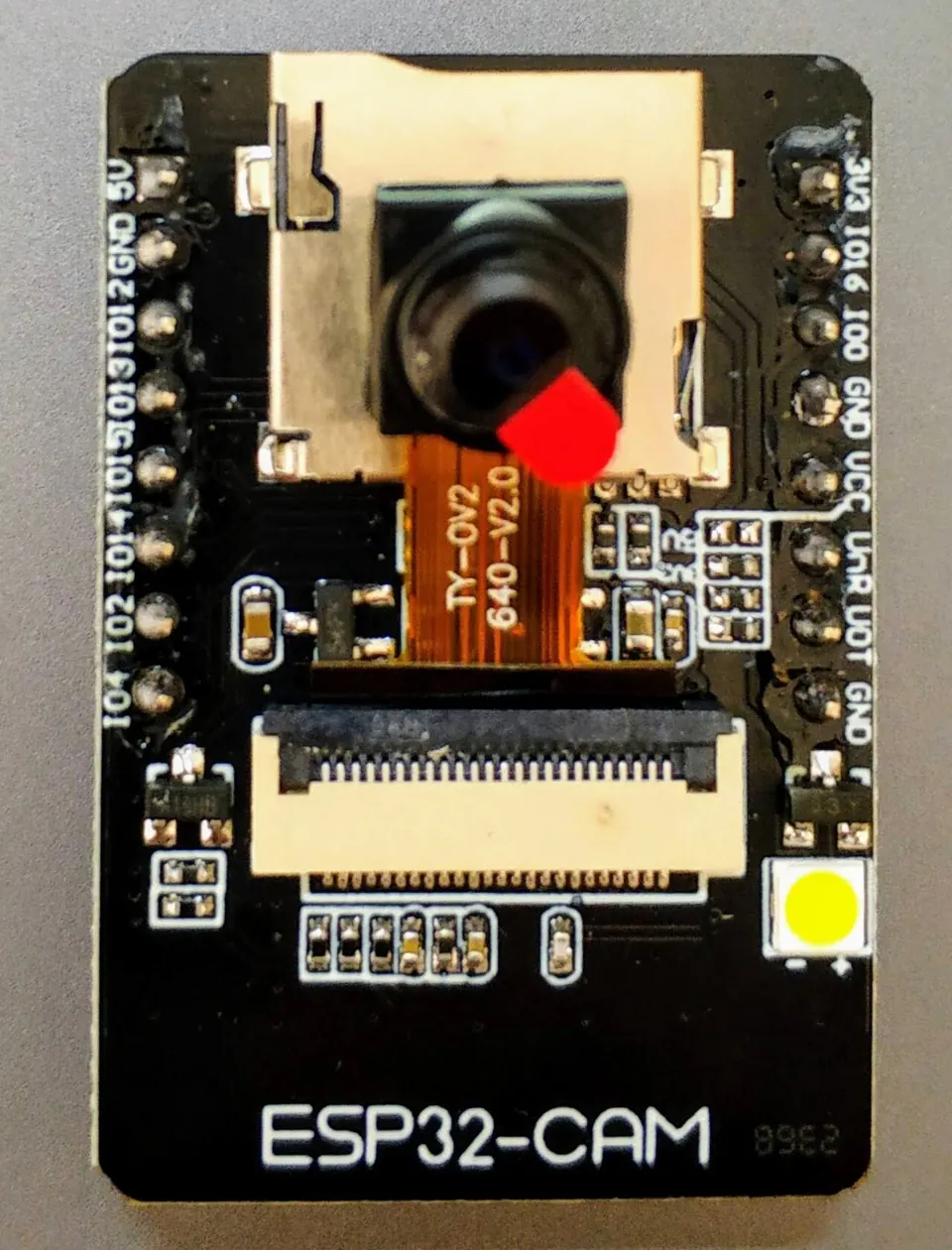
The ESP32-CAM is a small development board that combines Espressif's ESP32 microcontroller with a camera interface and wireless connectivity. The ESP32 family covers a range of variants — the CPU is either a Tensilica Xtensa LX6 (dual or single-core), an Xtensa LX7 (dual-core), or a RISC-V core — all manufactured by TSMC on a 40 nm process. The chip succeeded the ESP8266 and all variants share the same SDK, meaning code is largely portable across the family.
The AI Thinker variant is one of the most commonly seen ESP32-CAM boards. It runs at 160 MHz, uses a QIO flash mode at 80 MHz, and offers a maximum program storage of 3,145,728 bytes. Because these modules expose the ESP32's camera controller hardware directly, they are well suited for streaming, recording, and computer-vision applications.
 \2
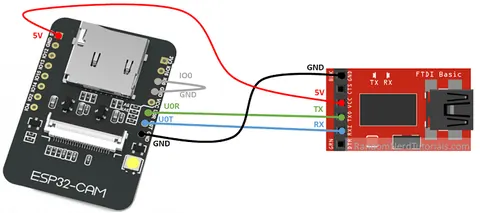
\2FTDI adapter wired to ESP32-CAM for flashing: TX to RX, RX to TX, with IO0 bridged to GND to enter bootloader mode.
What camera hardware does the ESP32 support?
The ESP32 camera controller driver supports three distinct hardware interfaces:
| Interface | Description |
|---|---|
| MIPI CSI | High-speed serial interface compliant with MIPI specifications |
| ISP DVP | Digital video parallel interface routed through the ISP module |
| LCD_CAM DVP | Digital video parallel interface via the LCD_CAM module |
The MIPI CSI peripheral requires a stable 2.5 V power supply. On chips with a built-in adjustable LDO, this can be configured in software before initializing the driver. When using the LCD_CAM DVP path at 8-bit data width, Espressif recommends keeping CAM_PCLK below 80 MHz.
Beyond raw capture, the ESP32 includes an Image Signal Processor (ISP) that provides a full processing pipeline: black level correction (BLC), dead pixel correction (DPC), Bayer noise filtering (BF), lens shading correction (LSC), demosaicing, white balance gain, color correction matrix (CCM), gamma correction, RGB-to-YUV conversion, sharpening, contrast/hue/saturation adjustment, and image cropping. Statistics engines for auto focus (AF), auto white balance (AWB), auto exposure (AE), and histogram analysis are also available.
 \2
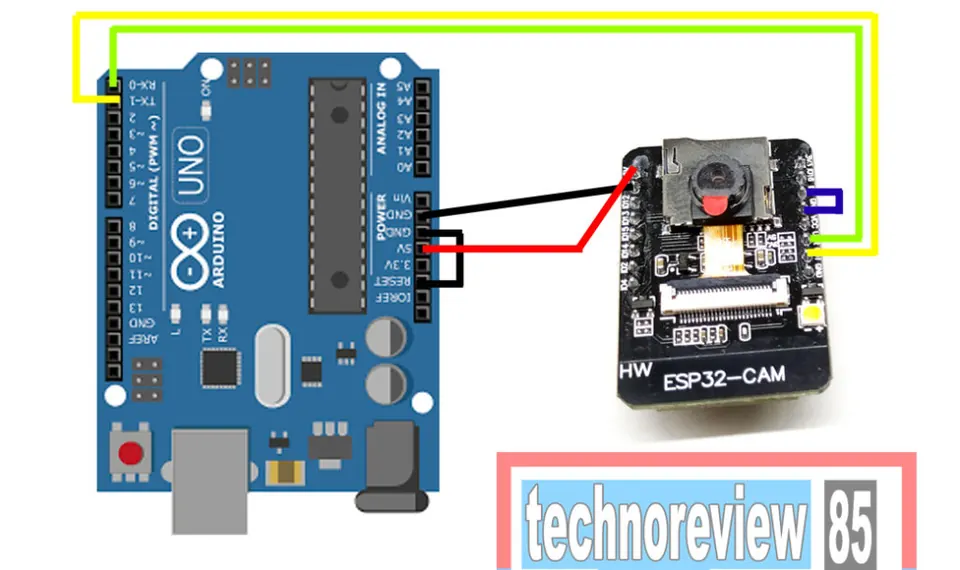
\2Arduino Uno R3 used as a USB-to-UART passthrough to flash the ESP32-CAM, with TXD-to-TXD and RXD-to-RXD connections and the IO0-to-GND jumper in place.
How do you wire and flash the ESP32-CAM?
The basic ESP32-CAM board has no USB port, so it cannot be plugged directly into a computer. You need an external USB-to-UART adapter — most commonly an FTDI programmer or a CH340-based shield such as the ESP32-CAM-MB, which adds a micro USB connector.
Wiring an FTDI adapter to ESP32-CAM:
- Connect FTDI TX → ESP32-CAM RX, and FTDI RX → ESP32-CAM TX.
- Connect power (5 V or 3.3 V, matching your adapter's output) and GND.
- Bridge IO0 to GND with a jumper wire — this places the chip in bootloader (download) mode.
Upload sequence in Arduino IDE:
- Start compiling and uploading your sketch.
- When the IDE begins the connect handshake, press the reset button on the ESP32-CAM.
- After the upload completes, remove the IO0-to-GND jumper.
- Press reset again so the new firmware runs normally.
This sequence is required every time you flash new code. For PlatformIO users, the AI Thinker board maps to board = esp-wrover-kit and the huge_app.csv partition scheme accommodates larger camera sketches.
Can I use something other than an FTDI adapter?
Yes. An Arduino Uno R3 can act as a USB-to-UART passthrough to flash the ESP32-CAM. The wiring is counter-intuitive compared to a normal serial connection:
- Connect ESP32-CAM TXD → Arduino TXD (not RX), and ESP32-CAM RXD → Arduino RXD.
- Hold the Arduino in reset by bridging its RESET pin to GND — this prevents the Arduino's own MCU from interfering.
- Place the IO0-to-GND jumper on the ESP32-CAM before starting the upload.
- Set the baud rate to 115200 in Arduino IDE.
The Uno R3 uses the ATmega16U2 as its USB serial adapter IC, which correctly detects 3.3 V logic output from the ESP32. Its 1 kΩ protection resistors reduce — but do not fully eliminate — the voltage level mismatch risk between the 5 V Uno and 3.3 V ESP32.
What are the most common ESP32-CAM pitfalls?
1. "Failed to connect to ESP32: Timed out waiting for packet header" Almost always caused by IO0 not being connected to GND before upload, or the reset button not being pressed at the right moment. Verify both steps and retry.
2. CH340 / CH341 not recognized on Linux
On Ubuntu and Debian-based distributions, a service called brltty (Braille Ready Linux Terminal) claims CH341 USB serial adapters and immediately releases them, causing the port to vanish. Disable it:
sudo systemctl stop brltty-udev.service
sudo systemctl mask brltty-udev.service
sudo systemctl stop brltty.service
sudo systemctl disable brltty.service
After disabling brltty, use dmesg -w to find the actual port name — it may appear as /dev/ttyCH341USB0 rather than /dev/ttyUSB0. Update your IDE or upload_port in platformio.ini accordingly.
3. Forgetting to remove the IO0 jumper after flashing Leaving IO0 tied to GND means every reset re-enters bootloader mode. The sketch never runs until the jumper is removed.
4. Camera-equipped boards not appearing in PlatformIO device scan Camera WROVER variants may use a different USB-serial chip than their non-camera counterparts and may not show up in auto-detection. Resolve the brltty conflict first, then specify the port manually.
What can you build with the ESP32-CAM?
Wi-Fi, Bluetooth, and hardware camera support open up a practical range of projects:
- Wi-Fi streaming cameras — serve live MJPEG or RTSP video over a local network
- Motion-triggered security cameras — detect movement and record AVI clips to an SD card
- Video doorbells — combine the camera with two-way audio for a DIY intercom
- Apple HomeKit IP cameras — with appropriate firmware the module can act as a native HomeKit camera device
- Time-lapse recorders — periodically capture and store frames to SD storage
- MicroPython webcam servers — stream video using Python-based firmware with camera driver support
Because all ESP32 variants share the same SDK, Arduino sketches and ESP-IDF projects developed for the ESP32-CAM can largely be reused on other boards in the family.
Which programming tools work with the ESP32-CAM?
The ESP32 family supports a broad ecosystem of languages and frameworks:
| Tool / Framework | Language |
|---|---|
| ESP-IDF | C / C++ |
| Arduino-ESP32 | C++ (Arduino API) |
| MicroPython / CircuitPython | Python |
| Espruino | JavaScript |
| Mongoose OS | JavaScript or C |
| NodeMCU | Lua |
| Rust | Rust |
| Zerynth | Python |
Arduino IDE is the most common entry point. ESP-IDF gives direct access to the low-level camera driver API — functions such as esp_cam_new_csi_ctlr, esp_cam_new_isp_dvp_ctlr, and esp_cam_new_lcd_cam_ctlr — and to the full ISP pipeline. All variants share the same SDK, so moving between frameworks on different ESP32 boards is straightforward.
Frequently asked questions
Why does the ESP32-CAM show 'Timed out waiting for packet header' during upload?
The board was not in bootloader mode. Bridge IO0 to GND before starting the upload, then press the reset button on the ESP32-CAM as soon as the IDE begins connecting. Remove the jumper and reset again after the upload finishes.
Does the ESP32-CAM have a USB port?
The basic ESP32-CAM board (such as the AI Thinker model) has no USB port. You need an external USB-to-UART adapter such as an FTDI programmer, the ESP32-CAM-MB shield, or an Arduino Uno R3 used as a passthrough.
Why does my ESP32-CAM disconnect immediately on Linux?
The brltty service intercepts CH341 USB serial adapters and immediately releases them. Stop and disable brltty using systemctl, then use dmesg -w to find the correct port name, which may be /dev/ttyCH341USB0.
What camera interfaces does the ESP32 support in hardware?
The camera controller driver supports MIPI CSI, ISP DVP (through the ISP module), and LCD_CAM DVP. The MIPI CSI path requires a 2.5 V supply to the CSI peripheral.
Can I use MicroPython with the ESP32-CAM?
Yes. MicroPython is one of the supported programming environments across the ESP32 family, and camera driver support for the module is available.
The ESP32-CAM delivers Wi-Fi, Bluetooth, and a hardware camera pipeline at low cost, making it a solid foundation for streaming, security, and vision projects. The main friction is the absent USB port on most boards, which adds a few deliberate steps to every firmware update — but the IO0 jumper and reset sequence becomes second nature quickly. Linux users should resolve the brltty conflict before assuming any hardware fault.
Sources
en.wikipedia.orgESP32 (Wikipedia)github.comCamera Controller Driver (esp-idf docs)github.comImage Signal Processor (ISP) (esp-idf docs)stackoverflow.comESP32-WROVER CAM module not connecting to linux via USBstackoverflow.comESP32 CAM module: A fatal error occurred: Failed to connect to ESP32: Timed out waiting for packet headerelectronics.stackexchange.comESP32-CAM flash via UARTThis guide summarises the public sources listed above in our own words. Check the original documentation before relying on exact figures.