ESP32-CAM Video Recorder Junior: Build a Wi-Fi SD Card Camera
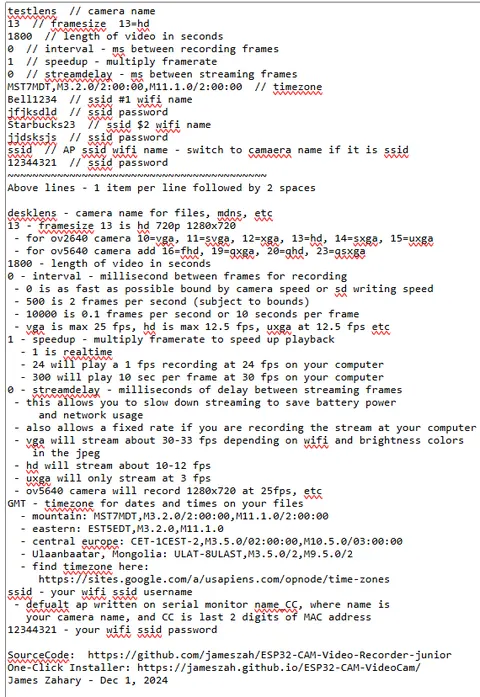
The config2.txt web editor lets you set Wi-Fi credentials, timezone, frame size, clip length, and more from any browser without touching the SD card.
- AI-Thinker ESP32-CAM
- Freenove ESP32S3
- diymore ESP32S3
- OV2640 camera module
- OV5640 camera module
- MicroSD card
- Momentary switch (optional, GPIO 12 / GPIO 46 on S3)
What You Will Build
This project transforms an AI-Thinker ESP32-CAM — a module that costs a few dollars and fits in a shirt pocket — into a fully independent video recorder. Once flashed and powered, it writes a continuous series of MJPEG AVI files to a MicroSD card with no host computer involved.
Out of the box it records 30-minute HD videos at 12.5 fps and creates a new file automatically when each segment ends. Connect it to your Wi-Fi network and you gain a live stream in any browser, a web-based file manager to browse and download recordings, and over-the-air firmware updates. A timelapse mode lets you slow capture to 1 fps and play back at any speedup factor.
A newer v62 build adds dual-router support (the module picks whichever access point is stronger), an always-on local access point so you can reach it without any router at all, the ability to peek inside a video at any timestamp before downloading, and automatic re-indexing of files that were not closed cleanly after a power loss.
 \2
\2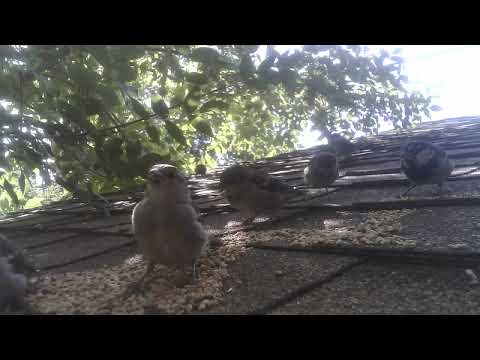 \2
\2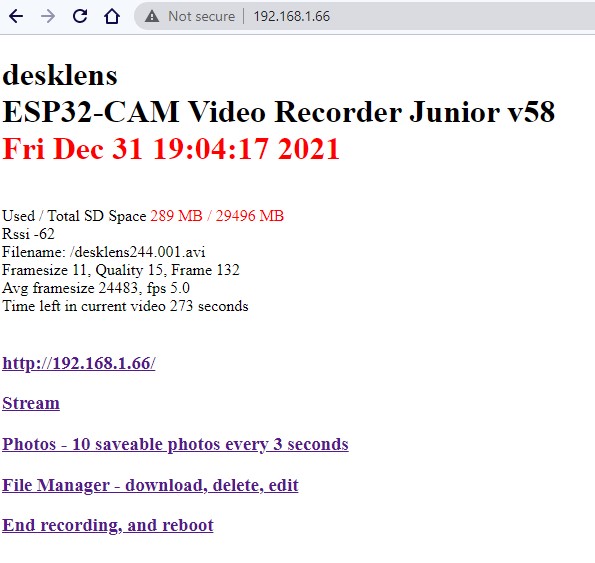 \2
\2 \2
\2What You Need
Hardware
- AI-Thinker ESP32-CAM with OV2640 camera (the most common variant). The v62.S3 build also supports the Freenove ESP32S3 and the diymore ESP32S3 with an OV2640 or OV5640 lens.
- MicroSD card (the firmware auto-deletes old videos to manage space).
- A USB-to-serial adapter or a dedicated ESP32-CAM programmer board for the first flash — the module has no USB port of its own.
- Optional: a momentary switch wired between GND and GPIO 12 (GPIO 46 on the S3) to stop and start recording without touching the web interface.
Software
- Arduino IDE 2.3.1
- esp32-arduino board package 3.3.10
- ESPping library (required for the v62 / S3 build)
- For a no-compile path, the one-click web installer flashes a pre-compiled binary directly from your browser over USB.
Typical use cases
Mount the ESP32-CAM in a weatherproof enclosure, wire a PIR to GPIO 12, and let the firmware record triggered clips to the SD card while streaming a live view to your browser.
Set the frame rate to 1 fps in config2.txt, point the camera at a garden or construction site, and retrieve a ready-to-play AVI over Wi-Fi when the shoot is done.
Attach the module to a small RC car or rover. The firmware records continuously to SD with no Wi-Fi needed, so you can review footage after each run.
Use the /capture endpoint to feed still frames into motionEye or a similar NVR, running cloud-connected monitoring alongside local SD card recording at the same time.
How It Works
The firmware runs three concurrent FreeRTOS tasks — camera capture, SD card write, and Wi-Fi/web server — each with its own mutex so none blocks the others. The camera captures JPEG frames from the OV2640 at the configured interval and appends them into an open AVI container on the SD card. Because each frame is an independent JPEG (MJPEG), the file stays valid even if power is cut; the re-index endpoint can rebuild a broken file's index afterward.
When Wi-Fi is enabled, two streaming channels are available at ports 81 and 82, and a lightweight web server exposes endpoints for live control (/stop, /start, /capture) and the file manager. Wi-Fi power-save mode is explicitly disabled to prevent the modem sleep from corrupting JPEG frames — a subtle hardware interaction that the project documents in detail.
All recording parameters (frame size, quality, clip length, Wi-Fi on/off, timezone, up to two router credentials) are read from a plain-text config2.txt file on the SD card at boot, so you can change behaviour without reflashing.
Install and Flash
Option A — One-click installer (no compile needed)
Open https://jameszah.github.io/ESP32-CAM-VideoCam/ in a Chromium-based browser, connect your ESP32-CAM programmer, and follow the prompts. The installer pushes a pre-compiled binary and you are done.
Option B — Arduino IDE
-
Install the esp32 board package version 3.3.10 via Tools → Board Manager.
-
Install the ESPping library via Tools → Manage Libraries (v62 / S3 build only).
-
Download all files from the
v62folder of the repository. -
Open the main
.inofile in Arduino IDE 2.3.1. -
Select your board and partition scheme:
AI-Thinker ESP32-CAM: set board type as AI-Thinker ESP32-CAM with Minimum Spiffs 1.9MB with ota.
ESP32S3 variant: use the following settings from the IDE menus:
Board Library: ESP32S3 Dev Module Partition Scheme: Minimal SPIFFS 1.9MB App 128KB SPIFFS PSRAM: OPI PSRAM Flash Size: 8MB -
Compile and upload. On first boot with a clean SD card the firmware creates a default
config2.txt, starts an access point named desklens (password12344321), and is reachable at192.168.4.1. Click Edit config2.txt to enter your own Wi-Fi credentials, timezone, and recording preferences.
Configure and Use
Edit config2.txt on the SD card (or through the web interface) to control every recording parameter. The file is self-documented with inline comments — leave two spaces before the // comment delimiter. Key parameters include recording length, frame size (SVGA, HD, UXGA, and others), quality (lower number = higher quality = larger file), frames per second, and whether Wi-Fi starts automatically.
Once Wi-Fi is connected the module gets an IP from your router (for example 192.168.1.100). Useful endpoints:
| Endpoint | Action |
|---|---|
192.168.1.100 |
Main status page |
192.168.1.100:81/stream |
Live stream channel 1 |
192.168.1.100:82/stream |
Live stream channel 2 |
192.168.1.100/stop |
Stop recording |
192.168.1.100/start |
Start recording |
192.168.1.100/capture |
Single-frame capture (for use with motionEye) |
192.168.1.100/ota |
Enable OTA firmware update (password: mrpeanut) |
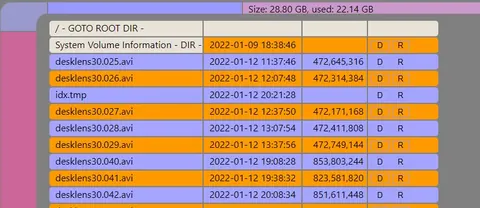
The built-in file manager shows SD card usage, lets you enter folders, download individual AVI files or entire folders, rename, delete, or upload files from a drag-and-drop zone. Under good conditions you can download at roughly 2 Mbps while recording is active, or about 3 Mbps when recording is paused.
Ideas to Extend It — and Limitations
Ways to go further
- Wire a PIR sensor output to GPIO 12 (or GPIO 46 on S3) to start and stop recording on motion, turning the build into a basic wildlife or security camera without any code changes.
- Set the frame rate to 1 fps in
config2.txtand choose a speedup factor for timelapse — the README includes a sample cloud timelapse recorded at 1 fps and played back 30× faster. - Use the
/captureendpoint as a motionEye network camera source, running local recording and remote monitoring simultaneously. - Enable OTA via
/otaand update firmware over the network once the module is installed somewhere inconvenient to reach physically. - The dual-router feature lets you configure the module at your desk on one network and carry it to an installation site on a second network without reconfiguring.
Limitations to keep in mind
- The format is MJPEG AVI — each frame is a full independent JPEG, so files are larger than H.264 equivalents. A 30-minute HD recording at 12.5 fps occupies significant SD space; the README notes roughly 1.5 GB per 30 minutes at SVGA quality 12.
- Wi-Fi and the camera share the same silicon; enabling Wi-Fi can occasionally produce a broken frame in the video. Turning Wi-Fi off after syncing the time gives cleaner recordings.
- Maximum wireless throughput is capped by the ESP32 radio at around 3.5 Mbps, so downloading large files takes patience.
- On some Android devices, downloaded AVI files may be saved with a
.phpsextension; renaming the file restores normal playback.
ESP32-CAM-Video-Recorder-junior is a mature, actively maintained firmware that squeezes reliable 12.5 fps HD MJPEG recording, browser-based file management, live streaming, and OTA updates out of a module that fits on a fingertip. The one-click installer removes the compile barrier for beginners, while the config file and REST endpoints give experienced makers plenty of room to integrate it into larger systems. The main trade-off is file size — MJPEG is not space-efficient — but for short clips, timelapse, and monitoring use cases the simplicity of the format is a genuine advantage.
Sources
github.comjameszah/ESP32-CAM-Video-Recorder-junior — repository & READMEFacts in this article come from the project's public README and GitHub metadata at the time of writing. Images belong to their respective owners and link back to the original source.