micropython-camera-driver: OV2640 Camera on ESP32
- ESP32-CAM
- M5Camera (Version B)
- T-Camera Mini (green PCB)
- OV2640 camera sensor
What You Will Build and Why It Is Useful
This project adds a native camera module to MicroPython for the ESP32 family. Once flashed, you can initialise an OV2640 camera, capture JPEG frames, adjust resolution, apply special effects, and tune brightness or contrast — all from plain Python scripts running directly on the chip.
Without this driver, MicroPython on ESP32 has no camera support at all. With it, you can prototype a wireless webcam, a timelapse rig, or a vision-triggered automation with only a few lines of code. The project ships prebuilt firmware so you do not need a C toolchain unless you want to customise the build from scratch.
What You Need
Hardware
- One of the supported boards: ESP32-CAM, M5Camera (Version B), or T-Camera Mini (green PCB). All three carry an OV2640 sensor.
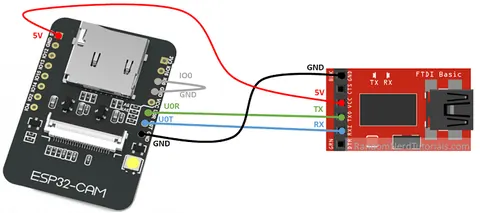
- A USB-to-serial adapter (the ESP32-CAM has no onboard USB).
- USB cable and a host computer.
Software
esptool.py— used to erase and flash the chip.- The prebuilt firmware
.binfile from thefirmwarefolder of the repository. - A MicroPython REPL client such as
mpremote, Thonny, orrshellto upload and run Python files after flashing.
For the T-Camera Mini you also need the axp202 library to configure the onboard power management IC before the camera will initialise.
Typical use cases
Serve live JPEG snapshots or a basic MJPEG stream over WiFi using the companion upyCam webserver example.
Trigger periodic captures and store frames on an SD card or upload them remotely with the timelapse branch of upyCam.
Mount the ESP32-CAM on a rover and stream frames to a host for processing, keeping heavy computation off the microcontroller.
Iterate on camera settings — resolution, effects, white balance — interactively from the MicroPython REPL without recompiling firmware.
How It Works
The driver wraps Espressif's esp32-camera component and exposes it as a built-in camera module inside a custom MicroPython firmware build. Because the module is compiled in — not imported as a .py file — it can talk directly to the camera hardware through the ESP-IDF layer.
Capture frames are stored in PSRAM. Using fb_location=camera.PSRAM unlocks higher resolutions that would otherwise overflow the chip's internal RAM. JPEG is the recommended output format: YUV and RGB are available but put heavy strain on the PSRAM bus, and WiFi makes data loss more likely in those modes. If your project needs RGB pixels, the recommended path is to capture JPEG first and convert it on a more capable host.
Flash the Prebuilt Firmware
The fastest path is the compiled firmware included in the repository's firmware folder. Two builds are available: one based on MicroPython v1.18 / ESP-IDF v4.4 and a newer one based on MicroPython v1.21.0 / ESP-IDF v5.0.2.
- Install
esptool.pyon your host machine. - Connect your board via a USB-to-serial adapter and identify the port (e.g.
/dev/ttyUSB0on Linux). - Erase the flash, then write the firmware:
esptool.py --chip esp32 --port /dev/ttyUSB0 erase_flash
esptool.py --chip esp32 --port /dev/ttyUSB0 write_flash -z 0x1000 micropython_camera_feeeb5ea3_esp32_idf4_4.bin
Replace the .bin filename with whichever build you downloaded. After flashing, open a REPL and confirm the board responds before moving on.
Initialise the Camera and Capture a Frame
Once the firmware is running, drop into the REPL or upload a script. Pin assignments differ by board, so use the matching snippet below.
ESP32-CAM (default pin mapping)
import camera
camera.init(0, format=camera.JPEG, fb_location=camera.PSRAM)
buf = camera.capture()
M5Camera Version B
import camera
camera.init(0, d0=32, d1=35, d2=34, d3=5, d4=39, d5=18, d6=36, d7=19,
            format=camera.JPEG, framesize=camera.FRAME_VGA,
            xclk_freq=camera.XCLK_10MHz,
            href=26, vsync=25, reset=15, sioc=23, siod=22,
            xclk=27, pclk=21, fb_location=camera.PSRAM)
buf = camera.capture()
T-Camera Mini requires the AXP192 power IC to be configured first — see the full example in the README, which uses the axp202 library to clear the USB current limit before calling camera.init().
After a successful capture, buf holds raw JPEG bytes you can save to a file, serve over HTTP, or forward to another device.
Common adjustments
# flip up side down
camera.flip(1)
# left / right
camera.mirror(1)

# framesize
camera.framesize(camera.FRAME_240x240)

# special effects
camera.speffect(camera.EFFECT_NONE)

# white balance
camera.whitebalance(camera.WB_NONE)

# saturation
camera.saturation(0)

# brightness
camera.brightness(0)

# contrast
camera.contrast(0)

# quality
camera.quality(10)
Resolutions range from FRAME_96X96 up to FRAME_QSXGA. Remember that anything above CIF requires PSRAM.
Extend It and Known Limitations
Project ideas from the README
- Wireless webcam — the companion upyCam repository provides a MicroPython webserver that streams JPEG frames over WiFi.
- Timelapse camera — the same repo has a timelapse branch that saves frames at set intervals.
Building from source (DIY)
If you need a custom board definition or a different MicroPython version, the README walks through cloning MicroPython, copying the boards/ESP32_CAM definition, cloning esp32-camera into the ESP-IDF components folder, and compiling with make USER_C_MODULES=... pointing to the included micropython.cmake. Exact commit hashes are listed in the README and must match to avoid build failures.
Limitations to keep in mind
- BLE is disabled in the prebuilt firmware; enabling it overflows the IRAM segment.
- YUV and RGB capture modes are unreliable, especially with WiFi active. Stick to JPEG.
- Converting JPEG to RGB on-chip almost always causes out-of-memory errors; do colour processing on a host instead.
- The project has not had a tagged release; pin your code to a known firmware build for production use.
micropython-camera-driver fills a real gap: official MicroPython has no camera support for ESP32, and this project delivers it with a clean Python API and a ready-to-flash binary. The main trade-offs are the absent BLE, the fragility of non-JPEG modes, and the need to match exact commit hashes if you build from source — all clearly documented in the README. For makers who want a quick Python-scriptable camera on an ESP32-CAM or M5Camera, it is the most practical option available.
Sources
github.comlemariva/micropython-camera-driver — repository & README lemariva.comOfficial websiteFacts in this article come from the project's public README and GitHub metadata at the time of writing. Images belong to their respective owners and link back to the original source.