ESP32 Deep Sleep Not Working: Troubleshooting Guide
Why won't my ESP32 enter deep sleep at all?
The most common reason the board ignores esp_deep_sleep_start() is that Wi-Fi or Bluetooth is still running. According to the ESP-IDF documentation, wireless peripherals are powered down during deep sleep, but the application is responsible for stopping them first. Before entering deep sleep, call esp_wifi_stop() to stop Wi-Fi. If Bluetooth is in use, the application must call esp_bluedroid_disable(), esp_bluedroid_deinit(), esp_bt_controller_disable(), and esp_bt_controller_deinit() in that order. For NimBLE, use nimble_port_stop() and nimble_port_deinit(). Skipping these calls does not prevent sleep outright, but Wi-Fi and Bluetooth connections are not maintained in deep sleep regardless, and failing to shut them down cleanly can cause undefined behavior.
If your sketch never sets up Wi-Fi or Bluetooth, you can skip these calls. But if any wireless init ran earlier in the session, the shutdown is mandatory.
A second cause is a missing wakeup source. Although the sleep API accepts a call with no wakeup source configured (the chip will sleep indefinitely), some frameworks or watchdog configurations may reset the board if no wakeup timer is set. Always configure at least one wakeup source before sleeping.
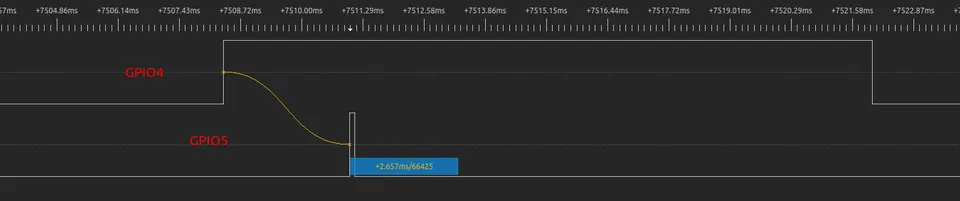 \2
\2Deep sleep stub wake-up timing diagram showing time from wake-up to stub execution
Why won't my ESP32 wake up from a GPIO button press?
This is the single most reported deep-sleep complaint, and it usually has one of three causes ranked by frequency:
1. Wrong wakeup API for your chip variant
EXT0 and EXT1 wakeup are not available on the ESP32-C3. Using the EXT0 or EXT1 API on a C3 board compiles silently but does nothing useful. The correct API for the C3 is esp_deep_sleep_enable_gpio_wakeup(), and it only works on GPIO0 through GPIO5:
esp_deep_sleep_enable_gpio_wakeup(1 << WAKEUP_PIN, ESP_GPIO_WAKEUP_GPIO_LOW);
esp_deep_sleep_start();
When you check the wakeup cause after boot, look for ESP_SLEEP_WAKEUP_GPIO on C3, not ESP_SLEEP_WAKEUP_EXT0 or ESP_SLEEP_WAKEUP_EXT1.
2. Missing pull-up or pull-down resistor
If the wakeup pin floats during sleep, it may never reach the threshold level needed to trigger wakeup, or it may trigger randomly. Either add an external resistor, or configure the pin mode before sleeping:
// pinMode(WAKEUP_PIN, INPUT_PULLUP); // when the pin does not have external pull-up resistor
Note that strapping pins such as GPIO2 on the ESP32-C3 already have an external pull-up on most modules, so a button on those pins should connect between the pin and GND and be configured to wake on a LOW signal.
3. Pin used is outside the valid RTC range
Only RTC-capable GPIOs can be used as wakeup sources. On the ESP32-C3, that is GPIO0–GPIO5. Using a higher-numbered GPIO with the sleep wakeup API will not generate an error, but wakeup will never occur.
| Chip | EXT0 | EXT1 | GPIO wakeup API | Valid pins |
|---|---|---|---|---|
| ESP32 | Yes | Yes | — | RTC GPIOs |
| ESP32-C3 | No | No | Yes | GPIO0–GPIO5 |
| ESP32-S2/S3 | Yes | Yes | — | RTC GPIOs |
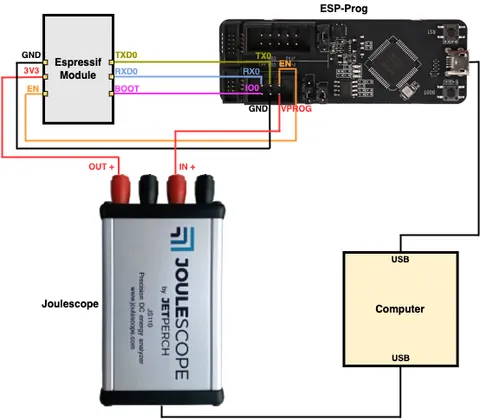 \2
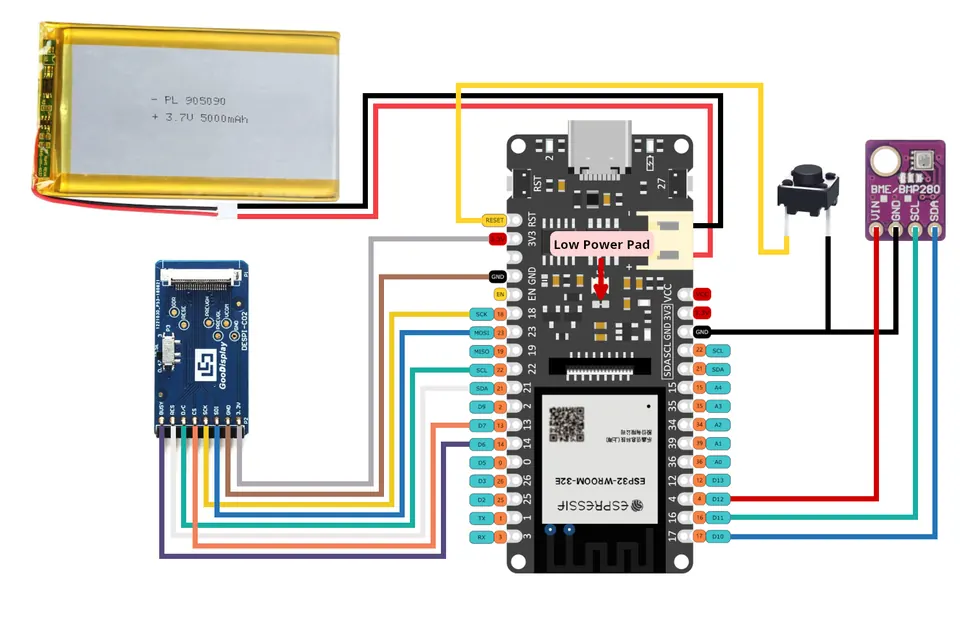
\2ESP32-WROOM wiring connections for deep sleep current measurement
Why is my ESP32 drawing milliamps instead of microamps during deep sleep?
A reading around 3 mA during deep sleep — compared to the roughly 50 mA active current — indicates the chip entered sleep but something external or a peripheral configuration is keeping current flowing. The chip itself is asleep; the problem is outside the SoC.
Common causes:
- GPIO outputs left in a driven state. If an output pin is held HIGH or LOW and drives a load (LED, transistor base, sensor supply line), that current keeps flowing during deep sleep because the RTC IO retains its output state. Either disconnect loads before sleep or use
rtc_gpio_isolate()on pins that do not need to be active. - Pull-up or pull-down resistors on input pins. An internal or external pull resistor connected to a floating or actively-driven signal creates a steady current path. The ESP-IDF example code for the ESP32 specifically isolates GPIO12 and GPIO15 with
rtc_gpio_isolate()to remove drain through pull resistors on WROVER modules. - External components still powered. Sensors, displays, or level shifters connected to the always-on 3.3 V rail continue drawing current regardless of what the ESP32 does. Switch their power rail with a transistor or load switch controlled by a GPIO that you pull LOW before sleeping.
Deep sleep current for the ESP32 core should be in the microamp range. If you are measuring milliamps, the power profiler is measuring the whole circuit, not just the chip, so work through each external component systematically.
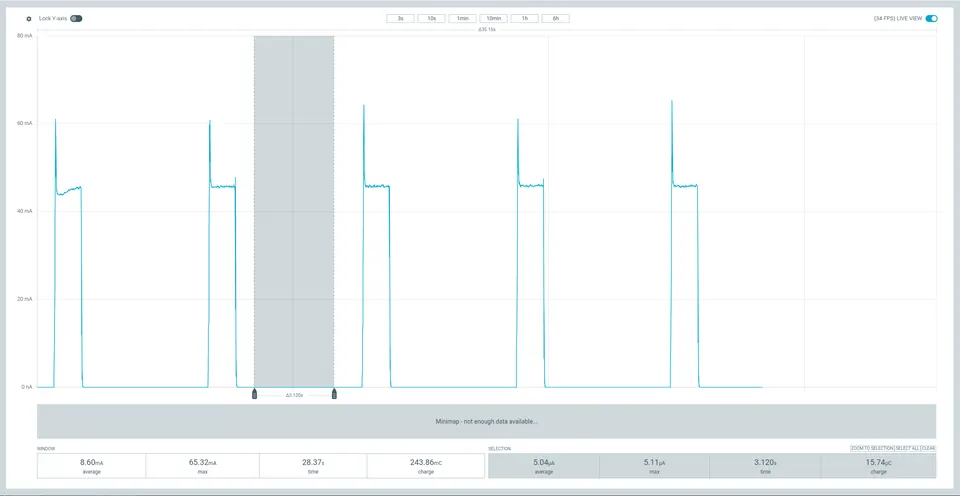 \2
\2Power Profiler output showing ESP32-WROOM current consumption during deep sleep
How do I preserve variables and count wake-ups across deep sleep cycles?
When the ESP32 wakes from deep sleep it goes through a partial boot — ROM and most RAM are reinitialized, so regular global variables reset to their initial values. To keep a variable alive across sleep cycles, store it in RTC memory using the RTC_DATA_ATTR attribute:
RTC_DATA_ATTR int bootCount = 0;
Data marked with RTC_DATA_ATTR goes into RTC slow memory by default, which survives deep sleep. Read-only data uses RTC_RODATA_ATTR. If you need to run code immediately on wake before the bootloader, place the function in RTC fast memory with RTC_IRAM_ATTR and call esp_default_wake_deep_sleep() at its start:
RTC_DATA_ATTR int wake_count;

void RTC_IRAM_ATTR esp_wake_deep_sleep(void) {
    esp_default_wake_deep_sleep();
    static RTC_RODATA_ATTR const char fmt_str[] = "Wake count %d\n";
    esp_rom_printf(fmt_str, wake_count++);
}
Wake stub code can only call functions in ROM or RTC fast memory — nothing from flash is mapped yet at that point.
RTC memory data is re-initialized on a power-on reset but preserved across deep sleep wakeups. In MicroPython, the sleep API differs between platforms; you can detect whether you are on ESP32 or ESP8266 at runtime using uos.uname().sysname and branch accordingly.
How do I read the wakeup cause after the board boots?
After every boot, call esp_sleep_get_wakeup_cause() early in setup() to find out why the board started. On first power-on the return value indicates the wakeup was not caused by deep sleep, which is normal. The following function, taken from the ESP-IDF examples, handles all common wakeup causes including the C3-specific ESP_SLEEP_WAKEUP_GPIO:
void print_wakeup_reason() {
  Serial.printf("Boot number: %d\n", ++bootCount);
  esp_sleep_wakeup_cause_t wakeup_reason = esp_sleep_get_wakeup_cause();
  switch (wakeup_reason) {
    case ESP_SLEEP_WAKEUP_EXT0:
      Serial.println("Wakeup caused by external signal using RTC_IO");
      break;
    case ESP_SLEEP_WAKEUP_EXT1:
      Serial.println("Wakeup caused by external signal using RTC_CNTL");
      break;
    case ESP_SLEEP_WAKEUP_TIMER:
      Serial.println("Wakeup caused by timer");
      break;
    case ESP_SLEEP_WAKEUP_GPIO:
      Serial.println("Wakeup by GPIO");
      break;
    case ESP_SLEEP_WAKEUP_ULP:
      Serial.println("Wakeup caused by ULP program");
      break;
    default:
      Serial.printf("Wakeup was not caused by deep sleep: %d\n", wakeup_reason);
      break;
  }
}
On the ESP32-C3, a successful GPIO wakeup returns ESP_SLEEP_WAKEUP_GPIO, not ESP_SLEEP_WAKEUP_EXT0. If you check only for EXT0 in your switch statement, your code will fall through to the default branch and appear to report no wakeup cause — even though the hardware woke correctly. Update your switch to include ESP_SLEEP_WAKEUP_GPIO when targeting C3 or C6 chips.
How do I prevent deep sleep problems before they start?
A few habits eliminate most deep-sleep issues before deployment:
Always stop wireless before sleeping. Make esp_wifi_stop() (and the BT equivalent if used) part of a helper function you call every time before esp_deep_sleep_start(). Forgetting it once in a code path is a common source of intermittent failures.
Check your chip's wakeup source support early. The EXT0/EXT1 vs. GPIO API split catches many people when they port code from an ESP32 to an ESP32-C3 or C6. Read the sleep mode documentation for the exact variant you are using before wiring up buttons.
Add explicit pull resistors to wakeup pins. Do not rely on the chip's internal pull state surviving deep sleep unless you have confirmed it for your specific chip and ESP-IDF version. A 10 kΩ external resistor to VCC or GND is cheap and removes one variable from debugging.
Isolate unused RTC GPIOs. On ESP32 WROVER modules, call rtc_gpio_isolate() on strapping pins like GPIO12 and GPIO15 to eliminate phantom current through pull resistors.
Measure current at the chip supply pin, not the USB input. A USB power measurement includes regulator quiescent current and other board components. For accurate sleep current figures, measure directly at the module's VCC pin with a current meter or a power profiler tool.
Test wakeup sources in isolation first. Before combining a timer wakeup with a GPIO wakeup, verify each one alone. Multiple wakeup sources can be registered together and the chip wakes when any one triggers, but debugging a combined configuration is harder when the basics are not confirmed.
Frequently asked questions
Does deep sleep disconnect my Wi-Fi connection?
Yes. Wi-Fi and Bluetooth are fully powered down during deep sleep and connections are not maintained. You must call esp_wifi_stop() (and the equivalent BT shutdown calls) before entering deep sleep. If you need to keep a Wi-Fi connection alive, use Modem-sleep mode with automatic Light-sleep instead.
What parts of the ESP32 stay powered during deep sleep?
Only the RTC controller, the ULP coprocessor (on chips that have one), RTC FAST memory, and RTC SLOW memory remain powered. The main CPUs, most RAM, and all peripherals clocked from APB_CLK are powered off.
Can I use EXT0 or EXT1 wakeup on the ESP32-C3?
No. EXT0 and EXT1 wakeup are not available on the ESP32-C3. Use esp_deep_sleep_enable_gpio_wakeup() instead, which supports GPIO0 through GPIO5 on the C3.
How do I keep a boot counter that survives deep sleep?
Declare the variable with RTC_DATA_ATTR, for example: RTC_DATA_ATTR int bootCount = 0;. Variables in RTC memory retain their value across deep sleep cycles but reset on a full power-on reset.
What current should I expect in deep sleep?
Deep sleep current should be in the microamp range. A measurement around 3 mA or higher means something external — a GPIO load, a pull resistor, or an attached sensor — is still drawing current. The ESP32's active current is roughly 50 mA for comparison.
Most ESP32 deep sleep failures reduce to three fixable mistakes: not stopping Wi-Fi or Bluetooth before sleeping, using an EXT0/EXT1 wakeup API on a chip that does not support it, and missing pull resistors on wakeup pins. Once those are resolved, the remaining issues — high sleep current and lost variables — are solved by isolating GPIO loads and using RTC_DATA_ATTR for persistent data.
Sources
github.comSleep Modes (esp-idf docs)github.comDeep-sleep Wake Stubs (esp-idf docs)stackoverflow.comDeep Sleep with EXT0 or EXT1 on ESP32-C3-MINI-1stackoverflow.comHow to detect hardware type (ESP32 or ESP8266) in MicroPython?electronics.stackexchange.comESP32 Wroom Deep Sleep - High CurrentThis guide summarises the public sources listed above in our own words. Check the original documentation before relying on exact figures.