micropython-samples: MicroPython Toolkit for ESP32 Makers
- ESP32
- ESP8266
- Pyboard D
- STM32
- SSD1306
- DS3231
- MAX31328
What You Will Build and Why It Is Useful
This project is not a single application — it is a curated toolkit. When you work through micropython-samples, you gain a library of battle-tested MicroPython patterns and utilities you can drop directly into your own ESP32 and ESP8266 projects.
The collection covers an unusually wide range: software watchdog timers that survive debug sessions, a decorator to time function execution, MQTT round-trip benchmarking, a fast rotary encoder algorithm, WiFi resilience patterns, bitmap manipulation without memory allocation, pseudo-random number generators safe to call from interrupts, NTP time helpers, and date handling classes. A separate module index in Section 5 points you to the author's fully supported and documented external libraries covering asyncio, GUI displays, IMUs, memory drivers, and communications.
If you have ever stared at a MicroPython runtime error and wondered whether the problem is your code or the firmware, the unofficial FAQ sections here address exactly those gaps. This makes the repo genuinely useful both as a learning resource and as a parts bin you return to repeatedly.
What You Need
Hardware
The README documents and targets the following boards:
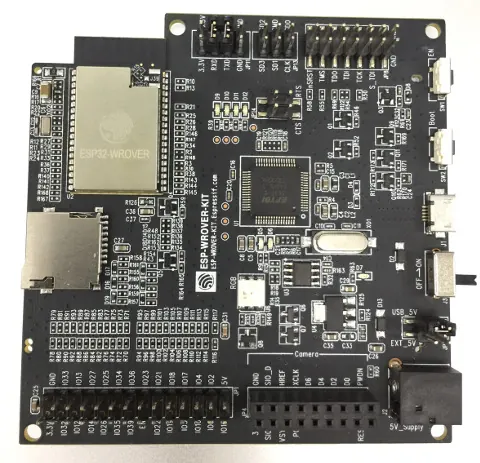
- ESP32 (ESP32-DevKit-C reference board, with a pinout PDF and reserved-pin warnings included in the repo)
- ESP8266
- Pyboard D and Pyboard V1.1
- STM32-based boards
Optional hardware mentioned for specific samples:
- SSD1306 OLED display (for the large-font Writer class)
- DS3231 or MAX31328 precision RTC module (low-cost, battery-backed, accurate to ±2 minutes per year)
Software
- MicroPython firmware flashed to your board. Follow the official MicroPython installation docs referenced in the README.
- A file-transfer tool. The README recommends rshell (the author also maintains a fork with text macros, listed in Section 5.9).
- Python 3 on your host machine to run rshell and any host-side scripts.
- The repository files, downloaded from the project page on GitHub.
Typical use cases
Apply the resilience guide to write ESP32 and ESP8266 firmware that reconnects reliably after network drops, covering the common failure modes in MicroPython WiFi code.
Use the MQTT benchmark script to measure round-trip latency between your ESP board and a broker before committing to a messaging architecture in a production IoT build.
Integrate the proven rotary encoder algorithm into a menu system, motor speed controller, or tuning knob using the documented approach to tracking absolute position safely.
Drop in the software watchdog, timed function decorator, and sequence checker to profile, protect, and validate your own MicroPython firmware during active development.
How It Works
The repository is divided into four main areas, plus a module index.
Installation guides (Section 1) explain how to install MicroPython libraries correctly, how to override frozen bytecode modules using the micropip helper, and how to use the Fastbuild scripts to compile MicroPython firmware for different target hardware. There is also a Buildcheck utility that raises an exception at startup if the firmware is older than a required date — useful when your code depends on a specific MicroPython version.
Hardware information and drivers (Section 2) includes a pinout PDF for the ESP32-DevKit-C reference board with notes on reserved pins, a large-font rendering approach for the SSD1306 OLED, Pyboard D notes absent from official docs, and a two-driver package for the DS3231/MAX31328 precision RTC. The Pyboard-specific RTC driver can calibrate the Pyboard's internal RTC against the DS3231 to high precision in about five minutes.
Essays (Section 3) are practical guides rather than opinion pieces. The resilience guide covers writing reliable WiFi code for ESP8266 and likely applies to ESP32 as well. The serialisation essay reviews five MicroPython serialisation libraries and includes a Protocol Buffer tutorial. The import subtleties doc explains how to save RAM using lazy loading, a reload function, and wildcard imports.
Code samples (Section 4) are the hands-on core of the repo. Each sample is a focused, working snippet you copy to your board and adapt.
Using Key Samples on Your ESP32
Each sample lives in its own subdirectory. Copy the relevant .py files to your board using rshell or your preferred transfer tool, then import and run them from the MicroPython REPL.
Software watchdog (soft_wdt/): The software watchdog supports fixed or variable timeouts and can be suspended during debugging to prevent unwanted reboots when you interrupt with Ctrl-C. A companion test script is included in the same folder. See the code and comments in the test script for usage details.
Timed function (timed_function/): Two files are provided — a decorator for timing a function's execution, and a closure for implementing timeouts. Copy whichever you need and import it into your script.
MQTT benchmark (ESP8266/benchmark.py): Edit the file to set your broker address and preferred QOS level (0 or 1 are supported). After 100 messages it reports maximum and minimum round-trip delays. A separate connect utility at esp32/conn.py connects in station mode using saved connection details where possible.
DS3231 RTC driver (DS3231/): Two drivers are provided — one portable across all MicroPython platforms, and one Pyboard-specific driver that can calibrate the Pyboard's internal RTC against the DS3231. Both are documented in DS3231/README.md.
USB pitfall on Pyboard: To avoid filesystem corruption when using USB mass storage mode, the README advises editing /flash/boot.py to switch to VCP-only mode:
pyb.usb_mode('VCP')
On reboot the Pyboard will no longer appear as a mass storage device. Use rshell or a similar tool to manage files over USB instead.
Extending the Collection and the Module Index
Section 5 of the README is an index to the author's fully supported, separately maintained repositories. These are production-quality libraries with their own documentation:
- asyncio — tutorial and drivers for cooperative multitasking on MicroPython
- Memory device drivers — non-volatile memory (EEPROM, Flash, etc.)
- Inertial measurement units — gyro, accelerometer, and magnetometer drivers
- Displays — fonts, graphics, GUIs, and display drivers including the improved Writer class for large fonts on SSD1306
- Communications — networking utilities
- rshell fork — adds text macros to the standard rshell workflow
For the rotary encoder sample (Section 4.7), the README notes that keeping track of absolute position has pitfalls and points to dedicated solutions. If your project uses a mechanical encoder for a menu or motor control interface, start with the essay in encoders/ENCODERS.md before writing your own ISR.
The astronomy module (Section 4.18) can derive sun and moon rise/set times and moon phase — a ready-made addition for any ESP32 clock or weather station project.
Limitations to be aware of: Some samples explicitly target Pyboard hardware (the mutex, hardware watchdog, phase measurement, and DSP sections). The README marks these clearly. The pseudo-random generators are not suitable for cryptography. The code samples are described as pointers for programmers rather than complete, drop-in solutions, so expect to adapt them to your specific board and wiring.
micropython-samples is one of the most practically useful reference repositories in the MicroPython ecosystem — a reliable first stop when you hit an undocumented edge case or need a proven starting point for common tasks like watchdogs, encoders, or WiFi reconnection. The code is maintained actively and the author's broader suite of linked modules means the repo also functions as a curated map to production-ready libraries. Beginners will benefit most from the essays and installation guides; intermediate and advanced makers will return to the code samples and module index repeatedly across multiple projects.
Sources
github.competerhinch/micropython-samples — repository & READMEFacts in this article come from the project's public README and GitHub metadata at the time of writing. Images belong to their respective owners and link back to the original source.