ESP32 Home Assistant Projects: Ideas for Every Skill Level
How does an ESP32 connect to Home Assistant?
An ESP32 reaches Home Assistant over either WiFi or Bluetooth Low Energy (BLE) — both without MQTT brokers or cloud accounts. The WiFi path uses WebSocket connections for bidirectional real-time communication: the ESP32 reports sensor readings up to Home Assistant, and Home Assistant pushes switch commands back down. When a device comes online, Home Assistant discovers it automatically, so you do not have to configure entities by hand. The BLE path uses the BTHome v2 protocol, which Home Assistant supports natively, meaning no extra integration step is needed beyond pairing. BLE devices run in a passive broadcast mode that keeps power consumption very low, making it the right choice for battery-operated sensors. Devices on either transport can also subscribe to Home Assistant entity states — useful when you want a display or actuator to react to conditions elsewhere in the house. To get started you need Home Assistant 2026.7 or later, HACS installed for the custom integration, and either Arduino IDE or PlatformIO to compile and flash firmware. A browser-based web flasher (Chrome or Edge) is also available for pre-built firmware, so you can skip the IDE entirely for a first test.
| Transport | Protocol | Power profile | Bidirectional |
|---|---|---|---|
| WiFi | WebSocket | Standard | Yes |
| BLE | BTHome v2 | Ultra-low (passive broadcast) | Yes (GATT) |
 \2
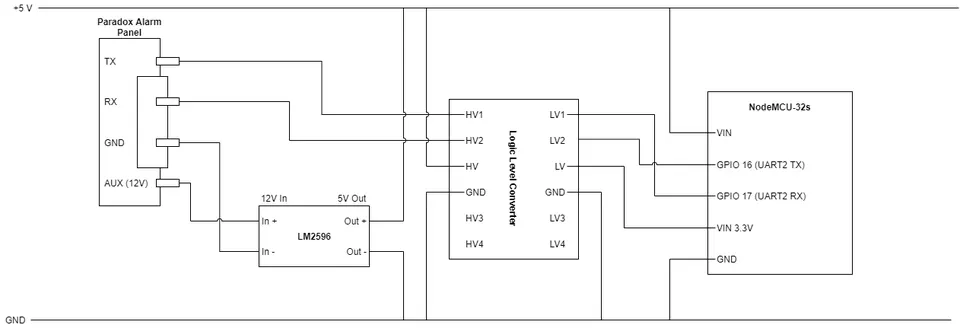
\2Proposed wiring for connecting an ESP32 NodeMCU32-S to a Paradox alarm panel, showing an LM2596 buck converter stepping 12V to 5V and a logic level converter bridging the 5V and 3.3V serial lines.
What are the best beginner ESP32 Home Assistant projects?
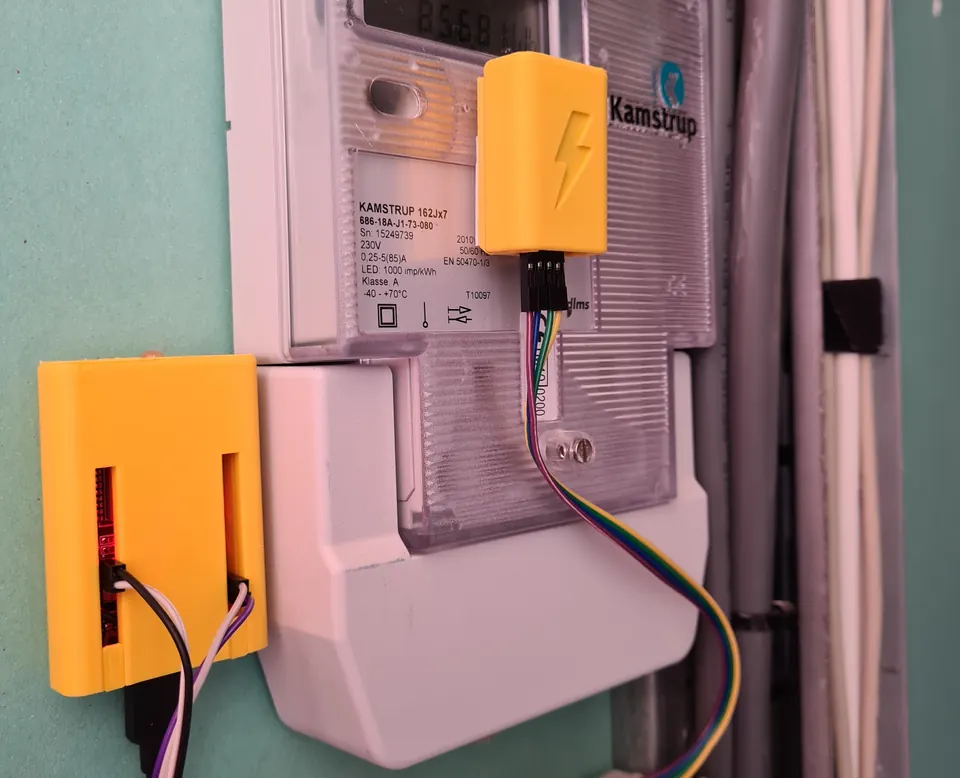
The easiest entry point is a project that pairs a single sensor with Home Assistant and requires no custom wiring. The Home Assistant Glow build turns an ESP32 into a non-invasive energy monitor by reading the pulse LED on a standard electricity meter, producing real kilowatt-hour data in the Home Assistant energy dashboard — no electrician required. For those who want several sensor types ready without writing firmware from scratch, the esphome-devices collection provides twelve ready-to-adopt ESPHome configurations covering motion, temperature, humidity, and more. If you have a Bambu Lab 3D printer, BambuHelper puts real-time print progress and status into Home Assistant using an ESP32, which makes for a satisfying first project because the feedback is immediate and visual. The ESPHome Weather Station is another guided entry-level build — a solar-powered ESP32 unit that reports outdoor conditions to Home Assistant with no cloud dependency. All of these projects share one beginner-friendly trait: they use ESPHome or pre-written Arduino sketches, so you configure rather than code. The Seeed HA Discovery framework goes further by letting you flash temperature-and-humidity or button-switch firmware directly from a Chrome or Edge browser through its web flasher, with no IDE installation at all.
 \2
\2A standard ESP32 development board — the common starting point for Home Assistant integration projects. Image: Edwiyanto, CC BY-SA 4.0, via Wikimedia Commons
What sensor and monitoring projects can I build?
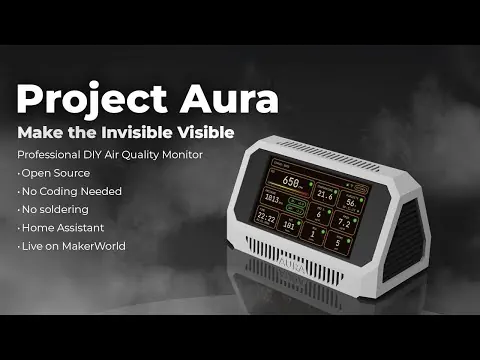
Sensor projects are the bread-and-butter of ESP32 Home Assistant work because the hardware is inexpensive, the wiring is minimal, and the payoff — real data on a dashboard — is immediate. Project Aura AQ pairs an ESP32-S3 with air quality sensors and pushes particulate and CO2 readings into Home Assistant for room-level monitoring. For energy tracking at scale, EnergyMe-Home supports sixteen channels on a single ESP32, while the CircuitSetup Expandable 6-Channel ESP32 Energy Meter targets households that want per-circuit tracking at a smaller scale. If you heat your home with a Daikin heat pump, ESPAltherma uses an ESP32 to read the pump's internal data bus and expose runtime, temperatures, and operating modes as Home Assistant sensors. Solar and off-grid setups benefit from VictronMPPT-ESPHOME, which bridges Victron charge controllers to Home Assistant over an ESP32. The Seeed HA Discovery library supports temperature and humidity sensors with a few lines of Arduino code; its WiFi mode delivers readings in real time, while its BLE broadcast mode suits locations where running power is inconvenient — making it straightforward to prototype a custom sensor node when none of the ready-made projects quite fit your situation.
 \2
\2Espressif ESP-WROOM-32 Wi-Fi and Bluetooth module, the core silicon inside many ESP32 dev boards used in Home Assistant builds. Image: Brian Krent, CC BY-SA 4.0, via Wikimedia Commons
What display and dashboard projects work with Home Assistant?
Giving Home Assistant a physical face is one of the most rewarding project categories. The ESPHome Touch Panel (CYD) uses an ESP32 Cheap Yellow Display with an LVGL UI to present a fully interactive Home Assistant control panel on a color touchscreen at low cost, and the result looks polished enough to mount on a wall. For rooms where a backlit screen would be intrusive, the HASS-epaper-display project drives an ESP32 e-paper screen that shows dashboard data with no glow and very low power draw — the display retains its image even when unpowered. ESPHomeDesigner adds a drag-and-drop visual editor so you can arrange widgets without writing LVGL markup by hand, which reduces the barrier for anyone not comfortable with display code. The Seeed HA Discovery framework includes a state subscription feature designed specifically for display applications: the device requests current entity values from Home Assistant so a clock or sensor readout always shows fresh data after a reboot. Whether you reach for a color TFT, an e-paper panel, or an OLED, Home Assistant's WebSocket API keeps the display in sync without continuous polling.
Can I build an ESP32 voice assistant for Home Assistant?
Voice control through Home Assistant has become practical on ESP32 hardware. The Koala Satellite project and ESP-Assistant both turn an ESP32-S3 into a local voice satellite that listens for commands, routes them through Home Assistant's voice pipeline, and speaks responses back — all on the local network with no cloud dependency. The ESPHome Voice Satellite on the Waveshare ESP32-S3-AUDIO-Board integrates directly with ESPHome so configuration stays in YAML rather than custom firmware. If you want something with visual character, the Rotary Phone Voice Assistant project wires an ESP32 into a vintage rotary phone body so lifting the handset triggers a Home Assistant voice session — a popular conversation piece. All of these projects rely on Home Assistant as the voice-processing backend: the ESP32 handles audio capture and playback while speech recognition runs on the Home Assistant server or a companion container. This division keeps the ESP32 firmware lean and means improvements to the Home Assistant voice pipeline benefit every satellite automatically, without reflashing the device.
How do I wire an ESP32 into existing home hardware?
Not every Home Assistant project starts with a clean sensor on a breadboard. Some of the most useful builds bridge an ESP32 to hardware already installed in the home, and that requires careful attention to voltage levels. A documented example involves integrating a Paradox alarm panel with Home Assistant: the panel's serial port runs at 5V TTL and is powered from a 12V AUX rail, while the ESP32's GPIO pins expect 3.3V logic. The safe approach uses an LM2596 buck converter to step 12V down to 5V, then relies on the ESP32's onboard regulator to produce 3.3V from that 5V supply, with a bidirectional logic level converter sitting between the two serial lines. One critical detail from this build: the ground of the alarm panel must be connected to the ground of the ESP32 circuit, or serial signals will be unreliable. It is also worth checking the current rating of the ESP32's onboard regulator before powering additional boards from it — if the total draw is tight, a second buck converter running 12V directly to 3.3V avoids making the onboard regulator a bottleneck. The Nuki Hub project takes a similar bridging approach for smart locks, turning an ESP32 into a local bridge between a Nuki lock and Home Assistant without any cloud dependency. For cameras, the DIY Video Doorbell pairs an ESP32-CAM with ESPHome to feed a live stream and motion alerts into Home Assistant.
Do I need ESPHome, or can I use Arduino or PlatformIO?
ESPHome is the dominant framework for ESP32 Home Assistant projects because it handles device discovery, OTA firmware updates, and entity registration through YAML configuration rather than code — making it fast to go from idea to a working device. The esphome-devices collection and ESPHomeDesigner tool are both built around it, and most beginner tutorials assume it. That said, ESPHome is not the only option and is not always the right fit. The Seeed HA Discovery library works entirely in Arduino IDE or PlatformIO without ESPHome; it connects to Home Assistant via WebSocket for WiFi devices or via BTHome v2 for BLE devices, with auto-discovery handled by the library itself. If your project involves a sensor or peripheral that ESPHome does not support natively, writing firmware in Arduino C++ and using the Home Assistant WebSocket API directly gives you full control. The choice usually comes down to how much configuration flexibility you need versus how quickly you want a working device on the dashboard. For BLE room-presence tracking, custom firmware tends to be the better fit; for a straightforward temperature or humidity sensor, ESPHome is typically faster to get running.
Frequently asked questions
Does an ESP32 need an MQTT broker to talk to Home Assistant?
No. Libraries such as Seeed HA Discovery use the Home Assistant WebSocket API for WiFi devices and BTHome v2 for BLE, so no MQTT setup is required and all data stays on the local network.
Which ESP32 chips support Home Assistant auto-discovery?
The ESP32-C3, C5, C6, and S3 are confirmed to work. The C5 also supports 5GHz WiFi in addition to 2.4GHz, which can improve connectivity in crowded environments.
Can I power an ESP32 from a 12V rail such as an alarm panel's AUX supply?
Yes, but you need a buck converter such as the LM2596 to step 12V down to 5V first. The ESP32's onboard regulator can then drop that to 3.3V, though you should verify its current rating covers all attached boards. Connecting the grounds of both systems is essential for reliable serial communication.
What is BTHome and does it need any Home Assistant configuration?
BTHome v2 is a BLE advertising protocol that Home Assistant supports natively. When a device broadcasts BTHome packets, Home Assistant recognises and adds it automatically — no extra integration or YAML entry is required on the Home Assistant side.
Can I flash ESP32 Home Assistant firmware without installing any software?
Yes. The Seeed HA Discovery project includes a web-based flasher that runs in Chrome or Edge, detects the connected ESP32 chip automatically, and loads pre-built firmware without any local software installation.
ESP32 is one of the most practical microcontrollers for Home Assistant integration because it supports both WiFi and BLE natively, costs little, and has a wide ecosystem of ready-made projects. Beginners can start with a pre-built ESPHome configuration or a browser-based web flasher in an afternoon, while more experienced makers can bridge existing home hardware — alarm panels, heat pumps, smart locks — using appropriate level-shifting circuits. The range of builds covering sensors, displays, voice satellites, and energy monitors means there is a genuinely useful project at every skill level.
Sources
electronics.stackexchange.comLogic level conversion between ESP32 and house alarm control panelgithub.comSeeed-Projects/Seeed-Homeassistant-Discovery (GitHub README)This guide summarises the public sources listed above in our own words. Check the original documentation before relying on exact figures.