ESP32 MicroPython Examples: Step-by-Step Setup Guide
What do you need before running MicroPython on ESP32?
Before writing any code, make sure you have the right firmware, an IDE, and — for hardware examples — the correct physical components and wiring.
Firmware
Download a MicroPython binary for your board from micropython.org/download/. I2S audio support was merged into the official build on July 5, 2021, so any binary released after that date includes it with no custom build required.
IDE
Two tools are widely used for ESP32 MicroPython development: Thonny and uPyCraft. Both give you a REPL (interactive Python prompt) over USB and a file manager for copying library files onto the device's filesystem.
Libraries
Some examples depend on third-party libraries that must be copied to the device before your script runs. The I2C sensor example below uses micropython-mpu9250, which ships as three separate Python files (mpu9250.py, mpu6500.py, ak8963.py). Missing even one of them causes an import error. The web example uses micropython-firebase-auth for authentication.
Hardware summary
| Example | Hardware needed |
|---|---|
| I2C sensor | ESP32, GY-91 breakout (MPU9250 + BMP280), 4 jumper wires |
| I2S microphone | ESP32, INMP441 microphone module, 3 jumper wires |
| I2S speaker | ESP32, Adafruit I2S amplifier (MAX98357A), 3 jumper wires |
| Web API | ESP32, Wi-Fi credentials |
 \2
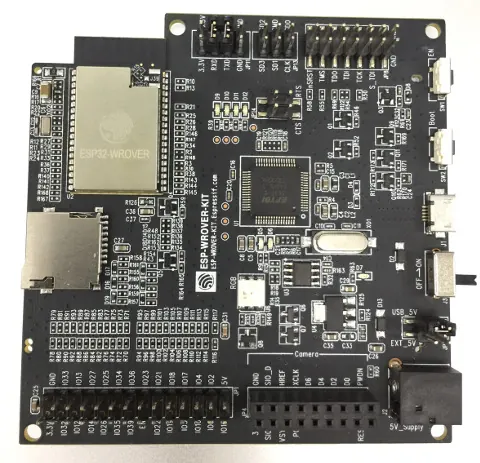
\2ESP32 development board used for MicroPython projects Image: Edwiyanto, CC BY-SA 4.0, via Wikimedia Commons
How do I wire and read an I2C sensor with MicroPython?
The I2C bus is one of the most common ways to attach sensors to an ESP32. This example reads acceleration, gyroscope, magnetic field, and temperature data from an MPU9250 on the GY-91 breakout board.
Step 1 — Wire all four pins
| GY-91 pin | ESP32 pin |
|---|---|
| VIN | 5 V |
| GND | GND |
| SCL | GPIO 22 |
| SDA | GPIO 21 |
Skipping the GND wire is the single most common I2C wiring mistake. The firmware will raise OSError: [Errno 19] ENODEV, meaning it cannot detect any device on the bus at all, even though power and data lines are connected.
Step 2 — Copy library files to the device
Using your IDE's file manager, copy mpu9250.py, mpu6500.py, and ak8963.py to the ESP32 before running any script.
Step 3 — Run the script
import utime
from machine import I2C, Pin
from mpu9250 import MPU9250

i2c = I2C(scl=Pin(22), sda=Pin(21))
sensor = MPU9250(i2c)

print("MPU9250 id: " + hex(sensor.whoami))

while True:
    print(sensor.acceleration)
    print(sensor.gyro)
    print(sensor.magnetic)
    print(sensor.temperature)
    utime.sleep_ms(1000)
If sensor.whoami prints a non-zero hex value without raising an exception, the I2C bus is healthy and the sensor is detected. The loop then streams all four data types once per second.
 \2
\2Espressif ESP-WROOM-32 Wi-Fi and Bluetooth module Image: Brian Krent, CC BY-SA 4.0, via Wikimedia Commons
How do I use I2S audio examples on ESP32 with MicroPython?
I2S (Inter-IC Sound) is a serial audio bus for streaming digital audio to and from external chips. MicroPython's machine.I2S class wraps Espressif's ESP-IDF I2S API and supports two independent peripherals — I2S.NUM0 and I2S.NUM1 — so you can record and play at the same time.
Step 1 — Reading audio from an INMP441 microphone
from machine import I2S, Pin

bck_pin  = Pin(14)   # Bit clock
ws_pin   = Pin(13)   # Word select
sdin_pin = Pin(12)   # Serial data input

audio_in = I2S(
    I2S.NUM0,
    bck=bck_pin, ws=ws_pin, sdin=sdin_pin,
    standard=I2S.PHILIPS, mode=I2S.MASTER_RX,
    dataformat=I2S.B32,
    channelformat=I2S.RIGHT_LEFT,
    samplerate=16000,
    dmacount=16, dmalen=256
)

samples = bytearray(2048)
num_bytes_read = audio_in.readinto(samples)
Step 2 — Playing audio through a MAX98357A amplifier
from machine import I2S, Pin

bck_pin   = Pin(14)
ws_pin    = Pin(13)
sdout_pin = Pin(12)   # Serial data output

audio_out = I2S(
    I2S.NUM1,
    bck=bck_pin, ws=ws_pin, sdout=sdout_pin,
    standard=I2S.PHILIPS, mode=I2S.MASTER_TX,
    dataformat=I2S.B16,
    channelformat=I2S.ONLY_RIGHT,
    samplerate=16000,
    dmacount=16, dmalen=512
)

samples = bytearray(1024)
num_bytes_written = audio_out.write(samples)
Key constructor parameters
| Parameter | Purpose |
|---|---|
bck |
Bit clock pin |
ws |
Word select pin |
sdin / sdout |
Data direction — only one allowed per instance |
mode |
MASTER_RX to receive, MASTER_TX to transmit |
dataformat |
Sample bit depth: B16 or B32 |
channelformat |
Stereo (RIGHT_LEFT) or mono (ONLY_RIGHT) |
samplerate |
Samples per second |
dmacount / dmalen |
DMA buffer count and per-buffer length |
readinto() blocks until the bytearray is completely filled from DMA memory unless you pass a timeout in milliseconds. Setting timeout=0 returns immediately when no DMA data is ready, which enables non-blocking designs built around uasyncio.
How do I call a web API from ESP32 MicroPython?
MicroPython's urequests module lets you make HTTP and HTTPS requests once the ESP32 is on Wi-Fi. A common project pattern is reading from or writing to a cloud database such as Firebase Realtime Database.
Basic GET request
import urequests

def get_data():
    response = urequests.get(
        "https://<DATABASE_NAME>.firebaseio.com/<NODE>.json?auth=<ID_TOKEN>"
    )
    data = response.json()
    return data
Authentication — ID token, not UID
Firebase security rules validate an ID token, not a plain user UID. Passing only the UID returns {'error': 'Permission denied'} because the UID is not a secret and carries no authentication weight on its own.
The correct flow:
- Use the
micropython-firebase-authlibrary to sign in with an email and password. - Retrieve the ID token from the sign-in response.
- Pass that ID token in the
authquery parameter of everyurequestscall.
If the ESP32 operates in a trusted environment such as a locked enclosure on a private network, the Firebase Admin SDK approach can bypass per-user authentication entirely.
How do I verify each example is working correctly?
Each category has a clear success signal you can check in the IDE's REPL window.
I2C sensor
- The line
MPU9250 id: 0x71(or another non-zero hex value) immediately after running the script confirms the sensor is detected on the bus. - Repeating tuples of acceleration, gyroscope, magnetic, and temperature values scrolling once per second confirm the read loop is healthy.
I2S audio
- For microphone input:
num_bytes_readreturns a positive integer matching the size of your bytearray (2048 in the example). Zero or an exception indicates a wiring or configuration problem. - For speaker output:
num_bytes_writtenmatches your sample buffer size, and you hear actual audio from the amplifier.
Web API
response.json()returns a Python dict containing your database values rather than{'error': 'Permission denied'}.- If you see the permission error, verify you are passing an ID token and not a raw UID.
What are the most common mistakes with these ESP32 MicroPython examples?
Most failures fall into a small set of predictable errors.
1. Missing GND wire on I2C sensors
Connecting VIN, SCL, and SDA but omitting GND makes the sensor completely invisible to the bus. MicroPython raises OSError: [Errno 19] ENODEV, which literally means no device was found. Always run four wires: power, ground, clock, and data.
2. Incomplete library files on the device
Libraries that span multiple files require every file to be present. The MPU9250 library needs three Python files. If any are missing the import chain breaks. Use your IDE's file manager to confirm each file is on the device before running.
3. Using a UID instead of an ID token for Firebase
A user UID is a public identifier — it is not a secret and cannot prove identity to Firebase's security rules. Obtain an ID token through micropython-firebase-auth and pass that instead.
4. Running firmware older than July 5, 2021 for I2S
Builds predating that date do not include the machine.I2S class. If from machine import I2S raises an ImportError, flash a current binary from micropython.org/download/.
5. Specifying both sdin and sdout in one I2S instance
Each I2S object accepts only one data-direction pin. Use I2S.NUM0 with sdin for recording and I2S.NUM1 with sdout for playback if you need both simultaneously.
Frequently asked questions
What does OSError: [Errno 19] ENODEV mean in MicroPython?
It means the firmware could not find any device on the I2C bus. The most frequent cause is a missing GND connection between the sensor and the ESP32.
Which IDEs work best for MicroPython on ESP32?
Thonny and uPyCraft are both commonly used. Both offer a REPL connection over USB and a file manager for uploading library files to the device.
When was I2S added to the official MicroPython build for ESP32?
I2S support was merged into the official MicroPython build on July 5, 2021. Any binary downloaded from micropython.org/download/ after that date includes it without requiring a custom compile.
How do I authenticate Firebase requests from ESP32 MicroPython?
Use the micropython-firebase-auth library to sign in and receive an ID token, then pass that token in your urequests call. Passing only the UID returns a Permission denied error.
Can I record and play I2S audio at the same time on ESP32?
Yes. Use I2S.NUM0 configured as MASTER_RX for the microphone and I2S.NUM1 configured as MASTER_TX for the speaker amplifier as two separate instances.
MicroPython makes ESP32 approachable for anyone comfortable with Python, covering practical ground from I2C sensor wiring to I2S audio streaming and cloud API calls with urequests. The patterns shown here — correct four-wire I2C connections, proper I2S peripheral configuration, and ID-token-based authentication — underpin the vast majority of real ESP32 MicroPython projects. Start with the latest official firmware from micropython.org, double-check every wire including GND, and copy all library files to the device before running your first script.
Sources
stackoverflow.comMicroPython: OSError: [Errno 19] ENODEVstackoverflow.comRetrieving firebase data from ESP32 using micropython with authenticationgithub.commiketeachman/micropython-esp32-i2s-examples (GitHub README)This guide summarises the public sources listed above in our own words. Check the original documentation before relying on exact figures.