MicroPython ESP32 psRAM LoBo: Build Firmware with 4MB RAM
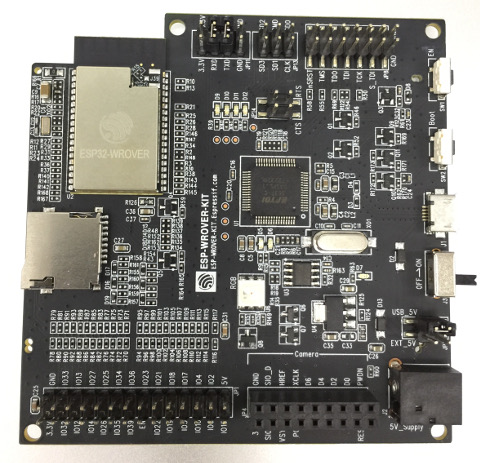
ESP-WROVER-KIT v3, the primary reference board used to test and develop this MicroPython psRAM firmware.
- M5Stack Development Kit (psRAM version)
- TTGO T8 V1.1
- ESP-WROVER-KIT
- WiPy 3.0
- TTGO TAudio
- Lolin32 Pro
- ESP-WROVER module
- ALB32-WROVER module
- Pycom S01 / L01 / G01 OEM modules
What You Will Build — and Why It Matters
Standard MicroPython on an ESP32 gives you fewer than 100KB of free memory. That limit forces you to keep scripts tiny, avoid large data structures and skip memory-hungry libraries. The LoBo port removes that ceiling.
By building firmware that maps the module's external SPIRAM (psRAM) into the MicroPython heap, you get 2MB of heap by default — and you can push that to 4MB or beyond with a config change. The boot log from a running board says it all:
uPY heap: 3073664/5664/3068000 bytes (in SPIRAM using malloc)
Beyond raw memory, the LoBo port compiles in a full set of extras that the standard port omits: SPI TFT display driver, MQTT client, FTP server, telnet REPL, SSH with sftp/scp, libcurl for HTTP/FTP/email, GSM/PPPoS for cellular internet, Neopixel via the RMT peripheral, BTree database, improved threading with inter-thread messaging, NTP-synced RTC with deep-sleep wakeup, ymodem file transfer and more. Everything is selected or deselected at build time through menuconfig — no manual header editing required.
What You Need
Hardware
You need an ESP32 module or development board that carries external SPIRAM. The README lists these confirmed options:
- ESP-WROVER-KIT (Espressif official dev board — recommended for beginners because it has USB, JTAG and a built-in TFT)
- M5Stack Development Kit (psRAM version)
- TTGO T8 V1.1
- WiPy 3.0 (Pycom)
- TTGO TAudio
- ALB32-WROVER module (4MB SPIRAM, up to 16MB Flash)
- Pycom S01 / L01 / G01 OEM modules
- Any board built around the ESP-WROVER module
The firmware can also be built for plain ESP32 boards without psRAM; you simply configure a smaller heap.
Software and build host
- A Linux, macOS or Windows machine — Windows users should use the Linux Subsystem (WSL)
- The repository cloned locally — it contains all toolchain sources and the BUILD.sh helper script
- No separate esp-idf installation is needed; the repo bundles everything required
A USB-to-serial adapter or a board with an onboard USB bridge (such as the ESP-WROVER-KIT) is needed for flashing.
Typical use cases
Run data-processing scripts, large JSON payloads or image buffers that would crash a standard ESP32 MicroPython build due to heap exhaustion.
Drive color TFT displays from MicroPython using the built-in C display driver — no slow pure-Python framebuffer needed.
Use WiFi as the primary uplink and fall back to a GSM module over PPPoS when the local network is unavailable — all configured in firmware.
Develop over a telnet REPL, manage files via FTP, and push firmware updates over OTA — no USB cable required after initial flash.
How It Works Under the Hood
The firmware is compiled as an esp-idf component. That means the entire Espressif SDK configuration system — menuconfig — is available to tune both the ESP32 itself and the MicroPython layer. You can switch between unicore and dualcore FreeRTOS, choose Flash speed and mode (QIO/QOUT/DIO/DOUT), set heap sizes, enable or disable individual modules, and configure the default time zone — all from the same curses-style menu used for normal esp-idf projects.
At runtime, the SPIRAM is registered with the esp-idf heap allocator immediately after boot. MicroPython's gc allocator then uses that pool as its main heap while a separate 32KB block of internal DRAM is reserved for DMA and C-level allocations. The terminal session in the README shows both heaps live side by side:
Heap outside of MicroPython heap:
  Free: 239920   Allocated: 52328

SPIRAM info:
  Free: 1048532  Allocated: 3145728
Peripheral modules (MQTT, FTP, mDNS) each run as independent FreeRTOS tasks, so they stay active while your Python script does other work. The internal Flash filesystem uses the esp-idf wear-leveling driver to extend Flash lifespan; SPIFFS can replace FatFS if preferred.
Building the Firmware
The repository ships a BUILD.sh script that automates the entire toolchain and build sequence. Detailed step-by-step instructions — including how to set up the host environment on Linux, macOS and Windows — are documented on the project Wiki.
The high-level flow is:
- Clone the repository to your build machine.
- Run BUILD.sh from the
MicroPython_BUILDdirectory. The script accepts arguments to invokemenuconfig, build or flash. Consult the Wiki for the exact flags. - Run menuconfig (via BUILD.sh) to tailor the firmware: choose unicore vs. dualcore, set heap size, enable/disable modules such as TFT, MQTT, SSH, GSM, BTree and SPIFFS, set your time zone.
- Build — BUILD.sh compiles MicroPython and all selected esp-idf components into a flashable binary.
- Flash — BUILD.sh can also invoke esptool to write the firmware over the serial port.
For Eclipse users, the repo includes project files. Import MicroPython_BUILD as an existing project and rebuild the index to get IDE integration.
Once the board is running, verify the psRAM heap at the REPL:
import micropython, machine
micropython.mem_info()
machine.heap_info()
Working with the Built-In Modules
Once the firmware is running, a wide set of modules is available at the REPL. A few highlights:
SD card
import uos
uos.mountsd()
uos.listdir('/sd')
The sdmmc driver supports 1-bit SD, 4-bit SD and SPI modes; the SD card can be connected to any pins.
RTC and NTP sync
rtc = machine.RTC()
rtc.init((2017, 6, 12, 14, 35, 20))
rtc.ntp_sync(server="<ntp_server>" )
rtc.synced()
rtc.now()
Deep sleep with external wakeup
rtc.wake_on_ext0(Pin, level)
rtc.wake_on_ext1(Pin, level)
machine.deepsleep(10000)
After wakeup, machine.wake_reason() and machine.wake_description() report exactly what woke the board.
Telnet REPL — enable the telnet module and you get a wireless Python prompt over WiFi without a USB cable.
FTP server — runs as a background task; connect any FTP client to browse and edit files on the board's internal or SD filesystem.
GSM/PPPoS — connect a GSM module to an ESP32 UART and the board gains cellular internet without WiFi.
Extending the Build and Limitations to Know
Ideas to take it further
- Enable the TFT display module in menuconfig and drive SPI displays directly from MicroPython — the driver is built in C for speed.
- Use the curl module to send email alerts or push data to an FTP endpoint from a Python script.
- Combine the MQTT client (C task, always running) with the Neopixel RMT driver to build a WiFi-controlled LED strip that responds to broker messages.
- Use OTA update partitions to deploy new firmware wirelessly once the board is deployed.
- The BTree module gives you a persistent key-value store on the filesystem — useful for logging sensor readings that survive reboots.
- Explore the modules_examples directory in the repo for working code you can adapt.
Limitations to keep in mind
- This is a custom fork, not the official MicroPython mainline. Upstream MicroPython updates do not automatically flow in; the last push was October 2023.
- Building requires a working Linux-compatible environment and some familiarity with embedded toolchains — this is not a pre-built firmware drop.
- 136 open issues in the tracker; some edge cases on specific boards may need workarounds found in the issue thread or Wiki.
- The Lolin32 Pro board listed in the README is no longer manufactured.
The LoBo MicroPython port is the most feature-complete ESP32 MicroPython build available for psRAM-equipped modules, turning a memory-constrained microcontroller into a capable embedded Linux-like platform with 3MB+ of Python heap. The BUILD.sh and menuconfig workflow keeps custom builds manageable, though it does demand a proper build environment and comfort with toolchain setup. If you have an ESP-WROVER-KIT or M5Stack with psRAM and want MicroPython with display, networking and filesystem features that the standard port cannot offer, this firmware is worth the build effort.
Sources
github.comloboris/MicroPython_ESP32_psRAM_LoBo — repository & READMEFacts in this article come from the project's public README and GitHub metadata at the time of writing. Images belong to their respective owners and link back to the original source.