esp32-tinyLLM: Run a 28.9M-Parameter LLM on ESP32-S3
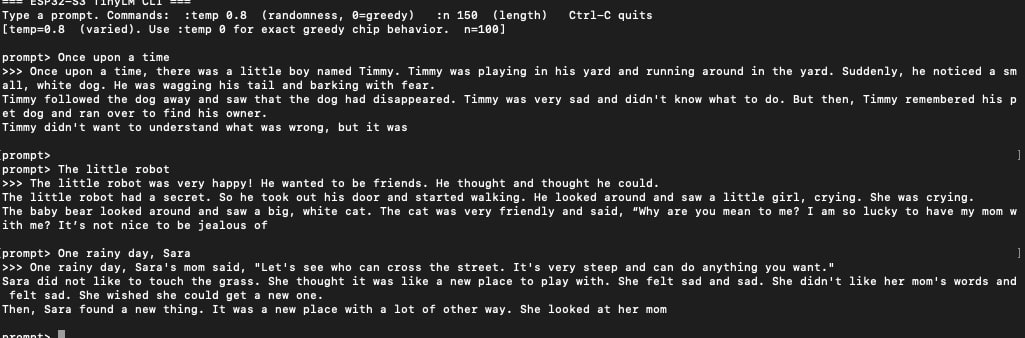
The esp32-tinyLLM firmware generating a children's story via the serial CLI, with per-token timing visible in the output.
- ESP32-S3
What You Will Build
You will flash a complete Rust-based language model inference engine onto an ESP32-S3 and watch it generate short children's stories directly on the chip — no cloud, no co-processor, no external RAM module.
The model has 28.9 million parameters. The ESP32-S3 has 512 KB of SRAM. Those two facts sound incompatible until you understand the trick: roughly 25 million of those parameters live in a flash-mapped Per-Layer Embedding (PLE) table — the same memory-layout idea used in Google's Gemma 3n — and the remaining weights are stored at 4-bit quantization. The chip never loads the full model into RAM at once; it pages what it needs from flash as it goes.
The result runs at 10.50 tok/s on stock settings, which is 28.2% faster per token than the C reference implementation it was ported from, with byte-identical output. This project is a serious benchmark of what embedded Rust can do on a microcontroller most people think of as a Wi-Fi chip, and it comes with 38 automated tests to prove every claim.
What You Need
Hardware
- An ESP32-S3 development board
- A USB cable for flashing and serial monitoring
Software and toolchain
- Rust (stable toolchain with the
xtensa-esp32s3-espidftarget) - ESP-IDF (Espressif's official IoT Development Framework)
- Python 3 (for the helper scripts:
scripts/run_device.sh,scripts/bench_host.py,scripts/plot_stages.py) - The repository cloned locally:
git clone https://github.com/Bellman281/esp32-tinyLLM
No hardware needed to start. The repo includes a host-side CLI demo and a full test suite you can run on your laptop before touching the board. This is worth doing first — it lets you confirm the model works and compare the Rust and C engines side by side without any flashing involved.
Typical use cases
Run a generative language model entirely on an ESP32-S3 with no network connection, cloud API, or external compute — just the chip, flash, and a USB cable.
A concrete, reproducible case study for comparing Rust and C inference engines on the same microcontroller, with automated digest verification and per-stage timing.
Explore quantization, PLE memory layouts, and `no_std` model math in a repo that documents every dead end alongside every win, with 38 tests to keep the numbers honest.
Run the same inference engine on your laptop via the demo CLI to prototype or test model changes before committing to a flash cycle.
How It Works
The engine is split into three Rust crates inside the engine/ workspace:
llm-core— the model math, written asno_stdand platform-agnostic. It handles the 4-bit dequantization, the attention mechanism, the feed-forward network, and the PLE table lookups. Because it has no platform dependencies, the same code runs on your laptop and on the ESP32-S3.llm-host— wrapsllm-corewith CLI tools and the correctness test suite. This is where the 38 tests live: golden logits checked against PyTorch, byte-identical output verified against the compiled C binary, and cross-entropy measured over real validation tokens.llm-firmware— the on-device build that links against ESP-IDF. It maps the PLE table into flash, drives the serial output, and measures per-stage timing (input, attention, FFN, PLE lookup, output head).
The model was trained on the TinyStories dataset (Eldan & Li 2023) and exported after 4-bit post-training quantization. It writes children's stories. It cannot answer questions or follow instructions — that is by design. The task is narrow enough that 28.9M parameters, squeezed through this memory layout, can do it well at real-time speed.
Every benchmark figure in the README is generated from benchmarks/device.toml by scripts/plot_stages.py. Nothing is typed by hand, so the numbers stay honest as the code evolves.
Build and Flash Steps
Step 1 — Verify the engine on your laptop (no board needed)
Run the full test suite to confirm the Rust engine matches the C reference and passes all golden-output checks:
cd engine/llm-host && cargo test --release
Then try the interactive CLI demo, which runs the model on your host machine:
cd demo && sh run_cli.sh
To compare Rust and C timing on your laptop before touching the board:
scripts/bench_host.py
Step 2 — Flash to the ESP32-S3
Once you have ESP-IDF installed and your board connected, a single script handles the build, flash, serial monitor, and run log:
./scripts/run_device.sh
The script flashes the firmware, opens the monitor, and streams the story output alongside per-token timing. You should see output at around 10.50 tok/s.
Step 3 — Optional: enable the fast memory bus
The repo ships with a second mode that runs the memory bus at 120 MHz instead of the default speed:
./scripts/run_device.sh --fast-mspi
This pushes throughput to 10.89 tok/s (32.9% faster than the C reference). The README notes this requires an experimental ESP-IDF flag and that Espressif documents 120 MHz as temperature-sensitive outside the commercial operating range, so it is not the default. Use it for benchmarking; be cautious in a product.
Step 4 — Confirm byte-identical output
The firmware folds every emitted token ID into a digest and prints it. The expected digest is pinned in model/models.toml and re-verified by llm-host/tests/token_stream_digest.rs. If your run diverges from the reference by even one token, the output says so. This is how the project certifies that a faster build is actually computing the same thing — not a faster approximation.
Extending the Project and Known Limits
What you can explore next
- Add a different model. The project has a model registry in
model/models.toml. The filemodel/README.mddocuments the format and how to add another entry. If you train or quantize a different TinyStories-style model to the same architecture, you can register it and run it through the same benchmarking pipeline. - Contribute an optimization. The CONTRIBUTING.md file describes the process for landing a measured change: every pull request needs a before/after timing from the device and must pass the digest gate. The BENCHMARKING.md file documents every optimization that was tried, including the ones that were reverted because the digest proved they were wrong.
- Enable the optional display. The repo layout includes
engine/llm-display/for an optional demo screen. The README marks it as not started, so this is genuinely open territory. - Port to a different board. Because
llm-coreisno_std, the model math has no ESP-IDF dependency. Porting the firmware layer to another Xtensa or RISC-V target is a plausible exercise for someone comfortable with embedded Rust.
Limits to keep in mind
This model writes stories. It does not answer questions, follow instructions, or hold a conversation. That is not a bug — the TinyStories training domain is intentionally narrow, and that narrowness is what makes 28.9M parameters viable on this hardware. Do not expect ChatGPT behavior from an $8 chip with 512 KB of RAM.
The llm-display crate is listed in the repo layout but marked as not started. Serial output is the only output mode that works today.
120 MHz SPI (--fast-mspi) is documented by Espressif as temperature-sensitive outside the commercial range. Treat it as a benchmark mode rather than a production setting.
esp32-tinyLLM is one of the most carefully engineered tinyML projects for the ESP32-S3: every benchmark is reproducible, every optimization is certified byte-identical, and the Rust engine genuinely outperforms the C reference it was built from. It is not a chatbot and does not try to be one — if you want to understand how far a $8 microcontroller can be pushed with modern quantization and Rust, this is the codebase to study.
Sources
github.comBellman281/esp32-tinyLLM — repository & READMEFacts in this article come from the project's public README and GitHub metadata at the time of writing. Images belong to their respective owners and link back to the original source.