CircuitSetup Expandable 6-Channel ESP32 Energy Meter Guide
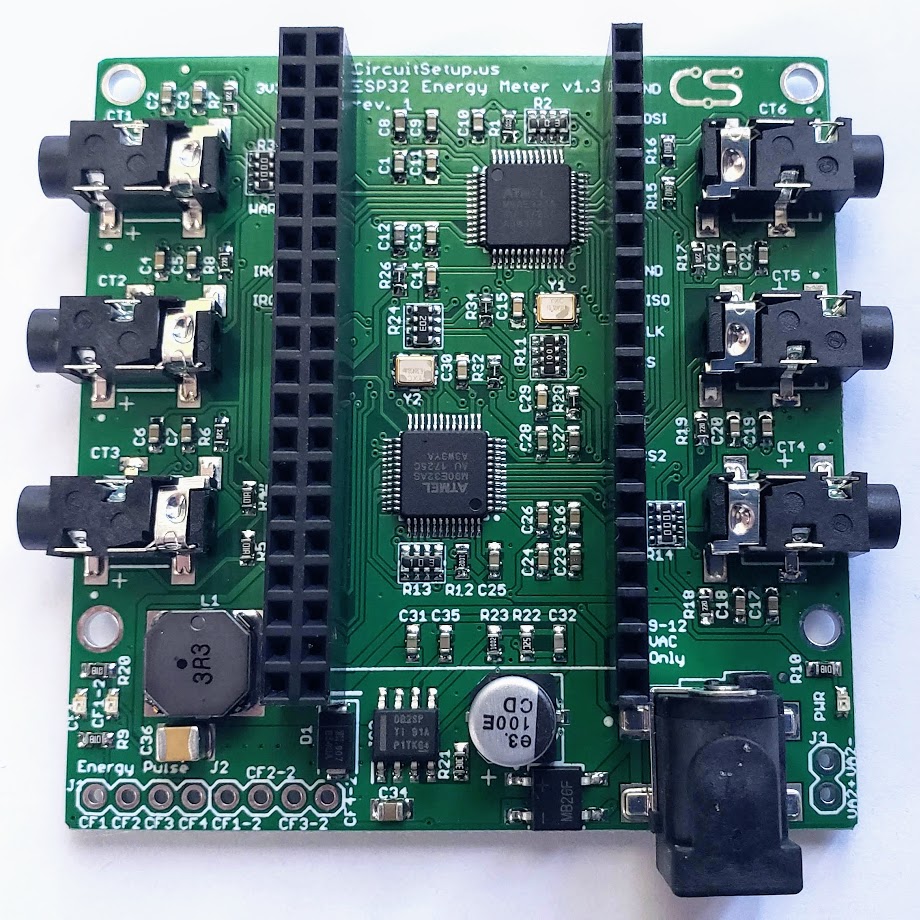
The CircuitSetup 6-channel ESP32 Energy Meter main board v1.3 with ATM90E32AS ICs and ESP32 header
- CircuitSetup Expandable 6-Channel ESP32 Energy Meter main board
- CircuitSetup 6-channel add-on boards (up to 6)
- NodeMCU 32s
- Espressif ESP32-DevKitC-32E
- Espressif ESP32-DevKitC-VIE
- CircuitSetup ESP32-S3 Ethernet Adapter
- LilyGO T-ETH-Lite ESP32-S3
- Waveshare ESP32-S3 ETH
- ATM90E32AS metering IC (x2 on main board)
- SCT-006 20A/25mA current transformer
- SCT-010 80A/26.6mA current transformer
- SCT-013-000 100A/50mA current transformer
- SCT-016 120A/40mA current transformer
- SCT-024 200A/50mA current transformer
- Jameco Reliapro 9VAC AC-AC adapter
- 9VAC or 12VAC AC-AC adapter (230V regions)
What You Will Build and Why It Is Useful
This guide walks you through flashing, wiring, and calibrating the CircuitSetup Expandable 6-Channel ESP32 Energy Meter — a real-time power monitor built around two ATM90E32AS metering ICs. The main board measures six current channels and one voltage reference. Stack up to six add-on boards and the system grows to 42 current channels and up to eight voltage references, enough to cover an entire electrical panel, subpanels, solar production, and large individual circuits at the same time.
The meter calculates active power, reactive power, apparent power, power factor, frequency, and temperature at 16-bit resolution. Stated metering IC accuracy is 0.1 percent with a 6000:1 dynamic range. Because it integrates directly with ESPHome and Home Assistant, every circuit shows up as a live sensor in your smart home dashboard with no custom server software to maintain. It is a good fit for North American split-phase 120V/240V 60Hz service, single-phase 230V/240V 50Hz or 60Hz systems, and 3-phase systems where each measured phase has a matching voltage reference.
 \2
\2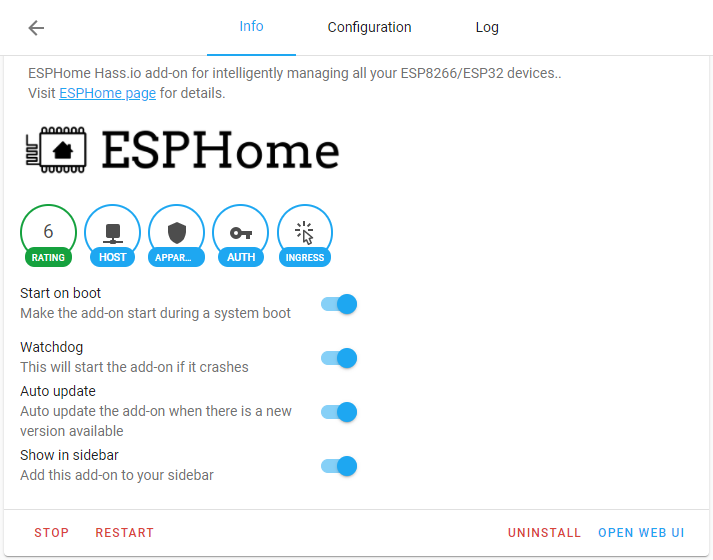 \2
\2 \2
\2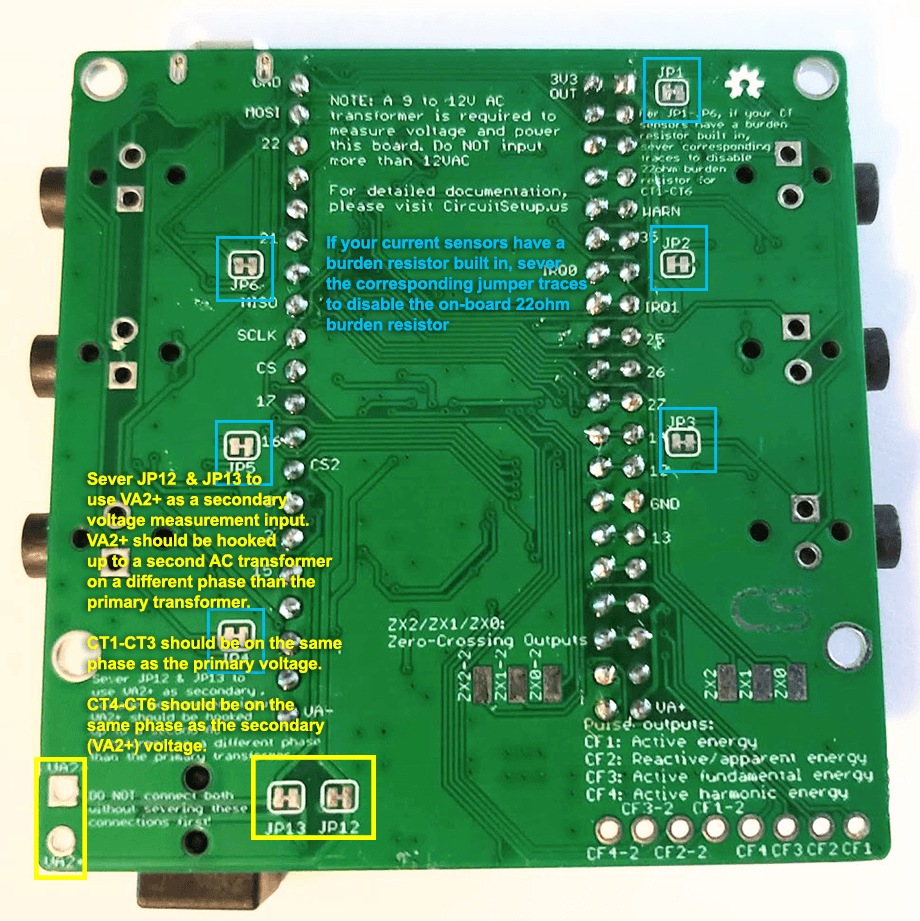 \2
\2What You Need
Hardware
- The CircuitSetup main board, plus add-on boards if you need more than six channels
- A supported ESP32 dev board. Documented options are the NodeMCU 32s, Espressif ESP32-DevKitC-32E, and ESP32-DevKitC-VIE — all 19 pins per side with 3V3 at the upper-left corner and CLK at the lower-right when installed correctly. Boards with a different pin map are not drop-in compatible; the ESP32-C6, for example, is not on the documented support path. Ethernet variants are also supported for ESPHome-only installs: the CircuitSetup ESP32-S3 Ethernet Adapter, LilyGO T-ETH-Lite ESP32-S3, or Waveshare ESP32-S3 ETH
- Current transformers (CTs) matched to your circuit sizes. The README lists the SCT-006 (20A/25mA, 6mm opening), SCT-010 (80A/26.6mA, 10mm), SCT-013-000 (100A/50mA, 13mm), SCT-016 (120A/40mA, 16mm), and SCT-024 (200A/50mA, 24mm), all with 3.5mm plugs. You can mix types across channels. Voltage-output CTs such as the SCT-013-030 and SCT-013-050 are also supported but require cutting a jumper trace (see wiring section below)
- An AC-AC transformer — not a DC wall adapter. For North America, a 9VAC or 12VAC adapter with a 2.5mm center pin is required. For 230V regions, use a native 230V-to-9VAC or 12VAC adapter rated for at least 500mA
- A USB data cable for first-time flashing
Software
- ESPHome and Home Assistant are the recommended combination for new installs
- EmonESP and EmonCMS are available if you prefer MQTT without Home Assistant
- CircuitPython and MicroPython libraries are also maintained in separate repositories
Typical use cases
Measure every breaker in a residential panel simultaneously. Stack add-on boards to reach up to 42 current channels and surface all readings as Home Assistant sensors.
Track solar production alongside grid consumption and subpanel loads in real time, using separate CT channels for each feed and dedicated voltage references for each leg.
Native ESPHome integration means every channel is automatically available in the Home Assistant Energy dashboard without any custom code or intermediary server.
Support for dual voltage references and expandable CT channels makes the meter suitable for North American split-phase 240V service and 3-phase installations with the correct hardware configuration.
How It Works
The main board hosts two ATM90E32AS ICs. Each IC handles three current channels and one voltage reference, communicating with the ESP32 over SPI. The default chip-select assignments are GPIO5 for CT1–CT3 and voltage reference 1, and GPIO4 for CT4–CT6 and voltage reference 2. MISO is GPIO19, MOSI is GPIO23, and CLK is GPIO18.
The AC-AC transformer does two jobs: it powers the board through a built-in buck converter, and it supplies the voltage waveform the metering ICs need to calculate real power and power factor. If you only connect one transformer, both ICs share that single voltage reference by default. To measure a second voltage — useful for split-phase 240V service or 3-phase work — you wire a second AC-AC transformer to the VA2 pads on the main board after cutting jumpers JP12 and JP13 (v1.3 and later boards) or JP7 (older revisions). When those jumpers are cut, CT1–CT3 stay referenced to the primary voltage and CT4–CT6 use the VA2 reference.
Add-on boards extend the SPI bus. Each add-on has two solder jumper banks — one for its CT1–CT3 and one for its CT4–CT6 — and the default chip-select assignments are documented in the README and pre-configured in the installer firmware.
Flash and Wire the Meter
Step 1 — Install the ESP32
Insert your ESP32 dev board into the meter header so that the 3V3 pin sits in the upper-left corner. Plugging into the lower row will likely short the board, so confirm orientation before applying power.
Step 2 — Flash ESPHome via the Web Installer
The fastest path requires only a browser that supports Web Serial (Chrome or Edge):
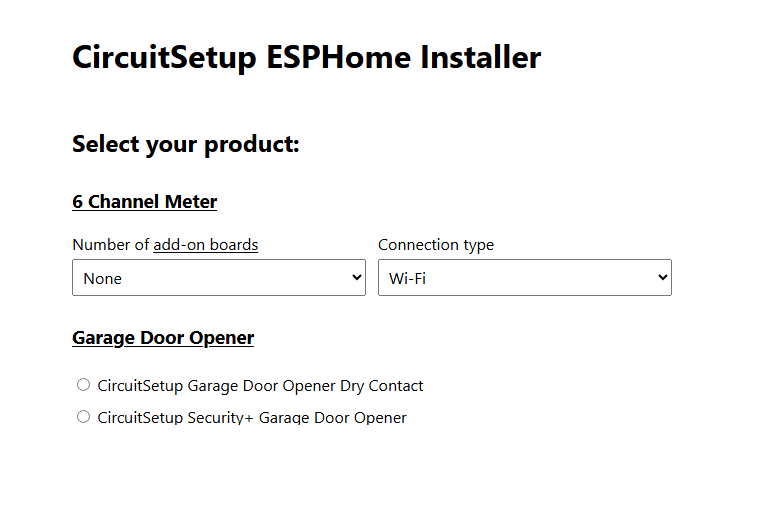
- Open the CircuitSetup ESP Web Installer
- Under 6 Channel Meter, select the number of add-on boards and your connection type: Wi-Fi, Ethernet (Lilygo), or Ethernet (Waveshare)
- Choose a firmware version
- Connect the ESP32 to your computer with a USB data cable
- Click Connect, select the correct serial port, and start the flash
- If the board does not enter the bootloader automatically, hold the IO0 button while the installer initialises
- For Wi-Fi builds, provision your network credentials after the flash completes
The flashed firmware already includes captive_portal, esp32_improv, and improv_serial, so Wi-Fi provisioning works before the device is adopted into Home Assistant.
Step 3 — Adopt Into Home Assistant
Once the device is online, open Settings > Add-ons > Add-on Store in Home Assistant, search for ESPHome Device Builder, install it, and open its web UI. The meter should appear automatically. From here you can rename channels, adjust calibration values, and push OTA updates without touching the USB cable again.
Step 4 — Wire the Current Transformers
Clip each CT around the hot conductor of the circuit you want to measure — not around the neutral or ground. For split-phase 240V loads you can measure one hot leg and double the readings in software, or use one CT per leg for better accuracy. If a current or power reading comes back negative, the CT is clipped in the wrong direction around the conductor; flip it.
If you are using voltage-output CTs (such as the SCT-013-030 or SCT-013-050, which have built-in burden resistors), cut the matching JP1–JP6 jumper trace on the back of the board for that channel. CircuitSetup SCT-006, SCT-010, SCT-013-000, SCT-016, and SCT-024 CTs do not require cutting anything.
Calibration
Each current channel has its own calibration variable in the ESPHome YAML. The README provides these common starting values:
| CT model | Calibration value |
|---|---|
| SCT-006 20A/25mA | 11143 |
| SCT-010 80A/26.6mA | 41660 |
| SCT-013-000 100A/50mA | 27518 |
| SCT-016 120A/40mA | 41787 |
| SCT-024 200A/50mA | 55036 |
| SCT-013-030 30A/1V | 8650 |
| SCT-013-050 50A/1V | 15420 |
| Jameco 9VAC transformer | 7305 |
These are starting points, not guaranteed final values. For tighter accuracy, the repository's ESPHome README describes a semi-automatic calibration workflow.
If you expect to measure more than 65A on a single channel, note that the ATM90E32AS current register tops out at 65.535A before scaling. The fix is to divide the CT calibration value and multiply the reported current and power in software. Examples for 200A service are already included in the YAML files in Software/ESPHome/.
Ideas to Extend It and Limitations
Ways to expand the build
- Stack up to six add-on boards to reach 42 channels, covering every breaker in a large residential panel
- Wire a second AC-AC transformer to the VA2 pads for accurate power factor on both legs of split-phase 240V service
- Switch to an Ethernet-connected ESP32-S3 variant for a wired connection in electrically noisy panel enclosures
- Feed data to EmonCMS over MQTT using EmonESP if you want a standalone energy dashboard outside Home Assistant
- Use the MicroPython or CircuitPython libraries to integrate the meter into a custom application
Limitations to keep in mind
- Only ESP32 dev boards with 19 pins per side and the documented pinout are supported. Different-pinout boards such as the ESP32-C6 are not on the documented support path
- GPIO2 — used as the chip-select for the third add-on board's first CT bank — can interfere with flashing on some ESP32 boards. If you cannot flash while that jumper is connected, disconnect the add-on board or move the jumper during programming, then restore the default position
- Accurate 3-phase metering requires a separate voltage reference for each phase, which means additional AC-AC transformers and VA2 wiring on each relevant board
- Working inside a live electrical panel is a serious safety hazard. Always de-energise the panel or have a licensed electrician handle any work near live conductors
The CircuitSetup Expandable 6-Channel ESP32 Energy Meter is a well-documented, production-ready energy monitoring platform that scales from a single six-channel main board to a 42-channel whole-home system. Native ESPHome support and a browser-based web installer lower the barrier for new installs, while the modular add-on board design and dual voltage reference capability make it practical for split-phase, solar, and 3-phase deployments. Working inside an electrical panel carries real safety risk, so this build is best suited for makers who are already comfortable with mains wiring or who can have a licensed electrician handle the panel connections.
Sources
github.comCircuitSetup/Expandable-6-Channel-ESP32-Energy-Meter — repository & README circuitsetup.usOfficial websiteFacts in this article come from the project's public README and GitHub metadata at the time of writing. Images belong to their respective owners and link back to the original source.