Flashduck Build Guide: ESP32-S3 Desktop Duck Robot
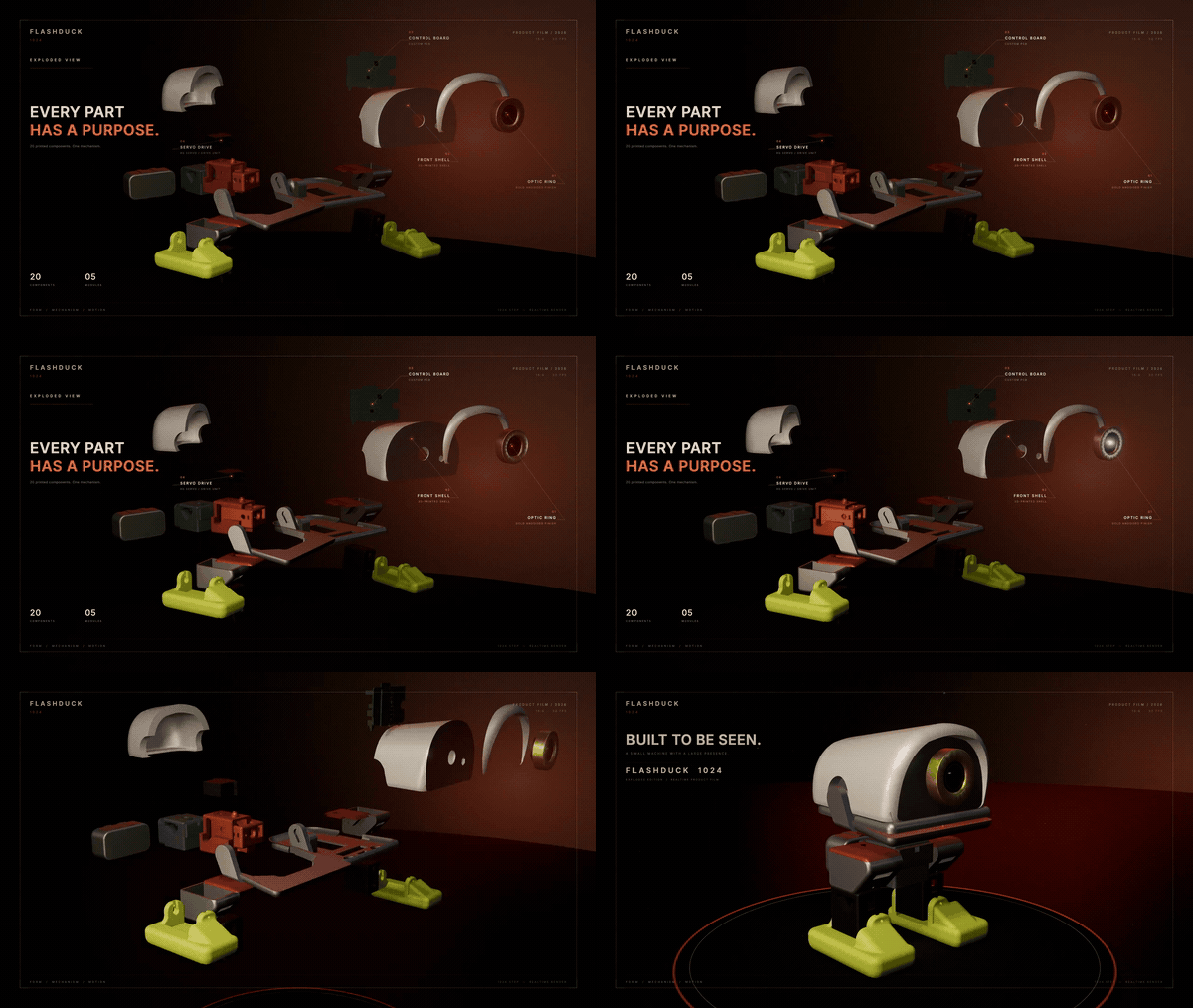
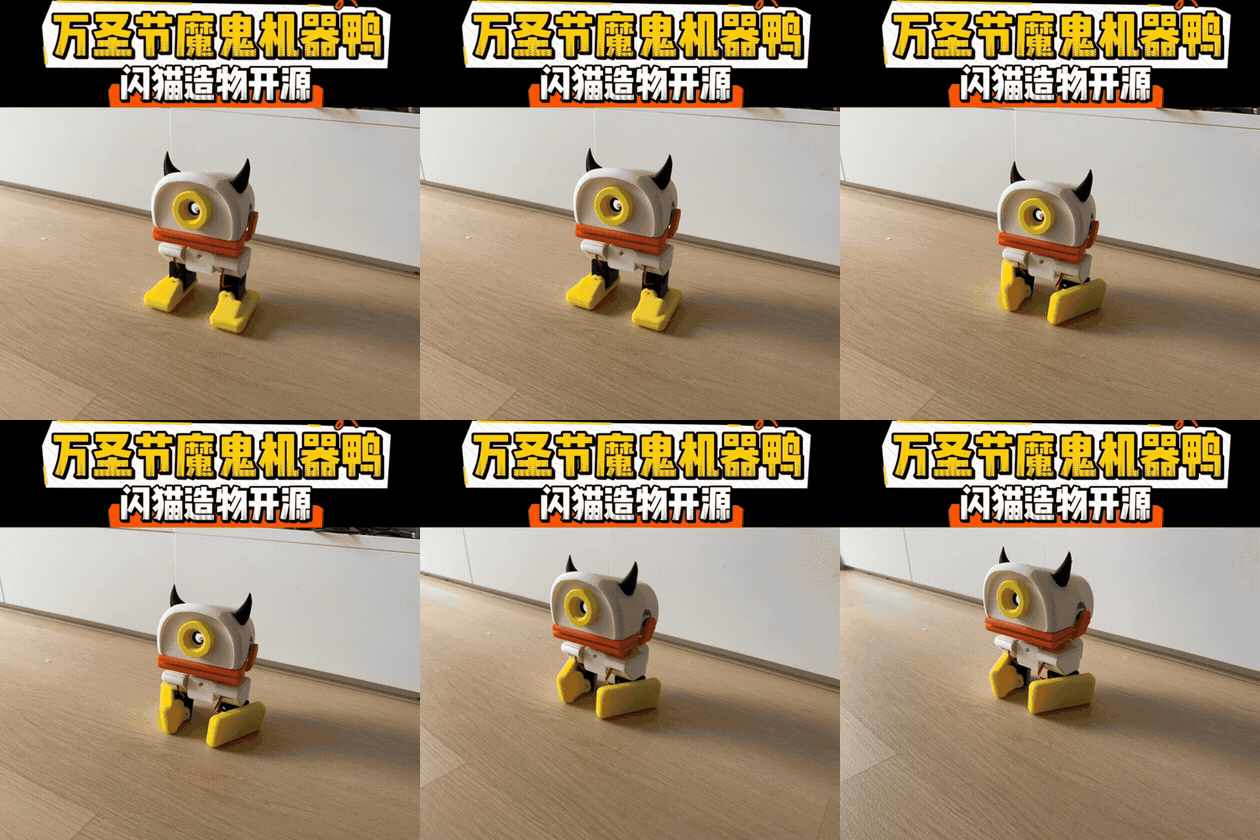
Product loop showing Flashduck walking and moving on a desk.
- ESP32-S3 main board with camera expansion support (16MB flash, board-dependent)
- 6 × MG90 series clutch servos
- 1.54-inch ST7789 240×240 display
- Optional camera: OV2640, OV3660 or GC2145
- I2S microphone and I2S speaker
- Rechargeable lithium battery with charge-status detection
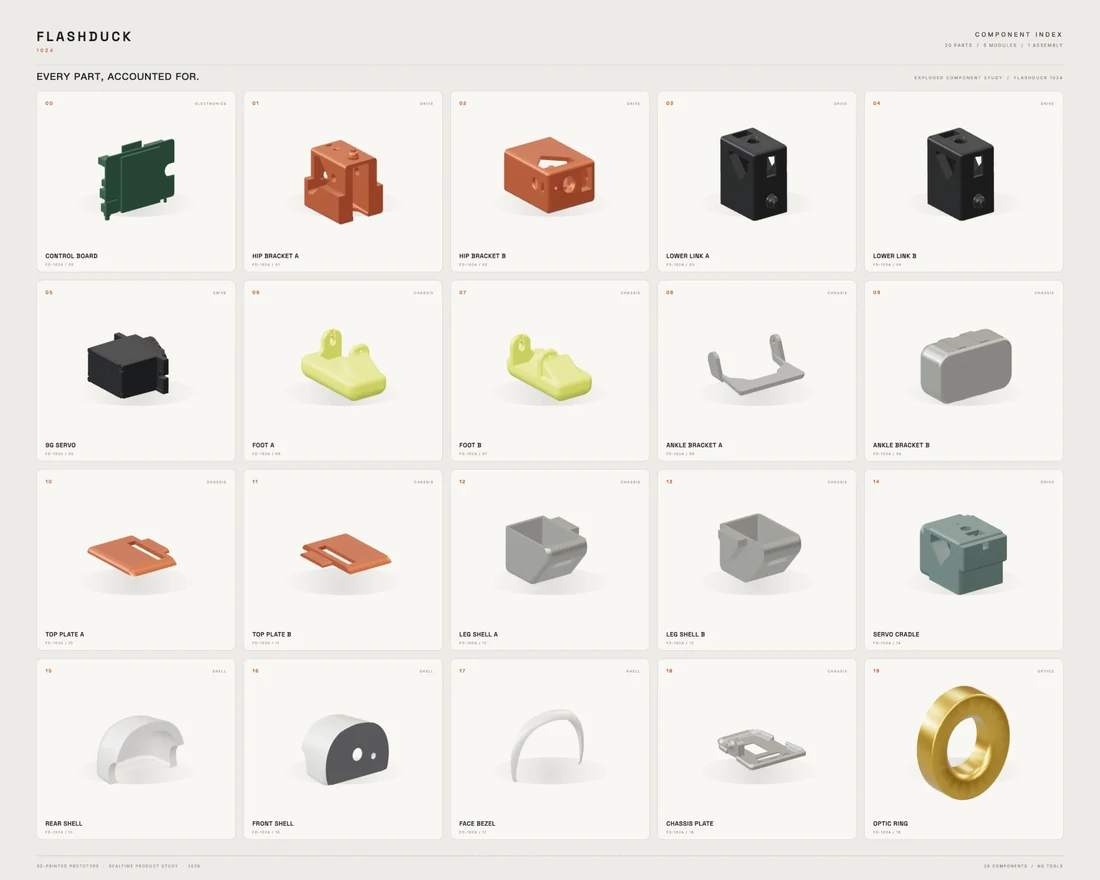
- 17 3D-printed structural parts across 13 types
- Rocker arm pack, screw pack and screwdriver
What you will build
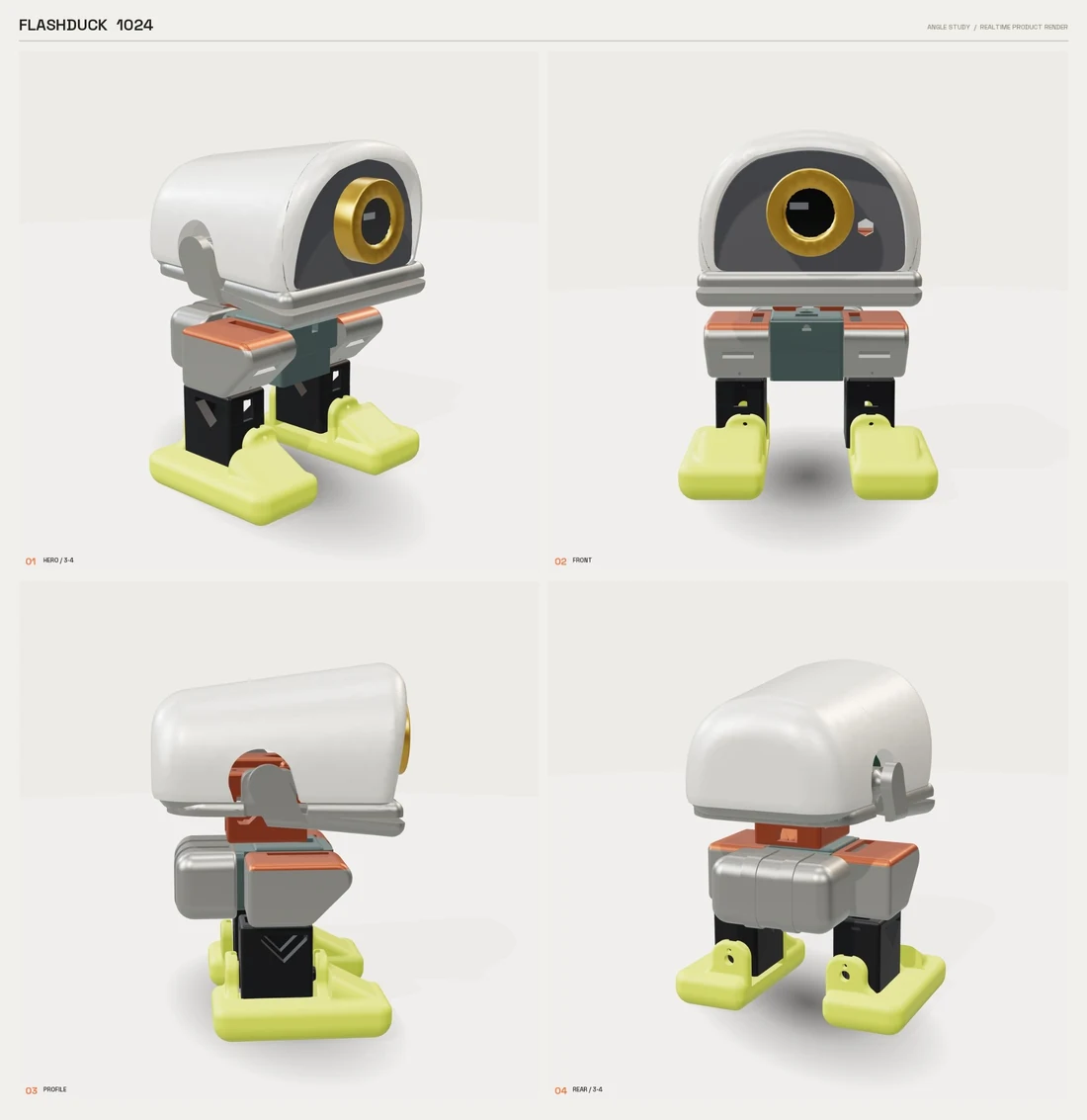
Flashduck is a six-servo desktop duck robot built around an ESP32-S3. It has six degrees of freedom — neck, mouth, left leg, left foot, right leg and right foot — plus a 1.54-inch 240×240 display for a single animated eye and an optional camera. The README lists walk, turn, jump, sit, dance, head movements and duck actions such as quack, preen and yawn. The default gait uses a wide stance.
What makes it more than a preset-action toy is how the joints are exposed. In DuckClaw mode, the Servo Sequences tool gives the model all six joint angles, so it can build poses and chain them at runtime rather than picking from a fixed list. The same hardware runs either a voice assistant that wakes to “小鸭小鸭” and answers with a quack plus body language, or DuckClaw, an on-device agent that talks over DingTalk and controls the body directly. Build it as a desk companion, a voice-controlled robot, or a base for your own AI hardware.
 \2
 \2
 \2
What you need
Flashduck reuses the official six-servo DIY kit; the README says no extra electronic parts are needed. The main items are:
- ESP32-S3 main board with camera expansion support (16MB flash, board-dependent)
- 6 × MG90 series clutch servos
- 1.54-inch ST7789 240×240 display
- Optional OV2640, OV3660 or GC2145 camera — the firmware skips camera init if none is fitted
- I2S microphone and I2S speaker
- Rechargeable lithium battery with charge-status detection
- Rocker arm pack, screw pack and screwdriver
- 17 3D-printed structural parts across 13 types
Software and network: ESP-IDF 6.0.1+, Python 3, a USB-C data cable, macOS/Linux/Windows, and 2.4GHz Wi-Fi. You also need a 3D printer or printing service; the shell models are on MakerWorld. For voice, pick xiaozhi.me for a hosted backend or self-host xiaozhi-esp32-server to run ASR, LLM and TTS. DuckClaw does not use those backends: its agent, memory and tool scheduling run on the robot, with a model service you configure.
Typical use cases
Use the voice build for quack-only conversations, or DuckClaw for quiet DingTalk check-ins with memory and 22 emotions.
Ask it to walk, turn, jump, shake its head or open its mouth, and watch the eye shift between listening and speaking states.
DuckClaw runs on the robot, calls tools, connects to DingTalk and lets the model compose servo poses instead of replaying fixed actions.
Reuse the voice, vision, display, motion or agent layer in your own build, or change the eye, gait, actions and 3D-printed shell.
How it works
The ESP32-S3 drives the servos on fixed GPIOs:
| Joint | Function | GPIO |
|---|---|---|
| Neck | Turn left/right | GPIO7 |
| Mouth | Open/close | GPIO4 |
| Left leg | Swing forward/back | GPIO5 |
| Left foot | Lift | GPIO6 |
| Right leg | Swing forward/back | GPIO43 |
| Right foot | Lift | GPIO44 |
The camera, screen, audio and power use the official CAM board pins. The eye is drawn, not played as an image: eyelid, pupil and saccade parameters change across five states — scanning/connecting (cyan), connected (green crescent squint for about two seconds), standby (warm amber), listening (violet) and speaking (orange-red). Blinks do not interrupt the current expression.
Walking uses a wide stance with a hip offset. Forward and backward share phase parameters, turning comes from a left/right phase difference, and head sway is layered on top. The voice firmware is a device-side client: it handles wake word, audio and motion, while the backend provides ASR, LLM and TTS. Replies are a quack plus gestures; the mouth picks one of 18 opening patterns and the neck reacts to the emotion sent by the server. DuckClaw is different: an on-device agent with tools, DingTalk connectivity, session and long-term memory, 22 emotions and relationship growth. The voice build can expose new actions as MCP tools, and DuckClaw has its own MCP tool chain. The two firmwares are mutually exclusive; flashing one overwrites the other.
Assemble, build and flash
Print the 17 structural parts first, with spares of the mouth and feet. Assemble legs and feet, then body, neck and head shell. The README estimates about 30 minutes for assembly once the parts are ready. There is no soldering; the work is printing, screws and rocker arms. Turn each joint by hand before powering up to check for binding.
Install ESP-IDF 6.0.1+ and run the environment check from the repository root if this is your first build:
bash skills/flashduck-dev/scripts/check-env.sh
Then clone and build the voice firmware:
git clone https://github.com/FlashCat-Jordan/Flashduck.git
cd Flashduck/firmware/voice
source ~/esp/esp-idf-v6.0.1/export.sh

python3 scripts/build.py flashduck \
  --name flashduck \
  --language zh-CN \
  --wake-word wn9_xiaoyaxiaoya_tts2
The build produces build/merged-binary.bin with bootloader, partition table, app and assets. Flash it, then press reset:
esptool --chip esp32s3 -p <PORT> -b 460800 \
  write_flash 0x0 build/merged-binary.bin
Use /dev/cu.usbmodem... on macOS or COMx on Windows. If you only change the app, you can flash just the app image at 0x20000; if you change the wake word or prompt sounds, also flash build/generated_assets.bin at 0x800000.
To try DuckClaw instead:
cd firmware/duckclaw
idf.py set-target esp32s3
idf.py build
idf.py -p <PORT> flash
DuckClaw and the voice firmware cannot run at the same time.
First boot, tuning and extensions
After reset, follow the serial prompts to connect Wi-Fi. The log prints the device IP. Open http://<device-ip>/ from a browser on the same network; port 80 is used first, with 8080 as fallback. Drag the gait sliders, test forward and backward walking, then save the values to the robot. They go to the flashduck_gait NVS namespace and survive a power cycle; voice commands read those defaults.
Say “小鸭小鸭” to wake the voice build, then try walk, turn, jump, head shake or open mouth. The eye moves through its connection, standby, listening and speaking states as you use it.
Good modification points:
- Eye:
firmware/voice/main/boards/flashduck/flashduck_display.*— add states, colours, eyelid curves or blink timing. Everything is drawn ineye_root_, so no GIF or PNG assets are needed. - Actions:
firmware/voice/main/boards/flashduck/flashduck_controller.*— reuse the gait primitives and register new actions as MCP tools for voice and web. - Gait: tune in the web page or edit the defaults in
flashduck_movements.h. - Camera: OV2640, OV3660 and GC2145 are auto-detected; the robot boots without one.
- Shell: all 13 part types can be changed, but keep the servo mounts and linkage lengths compatible or retune the gait.
Limitations: the official six-servo kit is the starting point; voice needs a backend; the two firmware systems are exclusive; DuckClaw is CC BY-NC-SA 4.0, which matters for commercial builds. The example uses a Chinese wake word and zh-CN; the README also warns that macOS builds can hit picolibc.specs if the repo path contains Chinese characters — use an ASCII path.
Flashduck is a strong fit if you want a complete AI hardware build rather than a single sensor demo: six servos, an expressive eye, optional vision and two very different interaction models. Expect to print parts, buy the official kit and work with ESP-IDF; this is not a five-minute build despite the no-soldering assembly. The payoff is a robot whose body can be driven by an agent at runtime, with clear entry points for changing the eye, gait, actions and shell.
Sources
github.comFlashCat-Jordan/Flashduck — repository & README shanmaotech.cnOfficial websiteFacts in this article come from the project's public README and GitHub metadata at the time of writing. Images belong to their respective owners and link back to the original source.