Rotary Phone Voice Assistant with ESP32 and Home Assistant
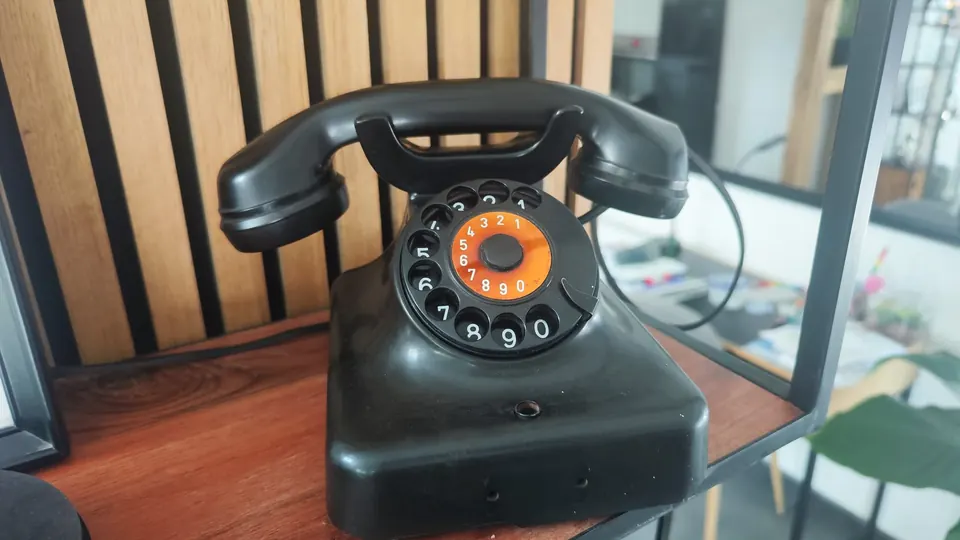
The finished Siemens W48 rotary phone running an ESP32-powered voice assistant via ESPHome and Home Assistant.
- ESP32 Dev Board
- INMP441 I2S Microphone
- MAX98357A I2S DAC/Amplifier
- Siemens W48 Rotary Phone
What You Will Build
You will retrofit a vintage Siemens W48 rotary telephone with an ESP32 microcontroller, an I2S microphone, and a small speaker amplifier board. The result is a fully functional AI voice assistant disguised as a 1950s desk phone.
Lifting the handset wakes the assistant. Speak your question into the original receiver, and the response comes back through the same earpiece — routed through Home Assistant Assist and, optionally, OpenAI's conversation model. The rotary dial is also wired up: each number you dial fires a Home Assistant event, so you can trigger automations the old-fashioned way.
This build is ideal for anyone who wants a conversation piece on their desk that is also genuinely useful for home automation and quick AI queries.
What You Need
Hardware
| Component | Notes |
|---|---|
| ESP32 Dev Board | Core microcontroller |
| INMP441 Microphone | I2S-based audio input |
| MAX98357A DAC | I2S speaker output |
| Siemens W48 Rotary Phone | Original housing and dial mechanism |
| Wires and resistors | Basic wiring parts |
| Ethernet cable | Sheathed for the correct period look |
Software and Services
- A running Home Assistant instance with the ESPHome add-on installed
- An OpenAI API key (if you want AI-powered conversation rather than local intent matching)
- The
esp-telefon.yamlconfiguration file from the project repository
Typical use cases
Ask natural-language questions through the handset and hear OpenAI-powered answers spoken back through the original earpiece.
Map rotary dial digits to Home Assistant automations — scenes, routines, or device controls — without touching a phone or app.
Place a functional conversation interface on your desk that blends vintage aesthetics with modern home automation.
Demonstrates ESPHome's voice assistant pipeline, I2S audio, GPIO event handling, and Home Assistant integration in a single YAML file.
How It Works
The ESP32 sits inside the phone body and communicates with Home Assistant over Wi-Fi using the ESPHome framework.
Handset hook (GPIO16): A binary sensor watches the hook switch. When you lift the receiver, the GPIO goes low and the ESPHome voice assistant pipeline starts — opening the I2S microphone stream and listening for speech.
Rotary dial (GPIO25): The dial generates a series of electrical pulses as it returns to rest after each digit. ESPHome counts those pulses with a global counter and a script, then fires a Home Assistant event (esphome.waehlscheibe_ziffer) carrying the dialed number. Any Home Assistant automation can listen for this event and act on it.
Audio pipeline: The INMP441 microphone captures your voice over I2S and streams it to the ESPHome voice assistant component. The processed audio response arrives back from Home Assistant and is played through the MAX98357A amplifier into the phone's original earpiece speaker.
AI responses: Home Assistant Assist acts as the pipeline orchestrator. When configured with the OpenAI Conversation integration, natural-language questions are forwarded to OpenAI and answers are spoken back. Local intents (like turning off lights) are handled directly by Home Assistant without a cloud round-trip.
Build and Flash Steps
Step 1 — Prepare the Phone
Open the Siemens W48 housing. Remove the original electronics but keep the handset, earpiece speaker, and dial mechanism intact. Disconnect the four-core cable that runs to the handset — you will replace it with an ethernet cable threaded through the same path (you may need to slightly enlarge the opening on the handset side).
Step 2 — Mount the ESP32
Secure the ESP32 inside the phone body using double-sided tape or small screws. Position it so the USB port is accessible for initial flashing and future updates.
Step 3 — Wire Everything
Follow this pin table exactly:
| Function | GPIO |
|---|---|
| Handset switch (hook) | GPIO16 |
| Dial pulse input | GPIO25 |
| INMP441 LRCLK | GPIO32 |
| INMP441 BCLK | GPIO14 |
| INMP441 DOUT | GPIO27 |
| MAX98357A LRCLK | GPIO13 |
| MAX98357A BCLK | GPIO18 |
| MAX98357A DIN | GPIO33 |
Route the mic and speaker wires through the ethernet cable sheath to keep the handset tidy and period-correct.
Step 4 — Power
Power the ESP32 via USB 5 V or a buck converter from a wall adapter hidden inside or beneath the phone.
Step 5 — Flash the ESPHome YAML
Copy esp-telefon.yaml from the repository into your ESPHome configuration directory, update your Wi-Fi credentials inside the file, then flash it to the board:
esphome run esp-telefon.yaml
After the device boots, it will appear in Home Assistant under Settings → ESPHome. Adopt it and confirm the connection.
Step 6 — Configure the Voice Assistant
- In Home Assistant, go to Settings → Voice Assistants.
- Edit your assistant and set Conversation agent to OpenAI Conversation.
- Enter your OpenAI API key under the OpenAI Conversation integration if you have not done so already.
- Lift the handset on the phone and speak — you should hear a response through the earpiece.
Automation Example: React to Dialed Numbers
Every digit dialed fires a Home Assistant event. Here is an example automation that announces the number on a media player:
alias: Dialed number announcement
trigger:
  - platform: event
    event_type: esphome.waehlscheibe_ziffer
condition: []
action:
  - service: tts.google_translate_say
    target:
      entity_id: media_player.living_room_speaker
    data:
      message: "You dialed the number {{ trigger.event.data.nummer }}"
mode: single
You could just as easily use dialed numbers to activate scenes, arm a security system, or trigger any other Home Assistant action — no smartphone needed.
Ideas to Extend It and Limitations
Ideas to extend
- Map specific dialed numbers to frequently used automations (1 = morning routine, 2 = goodnight, and so on).
- Add a ring function: have Home Assistant call the phone's bell circuit when a doorbell or calendar event fires.
- Swap OpenAI for a fully local model using the LocalAI or Ollama integrations to keep all processing on your home network.
- Use ESPHome's OTA update feature so you never need to open the phone again after the initial flash.
Limitations to be aware of
- The project has no software license declared, so review the repository terms before using it in a commercial or redistributed product.
- Wi-Fi is required — the phone has no fallback if your network is down.
- OpenAI responses add a cloud round-trip latency; local Assist pipelines will respond faster.
- Fitting everything inside a W48 requires careful cable management; the original housing is compact and not designed for modern boards.
This is a clever and well-documented retrofit that makes genuine use of every part of an old rotary phone — the handset switch, the dial mechanism, the speaker, and the housing. The ESPHome YAML approach keeps the firmware maintainable and the Home Assistant integration tight, making it a strong template for anyone who wants to build voice interfaces into unexpected objects.
Sources
github.comderkorte/home-assistant-voice-assistant-rotary-dial-telephone — repository & READMEFacts in this article come from the project's public README and GitHub metadata at the time of writing. Images belong to their respective owners and link back to the original source.