IKEA OBEGRÄNSAD ESP32 Hack: Turn a Lamp into a Smart LED Canvas
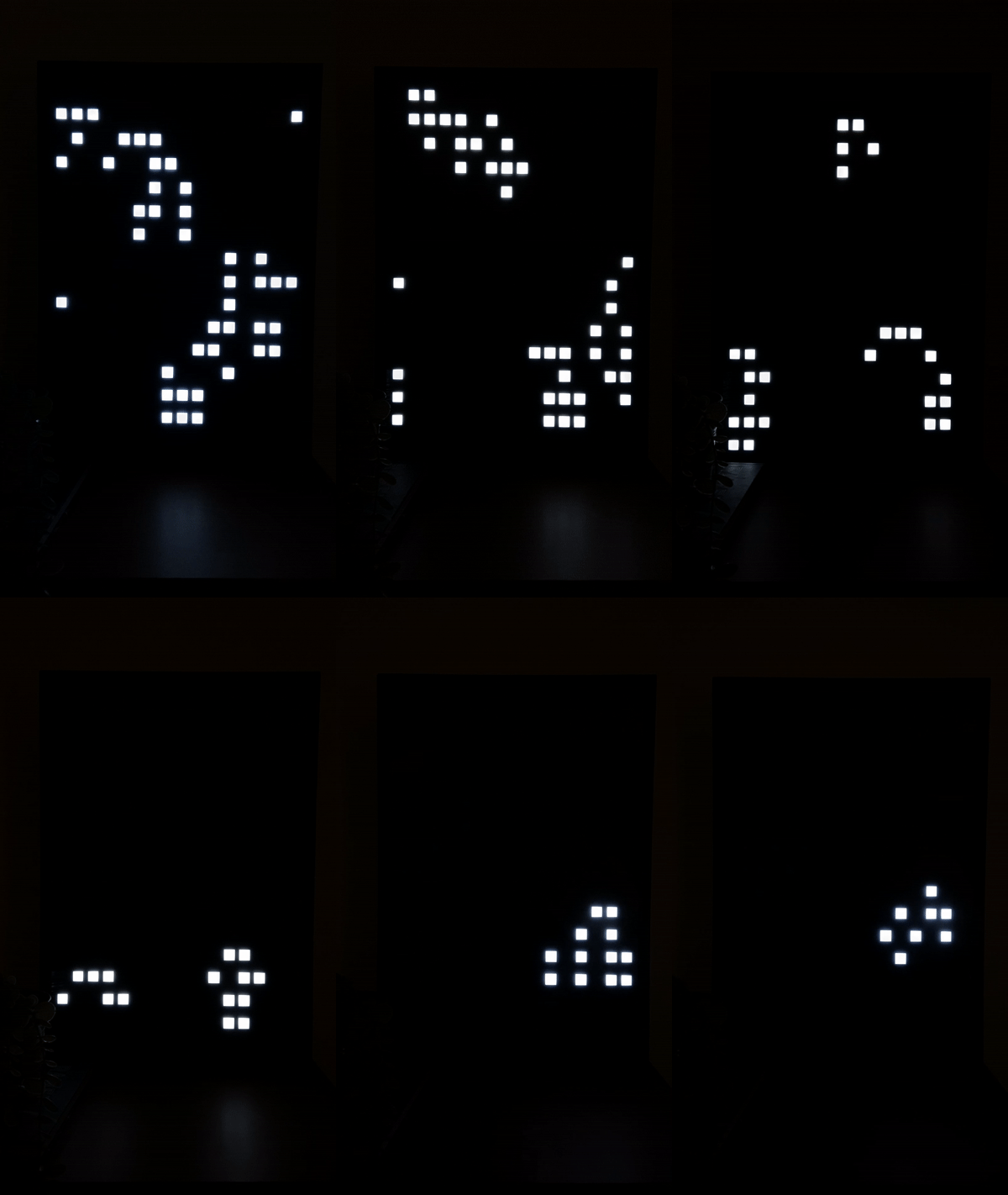
The modded OBEGRÄNSAD lamp cycling through pixel animations after the ESP32 replacement
- IKEA OBEGRÄNSAD LED Wall Lamp
- ESP32 Dev Board
- TTGO LoRa32 V2.1 (T3_V1.6.1)
- ESP8266 NodeMCUv2
- Wemos D1 mini
- Lolin D32 (Pro)
- Xiao ESP32S3
- ESP32-C3
What You Will Build
The IKEA OBEGRÄNSAD is a 16×16 LED wall lamp sold as a decorative piece with a fixed light pattern. This project removes that limitation entirely: you swap the original controller for an ESP32 Dev Board and flash custom firmware that transforms the lamp into a fully networked pixel display.
After the mod your lamp gains:
- A browser-based web GUI for live drawing, plugin selection, and brightness control
- More than 20 built-in plugins — Clock, Big Clock, Weather, Game of Life, Snake, Breakout, Tetris, Firework, Pong Clock, Falling Sand, Space Invaders, Tron, and more
- A REST HTTP API so any script, dashboard, or smart-home hub can push commands
- Home Assistant integration available through HACS
- Over-the-Air (OTA) firmware updates so you never need a USB cable after the initial flash
- A plugin scheduler that cycles displays automatically after configurable intervals
- Scheduled brightness so the lamp dims itself at night without any automation rules
 \2
\2 \2
\2 \2
\2 \2
\2What You Need
Hardware
- IKEA OBEGRÄNSAD LED Wall Lamp
- One of the supported microcontroller boards:
- ESP32 Dev Board (recommended — full feature support)
- TTGO LoRa32 V2.1 (T3_V1.6.1)
- Lolin D32 (Pro)
- Xiao ESP32S3
- ESP32-C3
- ESP8266 NodeMCUv2 or Wemos D1 mini (limited: per-pixel brightness only works when storage and global brightness are disabled)
- A small flat-head screwdriver to open the lamp
- Hook-up wires for seven connections (GND, 5 V, EN, DATA, CLK, LATCH, BUTTON)
Software
- Visual Studio Code
- PlatformIO IDE extension (install from the VS Code Extensions Marketplace)
- Git
Typical use cases
Run the Clock or Big Clock plugin to show the time as pixel art on your wall. Pair with scheduled brightness so the lamp dims automatically at night.
The Weather plugin fetches current conditions and renders them as icons and temperature readings on the 16×16 grid — a glanceable forecast for any room.
Connect the lamp to Home Assistant via the HACS integration or the HTTP API to trigger plugins, adjust brightness, or display messages from automations.
Switch to Snake, Breakout, Tetris, Flappy Bird, or Space Invaders via the button or web GUI for a surprisingly playable retro gaming display on your wall.
How It Works
Inside the lamp are four identical LED plates, each carrying 64 LEDs arranged in a 4×16 strip. Together they form a 16×16 pixel grid. Each plate has six edge connectors at the bottom.
The ESP32 drives the entire matrix through a shift-register interface using four signal lines: EN (enable), DATA, CLK (clock), and LATCH. The main loop runs a plugin system in which each plugin is a C++ class that writes pixel values to a shared frame buffer; the hardware driver then clocks those values out to the LED plates on every frame.
The web GUI is served directly from the ESP32's HTTP stack. It talks to a REST API at http://<device-ip>/api that exposes plugin control, brightness settings, scheduling, and raw display data. A separate DDP (Display Data Protocol) endpoint lets external tools — including the bundled Python helper — stream arbitrary pixel frames to the lamp in real time, which opens the door to visualisations driven by a PC or a home server.
Opening the Lamp and Wiring
Step 1 — Open the lamp
IKEA secures the back panel with rivets instead of screws. Insert a flat-head screwdriver between a rivet and the panel edge and gently pry. Work your way around all rivets. Alternatively, drill out the rivets for a cleaner result — note this is permanent.
Step 2 — Remove the original microcontroller
The original controller sits at the top of the lowest LED plate. Remove it. The six connectors along the bottom edge of that plate are your wiring points.
Step 3 — Wire your board
Connect the six panel edge pins to your board as shown in the table. After wiring, verify the pin numbers in include/constants.h match your board — the defaults target the standard ESP32 Dev Board.
| Panel pin | ESP32 Dev | ESP32-C3 | TTGO LoRa32 | NodeMCUv2 | Wemos D1 mini |
|---|---|---|---|---|---|
| GND | GND | GND | GND | GND | GND |
| VCC | 5 V | 5 V | 5 V | VIN | 5 V |
| EN | GPIO26 | GPIO3 | IO22 | GPIO16 D0 | GPIO16 D0 |
| DATA | GPIO27 | GPIO4 | IO23 | GPIO13 D7 | GPIO13 D7 |
| CLK | GPIO14 | GPIO5 | IO02 | GPIO14 D5 | GPIO14 D5 |
| LATCH | GPIO12 | GPIO6 | IO15 | GPIO0 D3 | GPIO0 D3 |
| BUTTON + | GPIO16 | GPIO7 | IO21 | GPIO2 D4 | GPIO2 D4 |
| BUTTON − | GND | GND | GND | GND | GND |
You can also reuse the lamp's original button wiring without adding external connections — see the project's issue tracker for details.
Build and Flash
Step 1 — Clone the repository
git clone [email protected]:ph1p/ikea-led-obegraensad.git
cd ikea-led-obegraensad
code .
PlatformIO detects platformio.ini and downloads dependencies automatically.
Step 2 — Configure credentials and pin constants
- ESP32: Wi-Fi is handled at runtime by the WiFi Manager captive portal — no secrets file is needed for basic connectivity.
- ESP8266: Edit
include/secrets.hand setWIFI_SSIDandWIFI_PASSWORD. - To enable OTA, add the following to
include/secrets.h:
#define OTA_USERNAME "admin"
#define OTA_PASSWORD "your-password"
- If you are using a board other than the standard ESP32 Dev Board, check
include/constants.hand update the pin definitions to match the wiring table above.
Step 3 — Clean and build
Click the PlatformIO: Clean button (the recycle-bin icon in the VS Code bottom toolbar), then click PlatformIO: Build. If any libraries are flagged as missing, install them through the PlatformIO Libraries tab, then Clean and Build again until the build succeeds.
Step 4 — Upload via USB
Connect the ESP32 to your computer, verify it appears in the PlatformIO Devices tab, then click PlatformIO: Upload.
Step 5 — First-boot Wi-Fi setup (ESP32)
On first boot the device cannot find a saved network and creates a hotspot named IKEA. Connect any phone or laptop to that network; a captive portal opens and guides you through entering your home Wi-Fi credentials. The device reboots and joins your network. Find its IP address from your router's admin panel or the USB serial monitor, then open http://<device-ip> in a browser to reach the web GUI.
To reset Wi-Fi later: unplug the device, hold the button while plugging it back in, keep holding for 5 seconds, then release.
Step 6 — OTA updates (after the first flash)
Navigate to http://<device-ip>/update, log in with your configured credentials (default: admin / ikea-led-wall), select the compiled firmware at .pio/build/esp32dev/firmware.bin, and click Update. The lamp displays a "U" while flashing and an "R" before rebooting. From PlatformIO you can also trigger this from the command line:
pio run -e esp32dev -t upload
Requires the requests_toolbelt and tqdm Python packages — install them with pip install requests_toolbelt tqdm if needed.
Extend It and Limitations
Ideas to take it further
- Write a custom plugin: Create a new C++ class in the plugins folder, register it in
main.cpp, and it appears in the web GUI automatically. The README includes a full plugin development walkthrough with file templates. - Home Assistant: Install the HACS integration for native entity support, or drive the lamp from automations using REST commands against the HTTP API.
- Stream live pixel art with DDP: Use the Display Data Protocol endpoint and the bundled
ddp.pyPython helper to push any 16×16 image or animation from a PC or home server in real time. - Plugin scheduling: Queue plugins with durations through the scheduler API — for example, rotate through Clock, Weather, and Game of Life every 60–120 seconds without any manual intervention.
- Scheduled brightness: Configure a nightly dim window directly in the web GUI (for example, 22:00 to 07:00 at a lower brightness level) without needing any external automation.
Limitations to keep in mind
- Opening the lamp requires removing or drilling out IKEA's rivets — this is a physical, partially irreversible modification. Proceed carefully.
- ESP8266 boards lose per-pixel brightness control when storage or global brightness is enabled; full feature parity requires an ESP32.
- The web GUI and REST API are local-network only; there is no built-in remote-access or cloud layer.
- The project's own disclaimer is worth repeating: use the code and instructions at your own risk — incorrect wiring can damage the lamp or the microcontroller.
The IKEA OBEGRÄNSAD hack is a well-documented, actively maintained project that turns a decorative lamp into a genuinely useful networked pixel display with an impressive plugin library and clean HTTP API. The physical mod asks for careful hands rather than special tools, and the PlatformIO build process is straightforward for anyone comfortable with Arduino-style embedded development. With Home Assistant integration, OTA updates, and real-time DDP streaming, it slots naturally into an existing smart-home setup.
Sources
github.comph1p/ikea-led-obegraensad — repository & READMEFacts in this article come from the project's public README and GitHub metadata at the time of writing. Images belong to their respective owners and link back to the original source.