Dsn AI Voice Assistant v2: ESP32-C3 Build Guide
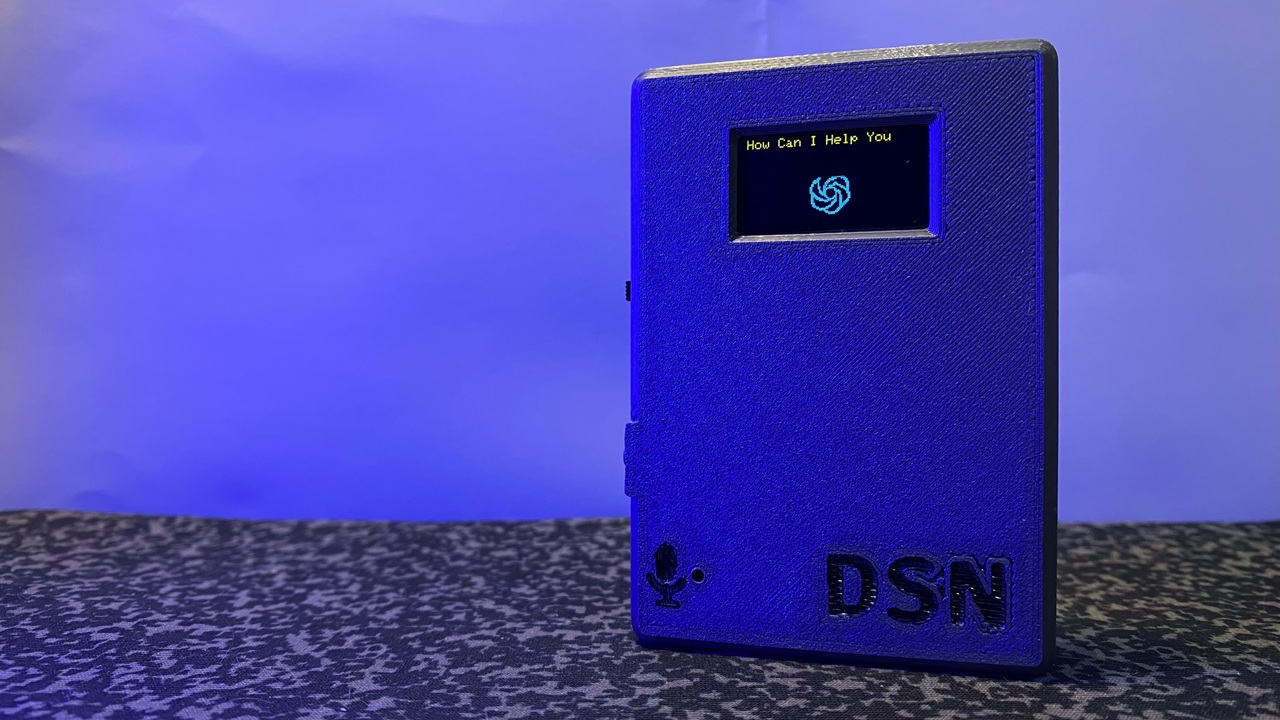
The finished Dsn AI Voice Assistant v2 in its 3D-printed enclosure.
- ESP32-C3
- INMP441 I2S MEMS microphone
- MAX98357A I2S audio amplifier
- SSD1306 OLED display (I²C)
What You Will Build
This project gives you a palm-sized AI voice assistant built around the ESP32-C3. Press a button, speak a question, and the device records your voice with an INMP441 I2S MEMS microphone, ships the audio to a Hugging Face model over Wi-Fi, then streams the AI's spoken reply back through a MAX98357A I2S amplifier — all without writing audio to flash storage first. A small SSD1306 OLED display shows status information, and a compact 3D-printed shell (designed in Fusion 360) keeps everything tidy and portable.
The jump from v1 matters: the first version downloaded MP3 files to SPIFFS before playing them, which introduced noticeable lag. Version 2 streams WAV audio directly, so the response feels nearly instant. The trade-off is a permanent Wi-Fi dependency, but for a desk or pocket gadget that is usually acceptable.
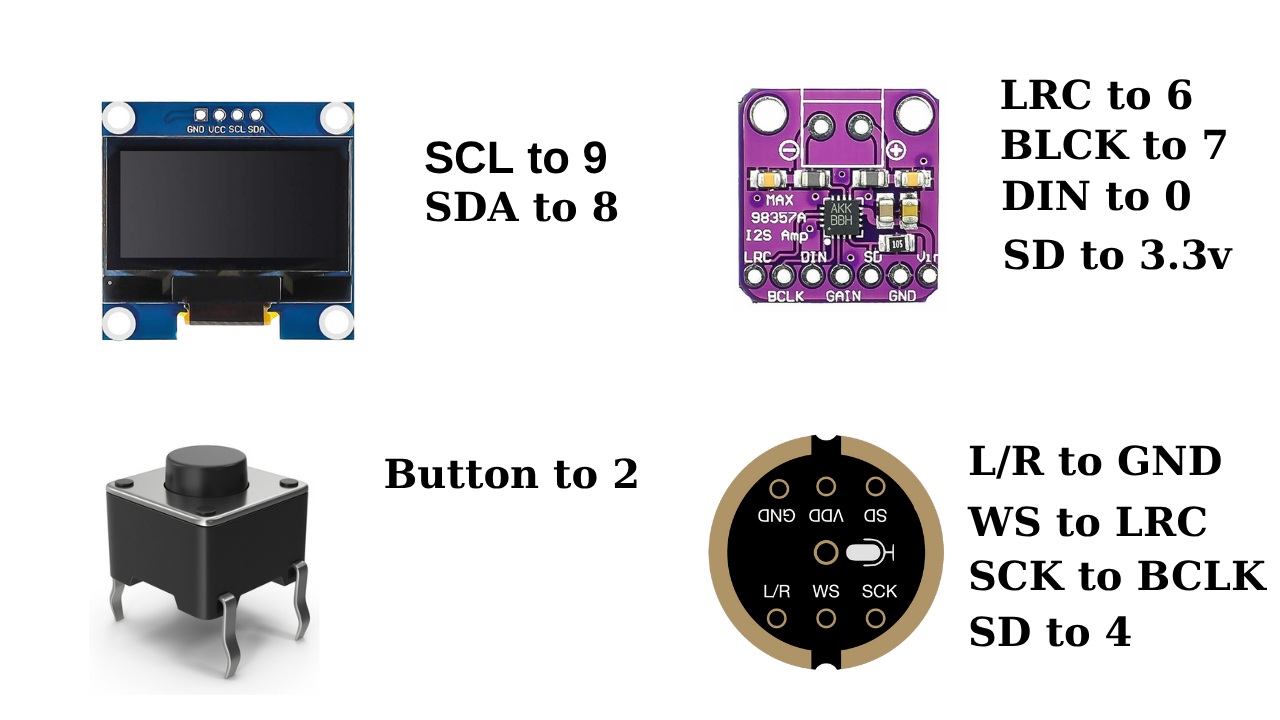 \2
\2What You Need
Hardware
| Component | Role |
|---|---|
| ESP32-C3 dev board | Main controller |
| INMP441 | I2S MEMS microphone (voice input) |
| MAX98357A | I2S audio amplifier (speaker output) |
| SSD1306 OLED | I²C display, 2-pin data connection |
| Small speaker | Connected to MAX98357A output |
| Push button | Press-to-talk activation |
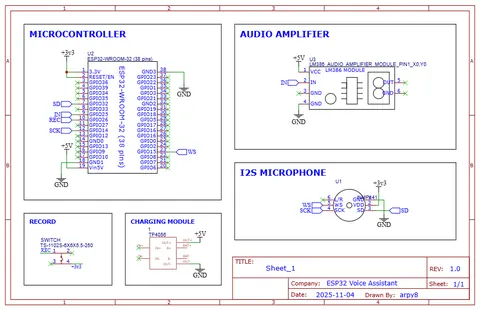
The README notes that the ESP32-C3 has fewer GPIO pins and less SRAM than a standard ESP32, so pin sharing is intentional: the INMP441 and MAX98357A share the same I2S clock and word-select lines; only their data lines (DIN and DOUT) are separate. The MAX98357A's SD (shutdown) pin is wired to 3.3 V to keep the amplifier always on.
Optional enclosure
The author published STL files on Cults3D (Dsn AI Assistant Shell), designed in Fusion 360 for compactness.
Software and accounts
- A Hugging Face account and API access for the AI model
- A server that the README's v1 video covers in detail (full server setup, installation, and configuration are explained there)
- Arduino IDE or PlatformIO with ESP32-C3 board support
- Stable Wi-Fi network during operation
Typical use cases
Carry the 3D-printed assistant in a pocket or bag for quick voice queries wherever you have Wi-Fi.
WAV streaming removes the file-download delay of older designs, giving near-instant spoken responses.
Swap the backend endpoint to test different open-source speech and language models hosted on Hugging Face.
Study a working example of sharing I2S pins between a MEMS microphone and an amplifier on a pin-limited ESP32-C3.
How It Works
The firmware running on the ESP32-C3 follows a straightforward pipeline:
- Capture — When the button is pressed, the INMP441 microphone feeds raw audio into the ESP32-C3 over I2S.
- Transmit — The recorded audio is sent over Wi-Fi to the server, which forwards it to a Hugging Face hosted AI model (speech-to-text, language model, text-to-speech chain).
- Stream back — The server returns WAV audio. The ESP32-C3 streams it directly to the MAX98357A amplifier without saving the file to flash, eliminating the SPIFFS write/read delay that v1 suffered from.
- Display — The SSD1306 OLED shows status information throughout the cycle, using only the two I²C data pins to keep GPIO usage low.
Because the I2S microphone and amplifier share clock and word-select pins, the design squeezes two audio peripherals onto the pin-limited C3. The always-on amplifier (SD tied high) trades a small idle current draw for simpler firmware logic.
Build and Flash Steps
1. Wire the hardware
Follow the schematic provided in the repository (images/schematic.jpg). Key wiring rules from the README:
- Keep I2S signal lines short to minimise noise.
- INMP441 and MAX98357A share I2S CLK and WS pins; only DIN (mic) and DOUT (amp) are separate.
- Wire MAX98357A SD pin to 3.3 V.
- Connect SSD1306 via I²C (SDA + SCL).
- Wire your push button to an available GPIO.
2. Set up the server
The full server setup, installation, and configuration is covered in the v1 YouTube video linked in the repository. Complete that before flashing the ESP32-C3, because the firmware needs a reachable server endpoint to send audio to and stream responses from.
3. Configure and flash the firmware
Clone the repository, open the project in your IDE, and update the Wi-Fi credentials and server address in the configuration. The README does not list specific build commands, so follow the instructions in the repository directly. Flash the ESP32-C3 using your normal IDE upload workflow.
4. Test
- Power the board, wait for Wi-Fi to connect (watch the OLED).
- Press the button, speak a short question.
- The OLED should update and the speaker should play the AI's reply within a few seconds.
Tip from the README: Keep a stable Wi-Fi connection for the best experience. Packet loss on a weak signal will interrupt WAV streaming and break responses.
Ideas to Extend It and Limitations
Planned features (from the README roadmap)
- Hands-free voice wake word (planned — currently button-only)
- Battery-powered portable version
- Animated OLED interface
- Improved audio noise cancellation
Ideas you can explore
- Swap the Hugging Face endpoint for a different hosted model API to change the AI's personality or language.
- Add a LiPo battery and charging module to make the enclosure fully untethered, in line with the author's own roadmap.
- Experiment with different OLED animations to give the device more personality while it processes a query.
- Tune the I2S sample rate or buffer size in firmware to balance audio quality against latency on your specific network.
Limitations to keep in mind
- The ESP32-C3 has limited SRAM and GPIO, so adding more peripherals requires careful planning.
- Responses depend entirely on cloud availability: no Wi-Fi means no AI.
- Audio capture is button-activated in the current release; true hands-free operation is not yet implemented.
- Server setup is documented in a video rather than a written guide, which can make troubleshooting harder.
The Dsn AI Voice Assistant v2 is a well-focused project that demonstrates how much AI capability you can pack into a tiny ESP32-C3 board when you offload the heavy lifting to a cloud model. The shift to WAV streaming is a real practical improvement, and the published 3D enclosure makes this feel like a finished gadget rather than a breadboard experiment. The main dependency is a reliable Wi-Fi connection and a separately configured server, so makers comfortable with both will get the most out of it.
Sources
github.comderdacavga/pocket-size-Ai-assistant — repository & READMEFacts in this article come from the project's public README and GitHub metadata at the time of writing. Images belong to their respective owners and link back to the original source.