zclaw: Personal AI Assistant on ESP32 in Under 888 KiB
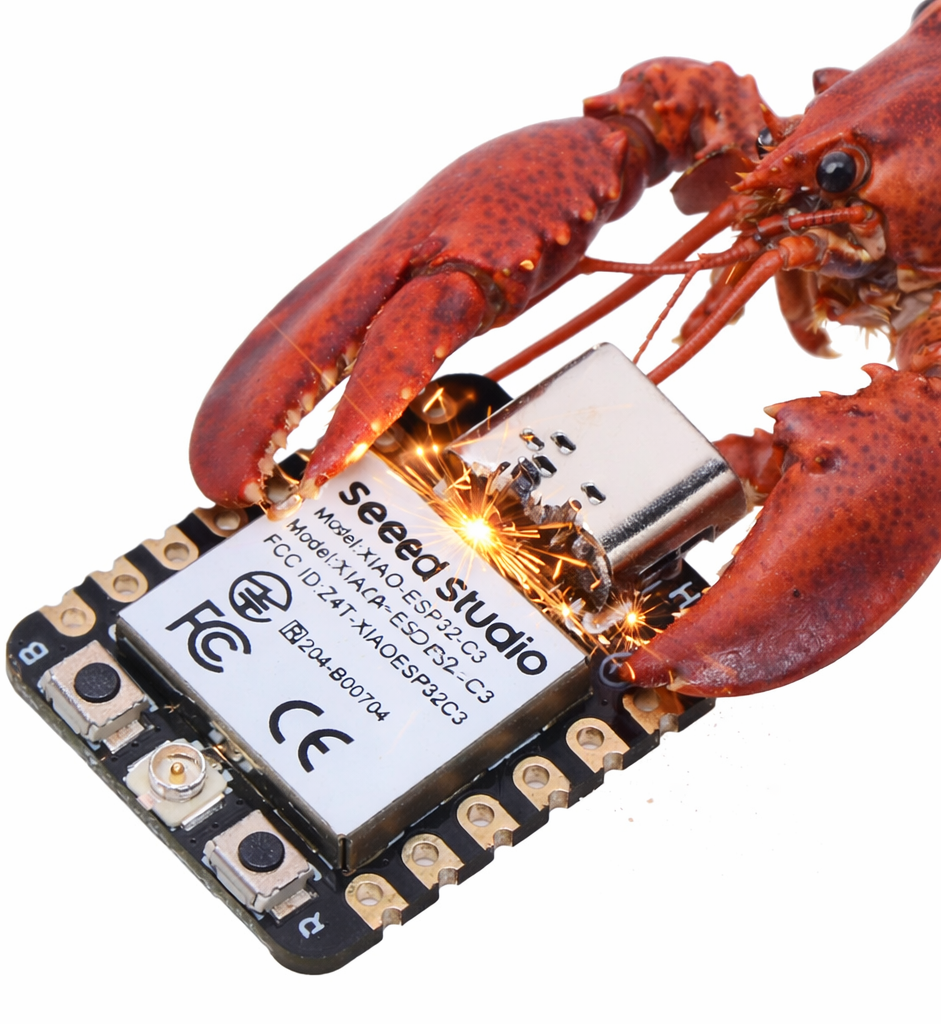
The recommended starter board for zclaw: a Seeed Studio XIAO ESP32-C3, shown being soldered.
- ESP32
- ESP32-C3
- ESP32-S3
- ESP32-C6
- ESP32-WROOM
- ESP32 DevKit
- Seeed XIAO ESP32-C3
What You Will Build
zclaw is a personal AI assistant that runs entirely inside ESP32 firmware. Unlike cloud-connected gadgets that outsource all intelligence to a separate server-side application, zclaw runs its own C-based orchestration layer directly on the chip. You send a message over Telegram or through the hosted web relay; the firmware interprets it, invokes whichever built-in or user-defined tools are needed — reading a GPIO pin, firing a timed schedule, querying device diagnostics — and replies, all within a strict 888 KiB firmware budget.
The practical result is a single small board that can toggle relays, report sensor readings from a DHT or I2C peripheral, send reminders on a schedule, and remember state across reboots, all controlled through plain English. The hard size cap means it fits comfortably on inexpensive ESP32-C3 modules with no external flash storage required. With 2,200+ stars and active development through early 2026, zclaw has built a following among makers who want embedded AI without the weight of a full Linux board.
What You Need
Hardware
- Any supported ESP32 board: ESP32, ESP32-C3, ESP32-S3, or ESP32-C6. Classic ESP32-WROOM and ESP32 DevKit boards are supported. The recommended starter is the Seeed XIAO ESP32-C3 — it is compact and well-tested with zclaw.
- A USB cable for flashing and serial access.
- Optional: a DHT sensor, I2C peripherals such as an environmental sensor or OLED, or a relay module if you want to exercise the GPIO and sensor tools.
Software and Accounts
- A macOS or Linux host machine. The bootstrap script handles both; Linux auto-detects apt-get, pacman, dnf, or zypper.
- An API key from Anthropic, OpenAI, or OpenRouter — or a local Ollama instance and its endpoint URL if you prefer on-network inference.
- A Telegram bot token and your Telegram chat ID if you want to use the Telegram interface. The hosted web relay works without Telegram.
- ESP-IDF and all other toolchain dependencies are installed automatically by the install script; no manual toolchain setup is required.
Typical use cases
Ask zclaw in plain English to set a pin high or low, read its current state, or scan for I2C devices on the bus. No dashboard or mobile app is required — just send a message.
Define daily, periodic, or one-shot tasks through natural language. zclaw's timezone-aware scheduler fires them directly in firmware without a separate home-automation server or hub.
Provision a Telegram bot token and chat with your device from anywhere. The firmware enforces a per-chat allowlist so only approved accounts can issue commands or read sensor data.
Even without Wi-Fi or a working LLM connection, the USB serial admin console lets you inspect GPIO state, run diagnostics, scan for nearby networks, and factory-reset the device.
How It Works
zclaw's firmware is split into a small application core (~38 KiB of app logic) and a much larger ESP-IDF/FreeRTOS runtime that handles Wi-Fi, TLS, and networking. Together they fit inside 888 KiB — the Wi-Fi and networking stack alone accounts for roughly 370 KiB, TLS/crypto another 132 KiB, and the cert bundle and metadata around 96 KiB, leaving the actual zclaw logic at just 4.6% of the total image.
The application layer registers a set of tools — GPIO read and write, I2C scan and transfer, DHT sensor read, cron-like schedules, runtime diagnostics, and persistent key-value memory — in a tool registry. When a user message arrives over Telegram or the web relay, the firmware sends it along with the available tool definitions to the configured LLM provider. The provider responds with a structured tool call or a plain reply; zclaw executes the call on-device and loops until a final answer is ready, then sends it back to the user.
Schedules use a timezone-aware engine with daily, periodic, and one-shot once trigger types. Persistent memory survives reboots via NVS (ESP-IDF's non-volatile storage partition). Default rate limits of 100 requests per hour and 1,000 per day are enforced in firmware and are adjustable at compile time in main/config.h. Four persona modes — neutral, friendly, technical, and witty — adjust the system prompt at runtime.
Build and Flash
Step 1 — Bootstrap (first time)
On macOS or Linux, a single command clones the repo, installs toolchain dependencies, builds the firmware, and flashes it:
bash <(curl -fsSL https://raw.githubusercontent.com/tnm/zclaw/main/scripts/bootstrap.sh)
If you have already cloned the repository, run the installer directly:
./install.sh
For non-interactive or scripted environments:
./install.sh -y
The bootstrap includes a ZCLAW_BOOTSTRAP_SHA256 integrity check you can verify before running. For encrypted credential storage in flash, pass --flash-mode secure during the install flow or use ./scripts/flash-secure.sh directly.
Step 2 — Provision credentials
After flashing, run the provisioning script. It prompts for your Wi-Fi SSID and password, your LLM provider and API key (or Ollama endpoint URL), and optionally your Telegram bot token and allowed chat IDs:
./scripts/provision.sh
Provisioning writes credentials to NVS. You can re-run it at any time without reflashing to update Wi-Fi details, swap LLM providers, or rotate API keys. For local development with a saved profile so you do not retype secrets on every iteration:
./scripts/provision-dev.sh --write-template
# edit ~/.config/zclaw/dev.env, then:
./scripts/provision-dev.sh
Step 3 — Validate
Start the web relay and send a test message to confirm the device is responding end-to-end:
./scripts/web-relay.sh
Step 4 — Monitor and use the local admin console
Open a serial monitor to watch firmware logs and issue local-only commands without an LLM round trip:
./scripts/monitor.sh /dev/cu.usbmodem1101
From the monitor prompt:
/wifi status
/gpio all
/diag all verbose
/bootcount
Typical development loop
./scripts/test.sh host
./scripts/build.sh
./scripts/flash.sh --kill-monitor /dev/cu.usbmodem1101
./scripts/provision-dev.sh --port /dev/cu.usbmodem1101
./scripts/monitor.sh /dev/cu.usbmodem1101
If the serial port is busy between flashes, run ./scripts/release-port.sh and retry.
Extending zclaw and Known Limits
Adding custom tools
zclaw supports user-defined tools at two levels. At the natural language level, you can compose existing built-in tools into new behaviors through prompting. For deeper integration, firmware-level tools are written in C: add a handler function and a registry entry, and the LLM can call your tool exactly the same way it calls built-in GPIO or diagnostic functions. The Build Your Own Tool guide on zclaw.dev covers the pattern in detail.
Project ideas to try
- Wire a relay to a GPIO pin and ask zclaw to toggle it on a daily schedule using plain English.
- Attach a DHT22 temperature and humidity sensor, then set a periodic check that sends a Telegram alert when a threshold is exceeded.
- Use the I2C tools (
i2c_scan,i2c_read,i2c_write) to communicate with an environmental sensor or OLED display wired to the board. - Point zclaw at a local Ollama instance to run entirely offline without cloud API costs or rate limits imposed by a third-party provider.
- Run
./scripts/benchmark.shin relay or serial mode to measure round-trip latency across 20 or more passes and tune your setup.
Limits to be aware of
The 888 KiB firmware cap leaves roughly 55 KiB of headroom in the current default build. Large additions to app logic will require trade-offs. Default rate limits of 100 requests per hour and 1,000 per day are compile-time constants; adjust them in main/config.h before building if your workload requires higher throughput. If the Telegram bot was offline for a period, stale queued messages can replay on reconnect — run ./scripts/telegram-clear-backlog.sh to flush them. Offline LLM inference requires a local Ollama server on the same network; there is no on-device model execution.
zclaw is a well-engineered project for makers who want a tiny always-on AI assistant without a Raspberry Pi or a cloud middleware layer in between. The scripted toolchain removes the friction of ESP-IDF setup, and the provisioning flow makes credential management repeatable across reflashes. The hard 888 KiB firmware cap is an honest engineering constraint that keeps the binary lean and the scope focused.
Sources
github.comtnm/zclaw — repository & README zclaw.devOfficial websiteFacts in this article come from the project's public README and GitHub metadata at the time of writing. Images belong to their respective owners and link back to the original source.