PocketMage PDA: Build an E-Ink PDA with ESP32-S3
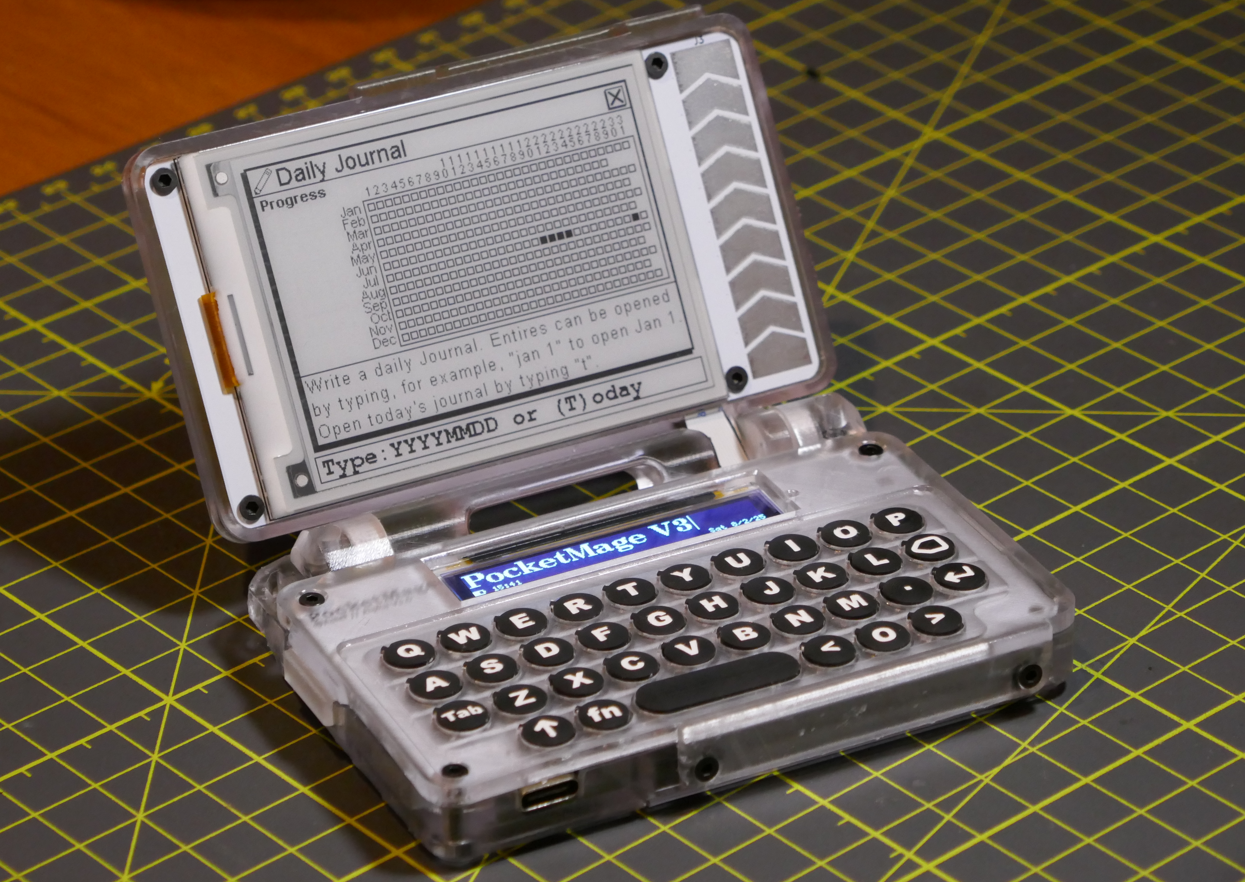
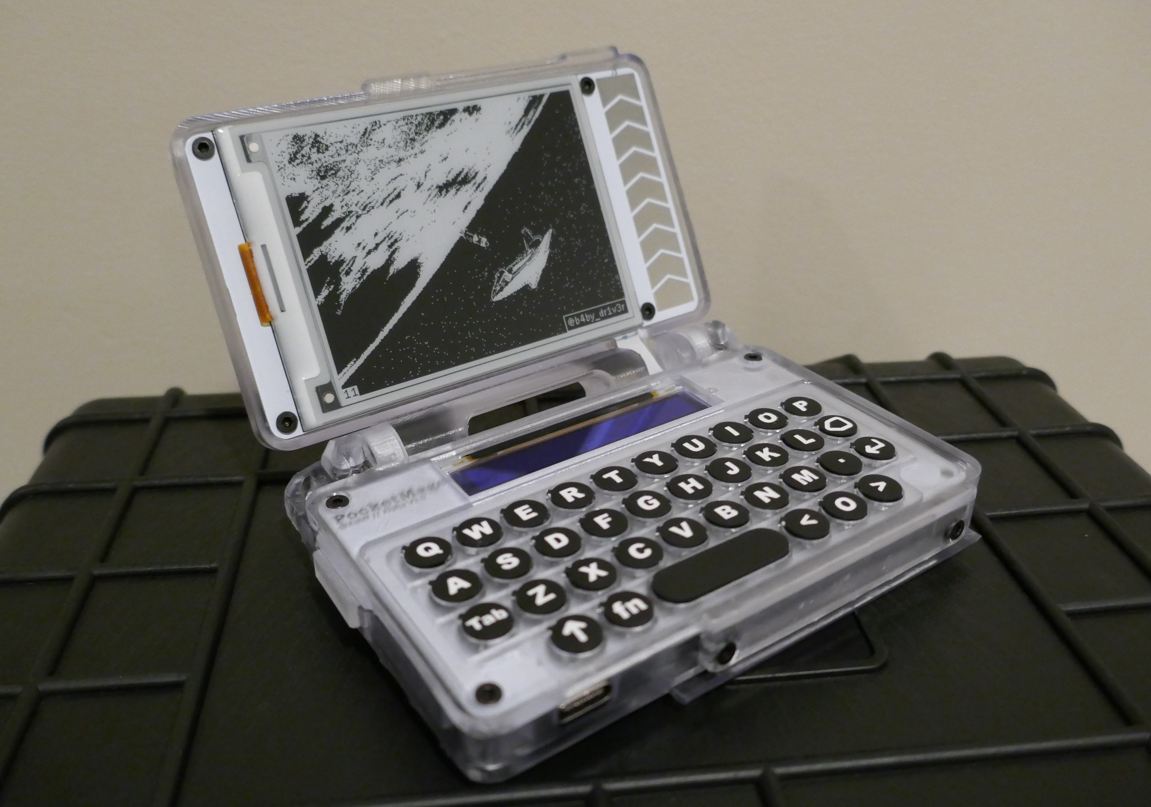
PocketMage PDA home menu showing the app launcher on the E-Ink display
- ESP32-S3 WROOM1 (16 MB flash, 8 MB RAM)
- 3.1" 320x240 1-bit SPI E-Ink panel (GDEQ031T10)
- 256x32 1-bit SPI OLED (SSD1326, ER-OLED018-1W)
- MicroSD card slot
- TCA8418 I2C keyboard matrix IC
- PCF8563T I2C RTC module
- 1200 mAh LiPo battery with JST PH 2 mm connector
- USB Type-C connector
- Piezo buzzer
- Power button
- Expansion port
What You Will Build
PocketMage is a clamshell personal digital assistant powered by an ESP32-S3. At its heart is an unusual display pairing: a 3.1-inch, 320×240 E-Ink panel for the main screen and a narrow 256×32 OLED strip running alongside it. The OLED handles fast-changing UI feedback — status bars, cursor movement, typing echoes — while the E-Ink panel holds the calm, paper-like content that makes long reading and writing sessions comfortable without draining the battery.
The device runs a custom operating system written in C++. Right now that OS includes a GUI home menu, a plain-text file editor, a file manager (FileWiz), a calendar, a journal, a dictionary app (Lexicon), a Tasks app, a USB file transfer app, a COMM mesh chat app, an SSH client, and a terminal powered by a built-in scripting language called Wrench. The home menu also accepts typed commands — roll dice, set the time, open a file by name, and more.
The project is still in active development, but it already works well enough that the author is making it available on Crowd Supply as a kit. If you want to build your own, you have access to the firmware source code now, with PCB schematics and 3D files to follow as the hardware design matures.
 \2
\2What You Need
Hardware (as listed in the project README)
- ESP32-S3 WROOM1 module with 16 MB flash and 8 MB RAM (WiFi and Bluetooth included)
- 3.1" 320×240 1-bit SPI E-Ink panel — GDEQ031T10 with integrated driver
- 256×32 1-bit SPI OLED — SSD1326 / ER-OLED018-1W with integrated driver
- MicroSD card slot (supports up to 2 TB cards)
- TCA8418 I2C keyboard matrix IC (for the physical keys)
- PCF8563T I2C real-time clock module
- 1200 mAh pouch-style LiPo battery with JST PH 2 mm connector
- USB Type-C connector
- Piezo buzzer and power button
- Expansion port breaking out 3.3 V, GND, I2C, SPI, four GPIO pins, and switchable UART TX/RX
Because the hardware uses a custom PCB, the easiest path right now is to wait for the Crowd Supply kit or source the components and fabricate the board yourself once the KiCad schematics are released. The 3D-printed enclosure files will follow the same open-source release.
Software
- PlatformIO for building and flashing the firmware
- A C++ toolchain (handled automatically by PlatformIO)
- Git to clone the repository
Start at the PocketMage Docs site before touching any code — it covers build environments, the command manual, scripting, and the full App API reference.
Typical use cases
The E-Ink screen and plain-text editor make PocketMage a distraction-free writing device that works without a network connection and is easy on the eyes in bright light.
The open App API and template file let developers build and flash new apps in C++ using PlatformIO, turning the device into a platform rather than a fixed product.
The included COMM app enables mesh chat over the ESP32-S3's radios, and a LoRa/Meshtastic add-on module is already planned for longer-range off-grid messaging.
The twelve-pin expansion port exposes I2C, SPI, GPIO, and UART, making it straightforward to attach sensors, modules, or custom breakout boards to the device.
How It Works
The central design challenge with E-Ink displays is their slow refresh rate — a full panel redraw takes a noticeable fraction of a second and produces a visible flash. PocketMage solves this with a two-screen strategy. The OLED strip refreshes instantly and handles anything that changes quickly: the cursor, status indicators, and short feedback messages. The E-Ink panel only updates when content genuinely changes, preserving its key advantages — sharp contrast, no backlight glare, and very low idle power draw.
The firmware is a custom OS built entirely in C++, compiled and flashed with PlatformIO. The OS manages a GUI home menu, app launching, file I/O over MicroSD, I2C peripherals (keyboard matrix via TCA8418, real-time clock via PCF8563T), and the dual-display pipeline. Apps are self-contained C++ modules that register themselves with the OS through a defined App API. A built-in scripting language called Wrench powers the terminal app and enables lightweight automation without recompiling.
WiFi and Bluetooth are available through the ESP32-S3's built-in radios. Planned features include LoRa/Meshtastic and battery expansion add-on modules via the expansion port.
Build and Flash Steps
The README does not include specific command-line build or flash steps — those are documented in full on the project's docs site. Follow these steps in order:
-
Read the docs first. Go to PocketMage Docs and work through the Build Environments page. It covers PlatformIO setup and any platform-specific requirements.
-
Clone the repository from github.com/TalismanDesign/PocketMage_PDA.
-
Open the project in PlatformIO (VS Code with the PlatformIO extension, or the PlatformIO CLI). The project lives under
Code/PocketMageOS/. -
Build and flash using PlatformIO's standard build/upload workflow. Select the correct environment for your hardware from the build environments page.
-
Write your first app using
APP_TEMPLATE.cppin the source tree as your starting point, then consult the App API Reference. The Developing For the PocketMage video walkthrough is recommended for a first pass.
If you run into trouble, the FAQ and the repository's open issues are the best starting points before filing a new issue.
Extending It and Current Limitations
Ways to extend PocketMage
- Write a new app. The App API is documented and there is a template file ready to use. Apps are compiled into the firmware, but an OTA app loader is already on the software list.
- Use the expansion port. The twelve-pin expansion header breaks out I2C, SPI, four GPIO pins, and switchable UART — enough to attach sensors, additional displays, or radio modules without modifying the main board.
- Contribute to the Wrench scripting layer. The built-in scripting language runs in the terminal app. Extending it is a lower barrier than writing a full C++ app.
- Planned add-ons mentioned in the README include a LoRa/Meshtastic module and a battery expansion module — both would slot onto the expansion port.
- Planned software includes an e-book reader, timers and alarms, Bluetooth keyboard support, Google Docs/Calendar sync, and custom text abbreviations.
Current limitations to be aware of
- The hardware files (KiCad schematics, 3D enclosure) are not yet open-sourced; they are planned for release once the design reaches maturity. Building the physical device today means waiting for the Crowd Supply kit or working from the software side only.
- The project is labeled BETA. There are 28 open issues at the time of writing, and the feature set is still growing.
- The E-Ink panel is 1-bit (black and white only), so graphical apps are limited to whatever looks good at that colour depth.
PocketMage is one of the most complete ESP32 PDA projects in the open-source space — the dual E-Ink and OLED display strategy is a genuinely smart solution to a well-known hardware constraint, and the growing app ecosystem gives it real daily utility. The hardware files are not yet public, so you are either building for the software side or waiting for the Crowd Supply kit, but the firmware is active, well-documented, and worth following if handheld ESP32 devices interest you.
Sources
github.comTalismanDesign/PocketMage_PDA — repository & README talismandesign.github.ioOfficial websiteFacts in this article come from the project's public README and GitHub metadata at the time of writing. Images belong to their respective owners and link back to the original source.