TamaFi: Build a WiFi-Enabled Virtual Pet with ESP32-S3

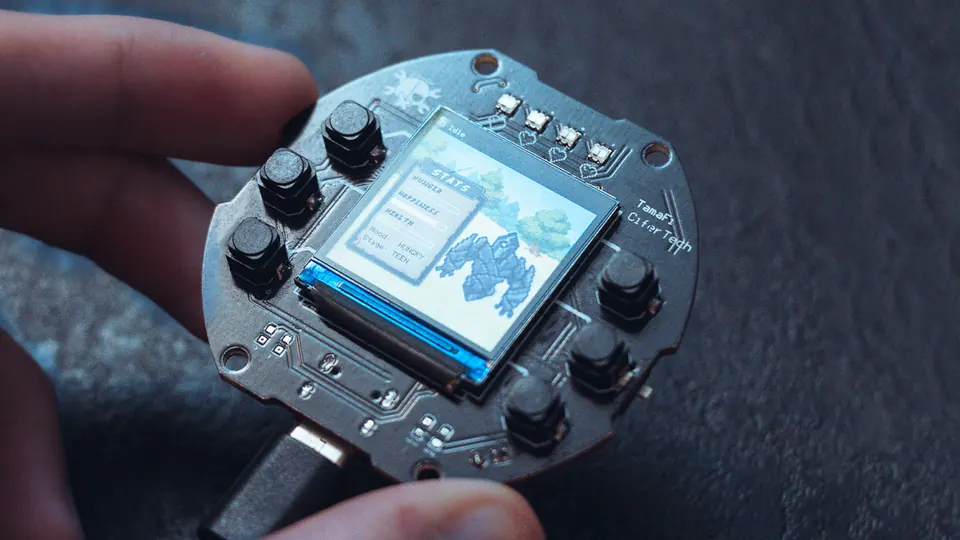
TamaFi V2 banner showing the handheld device and its compact custom PCB design
- ESP32-S3 module
- TFT ST7789 240×240 display (1.3–1.54")
- 4× WS2812-2020 addressable RGB LEDs
- 6× soft tactile switches
- Buzzer
- TP4056 single-cell Li-ion/Li-Po charger
- MOSFET
- USB-C connector
- CP2102 USB-to-TTL module (optional)
What You Will Build
TamaFi is a modern take on the classic Tamagotchi virtual pet, rebuilt around the ESP32-S3. Your pet lives on a compact custom PCB, shown on a 240×240 full-color TFT screen, lit by four addressable RGB LEDs, and fed by nearby WiFi networks. It hunts for WiFi signals, rests, explores, and evolves through four life stages — Baby, Teen, Adult, and Elder — depending on how well you maintain its hunger, happiness, and health, and what the radio environment around it looks like.
Unlike a simple animation loop, TamaFi runs a small decision engine on every logic tick. Nearby WiFi networks directly affect your pet's stats: a dense environment with many open networks makes a well-fed, curious pet, while a dead zone with no signals produces a bored, hungry one. Stats and settings are written to flash memory via the ESP32 Preferences library, so your pet survives reboots. That persistence, combined with a non-blocking firmware design where animations, WiFi scanning, audio, and UI rendering all run concurrently without a single delay(), makes TamaFi a genuinely interesting project both as a fun gadget and as a study in real-world ESP32-S3 firmware architecture.
 \2
\2What You Need
Hardware
All components are described in the README and schematic files in the repository:
- ESP32-S3 module
- 1.3–1.54" TFT ST7789 240×240 display
- 4× WS2812-2020 addressable RGB LEDs
- 6× soft tactile switches (three per side, for navigation and shortcuts)
- Buzzer (driven with PWM via the ESP32 LEDc peripheral)
- TP4056 single-cell Li-ion/Li-Po charger
- MOSFET for TFT backlight brightness control
- USB-C connector (on PCB)
- CP2102 USB-to-TTL module (optional — useful for serial debugging during development)
Building TamaFi as intended means ordering or fabricating the custom PCB from the files in the PCB/ directory. V2 is designed as a finished handheld device, not a breadboard prototype. Exact pin assignments live in the Schematic/ directory — there is no standalone breadboard wiring diagram in the README.
Software
- Arduino IDE
- ESP32 Arduino core (installed via Arduino Boards Manager, Espressif package)
- TFT_eSPI library
- Adafruit NeoPixel library
- WiFi and Preferences libraries (bundled with the ESP32 Arduino core)
Typical use cases
A fully self-contained virtual pet device with color animations, chiptune sound effects, and a multi-stage lifecycle — no phone or cloud service required.
The pet reacts to its RF environment in real time. Dense networks make it happy and curious; a signal-free room leaves it bored and hungry, turning passive WiFi scanning into a gameplay mechanic.
TamaFi combines an ESP32-S3, TFT display, NeoPixels, PWM buzzer, and battery management on one custom PCB — practical exposure to multi-peripheral embedded design.
The non-blocking state machine, double-buffered display rendering, and concurrent WiFi/audio/animation design make TamaFi a solid reference for writing responsive ESP32 firmware.
How It Works
TamaFi's firmware is built entirely around non-blocking updates. No delay() calls appear in the main logic, so animations, WiFi scanning, sound, and UI all coexist on a single core without stepping on each other.
Decision engine: On every logic tick the firmware evaluates three categories of input — pet stats (hunger, happiness, health), personality traits (curiosity, activity, stress), and environment data (number of visible networks, open vs hidden ratio, average RSSI). From that it picks one of four behaviors:
- Hunt — consumes WiFi scan results to feed the pet and adjust its stats
- Explore — reacts to network diversity, hidden networks, and open networks nearby
- Rest — enters a sleep cycle with a dedicated egg animation and gradual stat recovery
- Idle — holds the home screen with mood-driven sprite animations
Mood system: Six moods — Hungry, Happy, Curious, Bored, Sick, and Excited/Calm — are derived continuously from stats and environment. Mood changes idle animation speed, NeoPixel color patterns, and how frequently the pet chooses to hunt, explore, or rest.
Evolution: Age is tracked in minutes, hours, and days. Progression from Baby through Teen, Adult, and Elder depends on time alive combined with average stat quality and environment score. Each stage transition triggers special SFX and animations.
Rendering: All frames are drawn into a 240×240 off-screen sprite using TFT_eSprite from TFT_eSPI, then pushed to the display in a single operation, eliminating flicker. The full menu system — Pet Status, Environment, System Info, Controls, Settings, and Diagnostics — is navigated with the three left-side buttons (UP / OK / DOWN). Settings changes are written to NVS via Preferences so they persist across power cycles.
Setting Up and Flashing the Firmware
-
Clone the repository from github.com/cifertech/TamaFi.
-
Install the ESP32 Arduino core: open Arduino IDE, go to Boards Manager, search for
esp32, and install the package by Espressif. -
Install required libraries via Library Manager:
TFT_eSPIAdafruit NeoPixel
-
Configure TFT_eSPI: edit the
User_Setup.hfile inside the TFT_eSPI library folder to match the pin assignments shown in theSchematic/directory. The default library settings will not match the TamaFi PCB — skipping this step will produce a blank display or a compile error. -
Open
main.inofrom the cloned repository in Arduino IDE. -
Select your board: choose ESP32S3 Dev Module (or the matching variant) from the Arduino board list.
-
Connect via USB-C. The ESP32-S3 supports native USB flashing. If you are using the optional CP2102 module during development, select its serial port instead.
-
Enter download mode if needed: hold the BOOT button, press and release RESET, then release BOOT. Whether this step is required depends on your specific board configuration.
-
Click Upload. Once flashing completes, the pet boots to the home screen with its stats bars, mood label, and activity indicator.
For additional setup details, the full documentation is at cifertech.net.
Ideas to Extend It — and Limitations to Know
Ways to go further:
- Companion app: The README lists a companion web app and desktop tooling as planned. Contributing a simple interface that reads pet state over serial or WiFi would be a natural next step once the core firmware stabilizes.
- New LED patterns: NeoPixel mood and activity effects are still being refined per the project status table. Adding new WS2812 sequences for each mood state is a low-barrier starting point for firmware contributions.
- Custom sprites: TamaFi supports a DisplayKit-ready UI workflow, meaning you can design new pet sprites and screen layouts externally and export them without touching core logic.
- New sound sequences: The retro sound engine uses non-blocking note arrays driven by LEDc PWM. Adding chiptune melodies for new events — a level-up fanfare, a critical health warning — only requires defining new note arrays in the sound module.
- Menu extensions: The menu system layout and styling is still in progress. Adding a minigame screen or a historical stats view is feasible because the UI layer is modular.
Limitations to be aware of:
- V2 requires the custom PCB. There is no breadboard wiring guide in the README; all pin information is in the
Schematic/directory. - Some advanced and sensitive behaviors are intentionally simplified or left as placeholders in the public firmware, as noted explicitly in the README.
- The project is under active development — menus, NeoPixel effects, and desktop tooling are incomplete.
- TFT_eSPI requires manual
User_Setup.hconfiguration before the project will compile and display correctly on the TamaFi PCB.
TamaFi V2 is a well-considered open-source project that turns a nostalgic concept into a practical firmware learning exercise. The WiFi-driven behavior engine and non-blocking architecture set it apart from typical display demos, and the custom PCB gives it the feel of a finished product rather than a development board prototype. V2 is still under active development — menus and NeoPixel effects remain works in progress — but the core pet engine, mood system, and evolution logic are stable and worth studying.
Sources
github.comcifertech/TamaFi — repository & README youtu.beOfficial websiteFacts in this article come from the project's public README and GitHub metadata at the time of writing. Images belong to their respective owners and link back to the original source.