VictronMPPT-ESPHOME: Monitor Victron Devices with ESP32
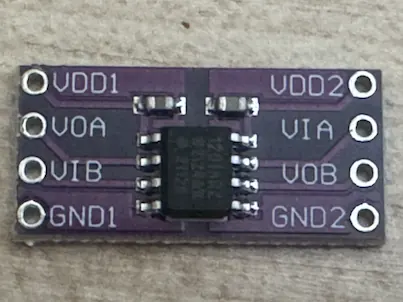
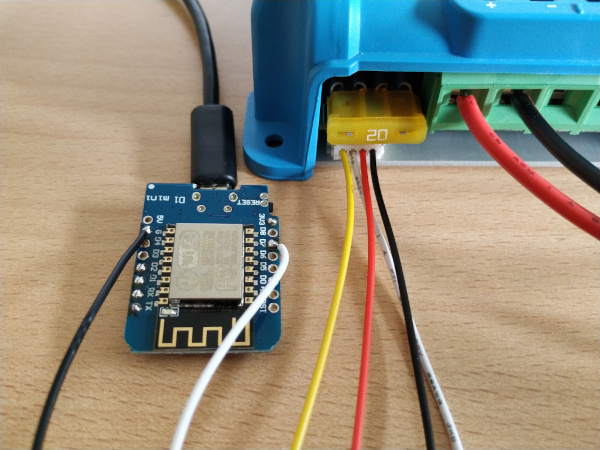
ADUM1201 isolator wiring between a Victron VE.Direct port and an ESP board
- ESP32
- ESP8266
- BK72xx
- RP2040
- Victron SmartSolar MPPT 75/10
- Victron SmartSolar MPPT 75/15
- Victron SmartSolar MPPT 100/15
- Victron SmartSolar MPPT 100/20
- Victron BlueSolar MPPT 100/30
- Victron SmartSolar MPPT 150/35
- Victron SmartSolar MPPT 150/45
- Victron SmartSolar MPPT 150/60
- Victron SmartSolar MPPT VE.Can 150/100 rev2
- Victron SmartSolar MPPT 250/70
- Victron Phoenix Inverter 12/500
- Victron Blue Smart IP65 Charger 12|25
- Victron Orion XS 12|12
- Victron SmartShunt 500A/50mV
- ADUM1201 digital isolator
- JST-PH 2.0mm connector
What You Will Build and Why
Victron Energy's solar chargers, battery shunts and inverters all carry a small four-pin VE.Direct port that streams live telemetry over a simple serial protocol once per second. Without extra hardware or a paid subscription you can read panel voltage, battery voltage and current, state of charge, yield totals, error codes and dozens of other fields.
This project wraps that serial stream in an ESPHome external component. Once flashed, your ESP32 or ESP8266 appears in Home Assistant as a device with fully typed sensors — no custom parsing, no MQTT juggling, no cloud dependency. You get real-time solar data on a local network with the same YAML workflow you already use for every other ESPHome node.
 \2
\2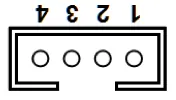 \2
\2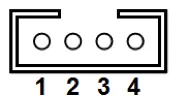 \2
\2What You Need
Hardware
- Any Victron device with a VE.Direct port (MPPT charger, SmartShunt, Phoenix Inverter, Orion XS, Blue Smart charger, and more)
- An ESP32, ESP8266, BK72xx or RP2040 development board
- A JST-PH 2.0 mm four-pin cable or bare wires to reach the VE.Direct port
- Important: check the TX voltage of your Victron device before wiring. Some models output 5 V; others output 3.3 V. If your device is 5 V, add a resistor voltage divider or a logic-level converter between the Victron TX pin and the ESP RX pin to avoid damaging the microcontroller
- Optional but recommended: an ADUM1201 digital isolator for galvanic isolation between the Victron device and the ESP, protecting both sides from ground loops or transients
Software
- ESPHome 2024.6.0 or higher (
pip3 install esphome) - A working ESPHome or Home Assistant installation
- Git (to clone the example files)
Typical use cases
Pull live panel voltage, battery voltage, current, and state of charge from any Victron MPPT charger into Home Assistant for real-time solar dashboards.
Log daily and cumulative energy yield, charge cycles, and historical min/max voltages to track long-term battery and panel health.
Monitor error codes, warning codes and off-reason bitmasks from your Victron device and trigger Home Assistant automations when faults appear.
Run the node entirely without cloud services — all data stays on the local network via MQTT or the native ESPHome API, suitable for off-grid cabins and boats.
How It Works
The VE.Direct protocol is a one-way, human-readable serial stream. The Victron device transmits labelled key-value pairs at 19200 baud, one complete frame per second. The component opens a UART listener on the ESP, parses every label it recognises, and maps each one to an ESPHome sensor entity.
Because the communication is read-only, only the TX pin of the Victron device (wired to the RX pin of the ESP) is needed. The Victron RX line is not connected in a minimal setup. The component publishes sensor updates each time a valid frame arrives. You can slow down Home Assistant update frequency using ESPHome's built-in throttle filter without losing any data on the device side.
Galvanic isolation via the ADUM1201 chip is the recommended production approach. The VE.Direct 5 V supply pin is strictly limited to 10 mA average (20 mA burst), far below what an ESP draws, so the ESP must be powered independently — never from the VE.Direct port.
Wiring
The minimal connection uses three wires. Match RX/TX pin names to your board variant.
              UART-TTL
┌────────────────┐                ┌──────────────────┐
│           GND o│<-------------->│o GND             │
│ Victron    TX o│--------------->│o D7 / GPIO16     │
│ Charger    RX o│  (not used)    │  ESP32/ESP8266   │
│            5V o│  (not used)    │                  │
└────────────────┘                └──────────────────┘
| VE.Direct pin | Purpose | ESP8266 | ESP32 |
|---|---|---|---|
| 1 | GND | GND | GND |
| 3 | TX | D7 (RX) | GPIO16 (RX) |
For the insulated connection using an ADUM1201, the wiring table from the README maps VE.Direct pins through both sides of the isolator:
| VE.Direct | Purpose | ADUM1201 side 2 | ADUM1201 side 1 | ESP8266 | ESP32 |
|---|---|---|---|---|---|
| 1 | GND | GND2 | GND1 | GND | GND |
| 2 | RX | VOB | VIB | D8 (TX) | GPIO17 (TX) |
| 3 | TX | VIA | VOA | D7 (RX) | GPIO16 (RX) |
| 4 | 5V/3V3 | VDD2 | VDD1 | 3V3 or 5V | 3V3 or 5V |
Note: if you leave the Victron RX line unconnected, still tie the ADUM1201 VIB pin to VDD1 or GND1 so it is not left floating.
Build and Flash
Step 1 — Install ESPHome and clone the repo
pip3 install esphome
git clone https://github.com/KinDR007/VictronMPPT-ESPHOME.git
cd VictronMPPT-ESPHOME
Step 2 — Create your secrets file
cat > secrets.yaml <<EOF
mqtt_host: MY_MQTT_HOST
mqtt_username: MY_MQTT_USERNAME
mqtt_password: MY_MQTT_PASSWORD
wifi_ssid: MY_WIFI_SSID
wifi_password: MY_WIFI_PASSWORD
EOF
Step 3 — Flash the example configuration
esphome run esp8266-example.yaml
Alternatively, add the component directly to any existing ESPHome node by pasting this into your YAML:
external_components:
  - source: github://KinDR007/VictronMPPT-ESPHOME@main

uart:
  id: uart_0
  tx_pin: D8   # Not used — communication is read-only
  rx_pin: D7
  baud_rate: 19200
  rx_buffer_size: 256

victron:
  id: victron0
  uart_id: uart_0

sensor:
  - platform: victron
    victron_id: victron0
    panel_voltage:
      name: "Panel voltage"
    battery_voltage:
      name: "Battery voltage"
    battery_current:
      name: "Battery current"
The uart_id and victron_id keys are optional when only one UART and one Victron device are configured. All individual sensors are optional — include only the ones you need.
Step 4 — Debugging
If data does not appear, flash the debug example to capture the raw serial stream and open a GitHub issue with the log output:
esphome run debug-esp8266-example.yaml
Extending the Build and Known Limitations
Ideas to extend
- Add ESPHome's
throttlefilter on any sensor to reduce the update rate sent to Home Assistant without losing resolution on the device - Combine with a display component (SSD1306, ILI9341) to show panel power and battery SOC on a local screen without Home Assistant
- Use the
state_of_charge,time_to_goanderror_codesensors to drive automations — send a notification when the battery drops below a threshold or when an error code appears - For installations with multiple Victron devices, the component supports multiple UART buses, each with its own
victronblock - The
yield_today,yield_yesterday,amount_of_charged_energyandamount_of_discharged_energyhistorical sensors give you a full energy dashboard without any server-side processing
Limitations to be aware of
- The VE.Direct port cannot power the ESP. You must supply the ESP from a separate 3.3 V or 5 V source
- The 5 V logic level on some Victron devices will damage a 3.3 V ESP input if connected directly — always measure the TX voltage before wiring
- Communication is strictly read-only in the default configuration; sending commands to the Victron device is not part of this component
- The component has been tested on the specific models listed in the README; behaviour on unlisted models may vary and should be verified with the debug firmware first
VictronMPPT-ESPHOME is a well-maintained, MIT-licensed ESPHome component that covers the full VE.Direct sensor set across a wide range of Victron hardware, with 418 stars and active commits through 2026. The main skill required is careful attention to voltage levels at the VE.Direct connector — get that right and the YAML configuration is straightforward for anyone already familiar with ESPHome. It is the most practical path to integrating Victron solar equipment into a local Home Assistant installation without proprietary bridges.
Sources
github.comKinDR007/VictronMPPT-ESPHOME — repository & READMEFacts in this article come from the project's public README and GitHub metadata at the time of writing. Images belong to their respective owners and link back to the original source.