WLED Wemos Shield: Build a Wi-Fi LED Controller for ESP32
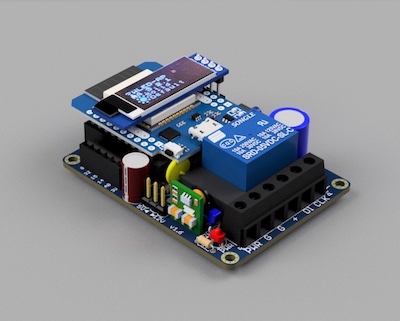
Assembled WLED Wemos Shield with an OLED display connected via the I2C header
- Wemos D1 Mini (ESP8266)
- Wemos ESP32 D1 Mini
- Addressable LED strips (WS2811, WS2812, WS2813, WS2815, SK6812, APA102)
- OLED display (I2C)
- Dallas temperature sensor
- IR receiver
What You Will Build
This project centers on an open-source PCB shield that sits on top of a Wemos D1 Mini and turns it into a reliable, Wi-Fi-connected addressable LED controller. The target firmware is WLED — a mature open-source platform with a browser-based interface, a mobile app, a desktop app, and hundreds of built-in lighting effects.
What the shield adds over a bare dev board is exactly what LED controller builds usually require you to figure out yourself: a proper signal-level shifter for stable data output, selectable power input for 5 V or 12/24 V strips, a relay for true idle power-off, and breakout headers for common add-ons such as an OLED display, a temperature sensor, and an IR receiver. The result is a compact, soldering-friendly board that works with the most popular addressable LED protocols and scales from a single bedroom light strip to a multi-room installation.
What You Need
Hardware
- Wemos D1 Mini (ESP8266) or Wemos ESP32 D1 Mini — the two are not interchangeable on this shield, so decide which you want before ordering parts. The ESP32 variant gains I2S connectivity for digital microphone input.
- WLED Wemos Shield PCB — order bare boards from the shared PCBWay project page linked in the repository ($5 for 10 boards). If you prefer to skip soldering entirely, a fully assembled shield is available on Tindie.
- Addressable LED strip in one of the supported protocols:
- 1-wire: WS2811, WS2812, WS2813, WS2815, SK6812
- 2-wire (data + clock): APA102
- Power supply matched to your strip — the shield's power selector supports both 5 V and 12/24 V.
- Optional add-ons mentioned in the README: I2C OLED display, Dallas temperature sensor, IR receiver, analog or digital sound sensor (for audio-reactive firmware builds).
Software
Pre-compiled WLED .bin firmware files are included in the repository under resources/Firmware/, organized by build variant:
- @Aircoookie — official WLED firmware releases
- @blazoncek — advanced development fork builds
- @Atuline — sound-reactive builds
- @MoonModules — enhanced audio-reactive builds
You will also need a firmware flashing tool to load the .bin onto your board, and the WLED mobile or desktop app for day-to-day control.
Typical use cases
Drive WS2812 or SK6812 strips for TV bias lighting, under-cabinet runs, or shelf lighting with full Wi-Fi control and WLED's built-in effect library.
Connect a microphone to the sound input headers and flash an audio-reactive firmware build for music-synchronized LED effects at parties or events.
Automate and theme outdoor or indoor addressable strips for holidays, with the on-board relay cutting idle power draw when the display is off.
Deploy several shields around a home and synchronize them over Wi-Fi using WLED's built-in sync and segment features for cohesive lighting across rooms.
How the Shield Works
The shield solves several hardware problems that come up every time you try to drive addressable LEDs from a bare ESP8266 or ESP32 board.
Level shifter — LED strips running at 5 V expect a 5 V data signal. ESP8266 and ESP32 GPIO pins output 3.3 V, which is often enough to work but is outside spec and can cause glitches. The shield includes a dedicated level shifter to produce a clean 5 V signal.
Power selection — A solder jumper lets you choose between 5 V and 12/24 V input. That single change lets you use the same board with short 5 V strips or longer 12 V or 24 V runs without rewiring the power path.
Relay for power saving — Even when WLED sets all LEDs to off, an LED strip continues to draw standby current. The on-board relay can fully cut power to the strip, which matters in always-on installations where idle draw adds up.
Auxiliary power output — A 5 V auxiliary output powers secondary devices such as a small external relay or other 5 V accessories connected to the build.
Connectivity headers — An I2C header accepts an OLED display or I2C sensors. Analog and digital inputs are available for sound-reactive microphone modules. ESP32 boards also have I2S connectivity for digital-interface microphones. An optional PWM fan circuit handles thermal management inside an enclosure.
Plug-in add-on boards — The repository includes a library of modular add-on boards that plug into the shield headers, letting you extend functionality without modifying the main PCB.
Build and Flash Steps
Full assembly documentation, component values, solder-jumper maps, and wiring diagrams live in the project wiki linked from the repository. The steps below follow the order described in the README.
1. Order the PCB. Use the PCBWay shared project link in the repository to order bare boards — ten boards for $5 is the price quoted in the README. If you want to skip assembly, order the pre-assembled shield from Tindie.
2. Solder the components. The README describes the components as easy to solder. Consult the wiki for the full BOM and placement guide. Before closing up the board, set the solder jumpers for your intended power voltage (5 V or 12/24 V) and LED protocol (1-wire or 2-wire).
3. Seat the Wemos module. Press your Wemos D1 Mini (ESP8266 or ESP32) into the shield header pins. Use the board variant that matches the firmware you plan to flash — the two are not interchangeable.
4. Wire the LED strip. Connect the strip's data line (and clock line for APA102) and power leads to the appropriate terminals on the shield. Connect your power supply to the board's power input.
5. Choose and flash firmware.
Navigate to resources/Firmware/ in the repository and pick the .bin file for your board and feature set — standard WLED for most builds, or one of the sound-reactive variants if you are connecting a microphone. Flash the file to the board using your preferred flashing tool.
6. Configure WLED. On first boot, WLED creates its own Wi-Fi access point. Connect to it from a phone or laptop, enter your home network credentials, then open the WLED web interface in a browser. Set the LED type, pixel count, and any add-on features (OLED, temperature sensor, IR receiver) through the interface. The WLED mobile app and desktop app can also control the device once it is on your network.
Extend the Build and Know the Limits
Sound-reactive lighting — Flash one of the audio-reactive builds (Atuline or MoonModules fork) and connect an analog or digital microphone module to the sound input headers. The LEDs will respond to music or ambient sound in real time.
OLED status display — An I2C OLED display connected to the on-board header can show IP address, brightness level, and the active effect name without needing to reach for a phone.
Temperature-aware automation — A Dallas temperature sensor on the optional header feeds data into WLED's automation features, useful for protecting dense LED strips or enclosed controllers from overheating.
IR remote control — Fit the optional IR receiver and pair an infrared remote for hands-free control of brightness, color, and effects — practical in home-theater setups where a phone is inconvenient.
Fan cooling — The PWM fan circuit on the shield can drive a small cooling fan inside an enclosure, keeping the controller and power supply at safe temperatures in high-load installs.
Limitations to keep in mind — The shield is sized for the Wemos D1 Mini form factor; other ESP32 modules will not fit without modification. Assembly details, exact component values, and jumper configuration tables are in the project wiki rather than the README, so plan time to read through the wiki before buying parts. The board variants for ESP8266 and ESP32 are separate — choose the right one for your intended firmware.
The WLED Wemos Shield is a practical, well-considered open-source PCB that removes the common friction points of building an addressable LED controller — unreliable signal levels, awkward power wiring, and nowhere to connect add-ons — and packages them into one compact board. It is an ideal intermediate build for any maker who wants a solid WLED platform without designing their own hardware. The active repository, multiple firmware variants, PCBWay ordering link, and Tindie assembled option make it accessible whether you prefer to solder or not.
Sources
github.comsrg74/WLED-wemos-shield — repository & README github.comOfficial websiteFacts in this article come from the project's public README and GitHub metadata at the time of writing. Images belong to their respective owners and link back to the original source.