SpotMicroESP32: Build a 3D-Printed Quadruped Robot with ESP32
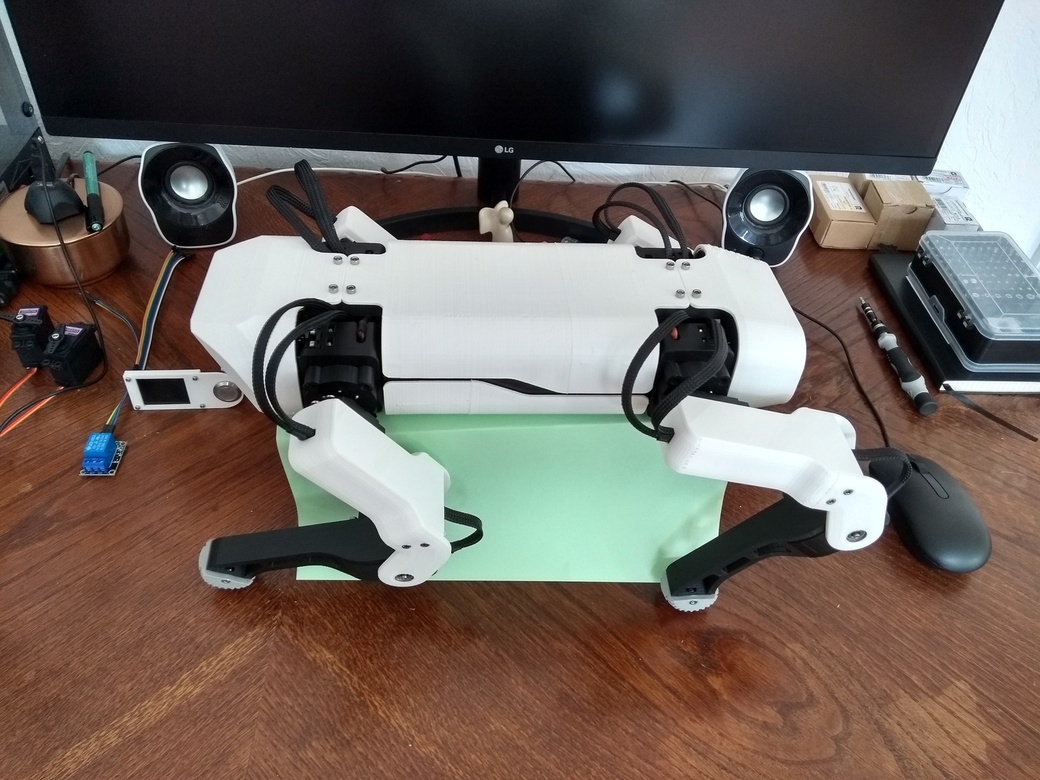
The assembled SpotMicroESP32 quadruped robot, showing the 3D-printed chassis, four articulated legs, and head unit with camera mount.
- ESP32-DevKitC
- ESP32-CAM (OV2640 v2)
- FT232RL USB-TTL Adapter
- MG996R Servo (x12) or DS3218MG Servo (up to x12)
- FSH6S Servo Horn (x12)
- 625ZZ Ball Bearing (x8)
- PCA9685 16-Channel 12-Bit PWM Board
- GY-521 Gyroscope and Accelerometer
- HC-SR04 Ultrasonic Sensor (x2)
- WS2812b 12-LED Ring (50mm outer diameter)
- 0.96" OLED I2C Display
- HW-482 / KY-019 5V 10A Relay Module
- ACS712 30A Current Sensor Module
- 25V Voltage Sensor Module
- XL4016 DC-DC 9A Step-Down Converter or SZBK07 DC-DC 20A Step-Down Converter
- LM2596 DC-DC Step-Down Module
- 5200–6200mAh 30C+ 2S LiPo Battery
- 19mm Illuminated Latching Push Button
- Micro-USB to DIP Adapter (x2)
What You Will Build
SpotMicroESP32 is a four-legged walking robot — a quadruped — based on the original SpotMicro design by Deok-yeon Kim. This remix by michaelkubina redesigns every printed part so that the entire robot can be 3D printed without any support structures, reducing filament waste and post-processing effort significantly.
The ESP32-DevKitC acts as the central microcontroller, managing all low-level electronics: 12 servos across four articulated legs, two HC-SR04 ultrasonic sensors for obstacle detection, a GY-521 IMU for measuring orientation and acceleration, an ESP32-CAM for live video, a WS2812b LED ring for visual feedback, and a small OLED display for status readouts. Heavier computation — such as gait planning or computer vision — runs on an external device, which sends commands back to the robot over Wi-Fi or Bluetooth.
This is a substantial build, both mechanically and electronically. Expect it to take significant time across 3D printing, assembly, and firmware setup. The reward is a capable, open-source quadruped platform that the global SpotMicro community continues to develop.
What You Need
Electronics
- 1x ESP32-DevKitC — the main MCU with Wi-Fi and BLE
- 1x ESP32-CAM with OV2640 v2 camera (portrait-orientation sensor; avoid fisheye variants)
- 1x FT232RL USB-TTL adapter — required to flash the ESP32-CAM
- 12x MG996R servos (budget option; acceptable for standing/posing, limited for walking) or up to 12x DS3218MG servos (20 kg torque; recommended for reliable locomotion)
- 12x FSH6S servo horns
- 8x 625ZZ miniature ball bearings
- 1x PCA9685 16-channel PWM driver board
- 1x GY-521 gyroscope/accelerometer (MPU-6050)
- 2x HC-SR04 ultrasonic sensors
- 1x WS2812b 12-LED ring (50mm outer diameter)
- 1x 0.96" OLED I2C display (SSD1306)
- 1x HW-482/KY-019 5V relay module
- 1x ACS712 30A current sensor module
- 1x 25V voltage sensor module
- 1x XL4016 (9A) or SZBK07 (20A) step-down converter for servo power (set to 6.5V minimum)
- 1x LM2596 step-down module for 5V logic power
- 1x 5200–6200mAh 30C+ 2S LiPo battery with Tamiya/XH connector
- 1x 19mm illuminated latching push button
- 2x Micro-USB to DIP adapters
- 4x servo cable extensions (10–15cm) for lower legs
- M2x8 and M3x8/M3x20 cylinderhead screws and nuts (buy in bulk)
- Servo rubber dampeners (48x), cables, connectors
Filament
- ~1kg PLA (chassis, covers, legs)
- Small amount of TPU for foot tips
Software
- ESP-IDF for the main firmware
- Or the Blacksheep Nitro Fork (Arduino-based, easier starting point)
- Optionally SpotMicro-Leika for a FreeRTOS build with walking gaits
Typical use cases
Control the robot remotely via a BLE smartphone app or an FSI6 RC transmitter, using community firmware that already implements inverse kinematics and walking gaits.
Use the open hardware and GPL-licensed software as a base to experiment with gait algorithms, sensor fusion, or reinforcement learning running on an external computer.
The build covers servo PWM control, I2C sensor integration, DC-DC power management, current sensing, and BLE communication — a thorough hands-on survey of embedded electronics.
Stream ESP32-CAM footage to an external device for object detection or line following, then relay navigation commands back to the ESP32 over Wi-Fi.
How It Works
The ESP32-DevKitC sits at the center of the electronics. Because the ESP32 alone does not expose enough hardware PWM channels for 12 servos, it offloads servo control to the PCA9685 PWM driver board over I2C. The same I2C bus connects the GY-521 IMU and the OLED display. The two HC-SR04 ultrasonic sensors wire directly to ESP32 GPIO pins.
Power comes from a 2S LiPo. The large step-down converter (XL4016 or SZBK07) steps the pack voltage down to at least 6.5V for the servos. The smaller LM2596 converter provides regulated 5V for the ESP32 and sensor modules. A relay module allows firmware to cut servo power completely when the robot is idle, protecting both servos and battery. The ACS712 current sensor and 25V voltage module let firmware monitor power consumption and remaining battery charge in real time.
The ESP32-CAM runs its own separate firmware. It connects to the main board through the head assembly and is flashed independently using the FT232RL USB-TTL adapter in bootloader mode. Keeping the camera on its own processor means the main ESP32 is not burdened with image data.
At the software level, the ESP32 accepts commands from an external device — a smartphone, PC, or single-board computer — over BLE or Wi-Fi. The external device handles the heavier logic, such as inverse kinematics calculations or camera-based navigation, and sends resulting servo targets or motion commands down to the ESP32.
3D Printing and Assembly
Download the 3D-printable parts from Thingiverse (thing:4559827). Every part is designed to print flat with no supports required. Plan for roughly 500g of PLA for the covers and upper legs, another 500g for the chassis, lower legs, and shoulder joints, a small amount for the sensor plate in the head, and a few grams of TPU for the foot tips.
Once parts are printed, follow the Assembly Guide in the repository. Key mechanical steps include:
- Press the 625ZZ ball bearings into the leg joints
- Mount each servo with rubber dampeners and M3x20 screws
- Attach servo horns with M2x8 screws and nuts (or glue, if you prefer to skip 72 screws)
- Route servo cables through the leg sections; add 10–15cm extensions on all four lower leg servos
- Secure the electronics bay components and route the power harness
If you choose different electronic components than those listed in the BOM, you may need to modify some printed templates to achieve a proper fit.
Firmware and Flashing
The main repository's Programming section documents the ESP-IDF-based firmware. The firmware covers sensor integration (IMU, ultrasonics, display, LED ring) and servo control via the PCA9685. Inverse kinematics and a walking gait are not yet implemented in the main codebase.
For a quicker start — especially if you want walking out of the box — the community has produced three ready-to-use options:
- Blacksheep Nitro Fork: Packaged as an Arduino project. Includes inverse kinematics and a walking gait, designed for use with an FSI6 RC remote. This is the simplest path to a walking robot.
- SpotMicro-Leika: FreeRTOS-based, actively maintained, and has both inverse kinematics and two gaits implemented.
- Maarten Weyn's repo: Inverse kinematics plus a BLE smartphone app for control. No walking gait.
Flashing the ESP32-DevKitC uses a standard USB connection. Flashing the ESP32-CAM requires the FT232RL USB-TTL adapter: connect TX→RX, RX→TX, GND→GND, and pull GPIO0 to GND before powering on to enter bootloader mode. Refer to the respective repository's flashing instructions for exact commands.
Extending the Build and Known Limitations
Ideas to extend it
- Use the ESP32-CAM feed on an external device (Raspberry Pi or PC) running object detection, then send avoidance commands back over BLE or Wi-Fi.
- Program the WS2812b LED ring to display battery charge level, connection status, or animated mood states.
- Add a voice-command layer using the approach in cholan2100/ceasar, which builds on Maarten Weyn's firmware to add voice control.
- Replace the FSI6 RC remote with a custom Flutter smartphone app for BLE-based control.
- Expand the sensor plate in the head to accommodate additional modules — the design is open and remixable under GPL-3.0.
Limitations to know before you start
- MG996R servos jitter and have noticeable gear play. Walking is possible but not smooth. DS3218MG servos are the recommended upgrade, particularly for the lower legs where stress is highest.
- No walking gait in the main repository. You must use a community fork if you want the robot to walk from day one.
- The project is work-in-progress. Some planned features are not yet implemented. Expect to consult the Discord community and multiple repositories.
- Build complexity is high. Between 3D printing volume, servo count, wiring, power management, and firmware choices, this is a multi-week project for an experienced maker.
SpotMicroESP32 is a well-documented, community-backed quadruped build that lowers the barrier to entry through supportfree 3D printing and a detailed bill of materials. The main repository is still a work-in-progress on the firmware side, so builders who want a walking robot today should start with one of the active community forks. If you are ready for an advanced, multi-week build that teaches servo control, power management, and embedded robotics from the ground up, this is a rewarding and highly extensible platform.
Sources
github.commichaelkubina/SpotMicroESP32 — repository & READMEFacts in this article come from the project's public README and GitHub metadata at the time of writing. Images belong to their respective owners and link back to the original source.